Lenovo Product Expert
Lenovo Product Expert's Stats
Reviews
- Review Count0
- Helpfulness Votes0
- First ReviewNone
- Last ReviewNone
- Featured Reviews0
- Average Rating0
Reviews Comments
- Review Comment Count0
- Helpfulness Votes0
- First Review CommentNone
- Last Review CommentNone
- Featured Review Comments0
Questions
- Question Count0
- Helpfulness Votes0
- First QuestionNone
- Last QuestionNone
- Featured Questions0
- Answer Count37808
- Helpfulness Votes24,833
- First AnswerApril 21, 2014
- Last AnswerOctober 9, 2026
- Featured Answers0
- Best Answers2827
Lenovo Product Expert's Reviews
Lenovo Product Expert has not submitted any reviews.
Lenovo Product Expert's Questions
Lenovo Product Expert has not submitted any questions.

Lenovo - Chromebook 3 11.6" HD Laptop - Celeron N4020 - 4GB Memory - 64GB eMMC - Onyx Black
Fast, flexible, and fun, the Lenovo IdeaPad 3 Chromebook 11" brings everyone~s favorite Chromebook features, housed in a slim chassis, running on the lightning-fast Chrome OS that boots up in seconds, updates automatically, and is protected by built-in virus protection. Powered by Intel Celeron processor offers up to 10 hours of battery life, to seamlessly run all of your favorite apps at the same time.
Is this Chromebook convertible

No. This Lenovo Chromebook 3 11 model number 82BA001FUS, is a traditional laptop configuration. The screen will open to a maximum of approximately 110 degrees.
4 years, 3 months ago
by
Posted by:
Lenovo Product Expert
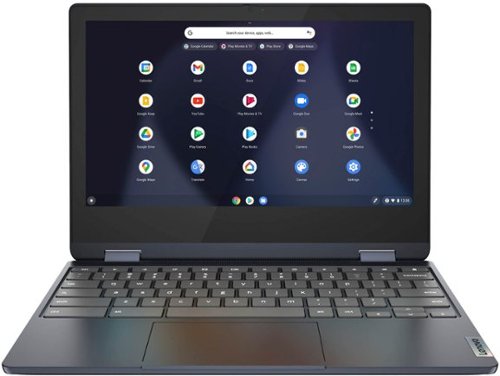
Lenovo - Flex 3 Chromebook 11.6" HD Touch-screen Laptop - Mediatek MT8183 - 4GB - 64GB eMMC - Abyss Blue
Packs what makes Chromebook so amazing into one svelte 360-degree convertible. Versatile and portable, the IdeaPad Flex 3 Chromebook measures just 19.6 mm thick and weighs 1.2 kg with a full keyboard and spacious trackpad, and can be viewed in tent, tablet, laptop or stand modes. Watch crisp visuals in high definition with its 10-point touchscreen on the 11.6" IPS display while being more productive with help from Google. Just say ~Hey Google,~ to manage tasks, enjoy your entertainment, get answers, or control smart home devices.
Can you play a cd on it?
Here is a link to information about using an external CD/DVD drive with a Chromebook: https://www.winxdvd.com/dvd-play/external-dvd-drive-for-chromebook.htm#:~:text=Chromebook%20supports%20USB%2Dpowered%20CD,and%20then%20the%20Files%20app.
4 years, 3 months ago
by
Posted by:
Lenovo Product Expert
Lenovo - Flex 3 Chromebook 11.6" HD Touch-screen Laptop - Mediatek MT8183 - 4GB - 64GB eMMC - Abyss Blue
Packs what makes Chromebook so amazing into one svelte 360-degree convertible. Versatile and portable, the IdeaPad Flex 3 Chromebook measures just 19.6 mm thick and weighs 1.2 kg with a full keyboard and spacious trackpad, and can be viewed in tent, tablet, laptop or stand modes. Watch crisp visuals in high definition with its 10-point touchscreen on the 11.6" IPS display while being more productive with help from Google. Just say ~Hey Google,~ to manage tasks, enjoy your entertainment, get answers, or control smart home devices.
Is this compatible with ABC Mouse programs? Buying for child with learning issues. Also what is difference in chrome and laptop? Hopefully, I can get answer before sale goes off. Thank you
This Lenovo Flex 3 11 Chromebook ships with and uses the Chrome Operating System rather than Windows. This Flex 3 11 Chromebook is compatible with Google Play Store APPs. Not all Google Play Store APPs are optimized for the Chrome OS. We recommend you check with the specific APPs software publisher's web site, of the specific APP you want to use, for their compatibility with the Chrome operating system and the minimum/recommended hardware requirements (Is a Graphics card required, the processor speed and the minimum required system RAM and the minimum available hard drive space) to run their program, then compare those requirements to this Chromebook's configuration.
4 years, 3 months ago
by
Posted by:
Lenovo Product Expert
Lenovo - Flex 3 Chromebook 11.6" HD Touch-screen Laptop - Mediatek MT8183 - 4GB - 64GB eMMC - Abyss Blue
Packs what makes Chromebook so amazing into one svelte 360-degree convertible. Versatile and portable, the IdeaPad Flex 3 Chromebook measures just 19.6 mm thick and weighs 1.2 kg with a full keyboard and spacious trackpad, and can be viewed in tent, tablet, laptop or stand modes. Watch crisp visuals in high definition with its 10-point touchscreen on the 11.6" IPS display while being more productive with help from Google. Just say ~Hey Google,~ to manage tasks, enjoy your entertainment, get answers, or control smart home devices.
Can you do Zoom meetings on this laptop?
That will depend on the requirements and compatibility of the specific APP you want to use. This Lenovo Flex 3 11 Chromebook, model number 82KM0003US, ships with a HD (720p) webcam with Privacy Shutter and Dual Array Microphones built in. This Flex 3 11 Chromebook uses the Chrome Operating System and is compatible with Google Play Store APPs. Not all APPs at the Google Play Store are optimized for the Chrome OS. We recommend you check with the specific APPs software publisher's web site for their compatibility with the Chrome operating system and the minimum/recommended hardware requirements (Is a Graphics card required, the processor speed and the minimum required system RAM and the minimum available hard drive space) to run their program, then compare those requirements to this Chromebook's configuration.
4 years, 3 months ago
by
Posted by:
Lenovo Product Expert
Lenovo - Chromebook 3 11.6" HD Laptop - Celeron N4020 - 4GB Memory - 64GB eMMC - Onyx Black
Fast, flexible, and fun, the Lenovo IdeaPad 3 Chromebook 11" brings everyone~s favorite Chromebook features, housed in a slim chassis, running on the lightning-fast Chrome OS that boots up in seconds, updates automatically, and is protected by built-in virus protection. Powered by Intel Celeron processor offers up to 10 hours of battery life, to seamlessly run all of your favorite apps at the same time.
Can you put a CD in it?
No. There is no built in CD/DVD drive within this Lenovo Chromebook 3 11, model number 82BA001FUS.
4 years, 3 months ago
by
Posted by:
Lenovo Product Expert
Lenovo - Chromebook 3 11.6" HD Laptop - Celeron N4020 - 4GB Memory - 64GB eMMC - Onyx Black
Fast, flexible, and fun, the Lenovo IdeaPad 3 Chromebook 11" brings everyone~s favorite Chromebook features, housed in a slim chassis, running on the lightning-fast Chrome OS that boots up in seconds, updates automatically, and is protected by built-in virus protection. Powered by Intel Celeron processor offers up to 10 hours of battery life, to seamlessly run all of your favorite apps at the same time.
How much storage memory does 32 or 64 have?
This Lenovo Chromebook 3 11, model number 82BA001FUS, ships with a 64GB eMMC 5.1 solid state hard drive, soldered on the systemboard.
4 years, 3 months ago
by
Posted by:
Lenovo Product Expert

Lenovo - IdeaPad 3 15" HD Touch Screen Laptop - Intel Core i3-1115G4 - Intel UHD Graphics - 8GB Memory - 256GB SSD - Almond
Engineered for long-lasting performance, the Lenovo IdeaPad 3 is the perfect laptop for your everyday tasks with features that you can depend on.
Would this laptop work well for a photographer that uses light room and premier?
That really will depend on the requirements and compatibility ,of the specific software you want to use. This Lenovo IdeaPad 3 15 laptop, model number 81X800KLUS, ships with Windows 11 S-Mode, 64-bit Operating System installed. Windows 11 S-Mode provides added security by only allowing APPs available ( and therefore certified by Microsoft) at the Microsoft Store. If you don't need the added security or you need to install APPs not available at the Microsoft Store, you can switch to standard Windows 11 Home 64-bit Operating System, at no additional cost. We recommend you check with the specific software publisher's web sites, of the specific version of the software APPs you want to use, for their compatibility with Windows 11 S-Mode 64-bit operating system and the minimum/recommended hardware requirements (Is a Graphics card required, the processor speed and the minimum required system RAM and the minimum available hard drive space) to run their program, then compare those requirements to this system's configuration.
4 years, 3 months ago
by
Posted by:
Lenovo Product Expert
Lenovo - IdeaPad 3 15" HD Touch Screen Laptop - Intel Core i3-1115G4 - Intel UHD Graphics - 8GB Memory - 256GB SSD - Almond
Engineered for long-lasting performance, the Lenovo IdeaPad 3 is the perfect laptop for your everyday tasks with features that you can depend on.
Can a bamboo pen be used with this?
This Lenovo IdeaPad 3 15 laptop, model number 81X800KLUS, is not compatible with any active/digital pen. You can use a capacitive touch stylus with the touch screen on this IdeaPad 3 15, as a finger replacement. We recommend you check with the pen manufacturer's web site for the compatibility and requirements of the specific model pen you want to use with this Lenovo Ideapad 3 15 laptop.
4 years, 3 months ago
by
Posted by:
Lenovo Product Expert
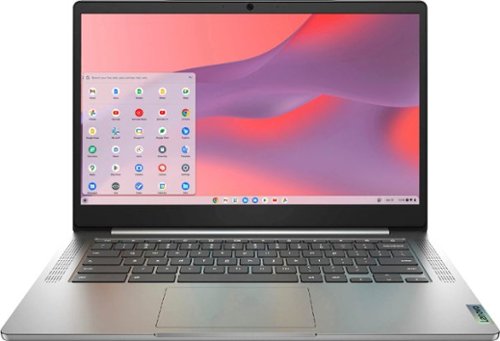
Fast, flexible, and fun, the Chromebook 3-14" brings everyone~s favorite Chromebook features, running on the lightning-fast Chrome OS that boots up in seconds, updates automatically, and is protected by built-in virus protection. Powered by a MediaTek processor and up to 10 hours of battery life, it~ll seamlessly run all of your favorite apps at the same time. Get Minecraft and 3 months of Realms Plus at no cost* with purchase of a new Chromebook. Terms Apply. *Offer valid for qualifying Chromebooks purchased on or after July 1st, 2023 through September 30th, 2023 while supplies last.
What cd external drive is compatible with this chrome book as I am having difficulty finding a compatible one.
Here is a link to information about using an external CDE/DVD drive with a Chromebook, like this Lenovo Chromebook 3 14: https://www.winxdvd.com/dvd-play/external-dvd-drive-for-chromebook.htm#:~:text=Chromebook%20supports%20USB%2Dpowered%20CD,and%20then%20the%20Files%20app.
4 years, 3 months ago
by
Posted by:
Lenovo Product Expert
Lenovo - Chromebook 3 11.6" HD Laptop - Celeron N4020 - 4GB Memory - 64GB eMMC - Onyx Black
Fast, flexible, and fun, the Lenovo IdeaPad 3 Chromebook 11" brings everyone~s favorite Chromebook features, housed in a slim chassis, running on the lightning-fast Chrome OS that boots up in seconds, updates automatically, and is protected by built-in virus protection. Powered by Intel Celeron processor offers up to 10 hours of battery life, to seamlessly run all of your favorite apps at the same time.
Does this computer run roblox? My sister bought a cheap hp chromebook on sale for her kids to play roblox and then come to find out it didn't. Well i don't want to run into the same situation. I just want my laptop back.
That will depend on the requirements and compatibility of the specific game you want to run. This Lenovo Chromebook 3 11, model number 82BA001FUS, ships with the Chrome Operating System installed and is compatible with Google Play Store APPs. Not all APPs at the Google Play Store are optimized for the Chrome OS. We recommend you check with the specific game's software publisher's web site, of the specific games you want to play, for their compatibility with the Chrome operating system and the minimum/recommended hardware requirements (Is a Graphics card required, the processor speed and the minimum required system RAM and the minimum available hard drive space) to run their program, then compare those requirements to this Chromebook's configuration.
4 years, 3 months ago
by
Posted by:
Lenovo Product Expert