


TravisJ's stats
- Review count179
- Helpfulness votes263
- First reviewNovember 6, 2016
- Last reviewJune 8, 2026
- Featured reviews0
- Average rating4.8
Reviews comments
- Review comment count0
- Helpfulness votes0
- First review commentNone
- Last review commentNone
- Featured review comments0
Questions
- Question count0
- Helpfulness votes0
- First questionNone
- Last questionNone
- Featured questions0
- Answer count2
- Helpfulness votes0
- First answerOctober 28, 2017
- Last answerNovember 20, 2018
- Featured answers0
- Best answers0
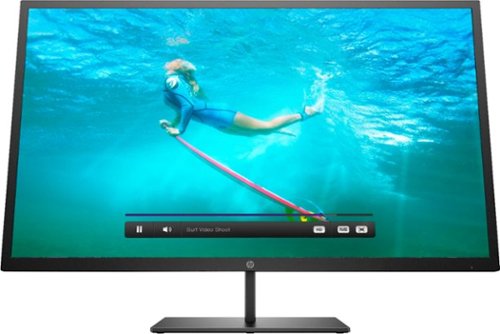
Multitask comfortably using this HP Pavilion 32-inch monitor. The QHD resolution provides immersive visuals for gaming and a spacious work space. Enjoy consistent clarity and color from multiple positions thanks to the 178-degree viewing angle. This HP Pavilion 32-inch monitor features an anti-glare panel for better visibility in bright conditions, while the Low Blue Light mode reduces eyestrain.
Customer Rating

5
Bright, vibrant display at 2k resolution
on July 3, 2019
Posted by: TravisJ
from La Grange, KY
The Good
- Large, bright 32-inch screen at 2560 x 1440 resolution has a fantastic picture. You can adjust the preset picture depending on your picture preference and the media you’re consuming. You can also set a custom preset as well so you can always go back to your favorite.
- Small bezels almost make you forget the screen is in a case at all.
- Multiple inputs (HDMI, DP, USB-C) and a usb hub give you options for connectivity and expandability. I have both my laptop and PS4 connected and easily switch to the PS4 when I want game on console.
- VESA wall mount is a nice touch, especially for studio set ups where multiple large screens help bring in the details.
- Free sync technology, which is compatible with AMD and 10, 16, and 20 series GPUs.
The okay
- The stand isn’t anything special. If you’re mounting this on a wall, this is a non-issue, but you could use any VESA compatible stand as a replacement.
- Not an issue for me, but some may find 32” a bit large to be a desk monitor. With windows, at times, having scaling issues, may cause apps to appear very large or very small. Not a problem with the monitor but may catch some off guard if they’ve not used a 2k or 4k monitor.
I’m very happy with this monitor. I switch often from my PC to PS4, gaming on both. Colors are bright and vibrant, and the small bezels help the display disappear into its surroundings. There aren’t any “cons” for this monitor, for the price point, it does what it says it does and does it well.
Mobile Submission: False
I would recommend this to a friend!
Share this review:


0points
0of 0voted this as helpful.

Acer Laptop: Run graphic-intensive games with this Acer Nitro 5 gaming laptop. The 15.6-inch FHD display shows an immersive picture with sharp visuals. CoolBoost technology lowers CPU and GPU temperatures for long-lasting sessions. This Acer Nitro 5 gaming laptop features a NVIDIA GeForce GTX 1650 graphics card for a vivid picture, and the high-quality speakers deliver clear dialog and deep bass.
Customer Rating
5
A Top Entry Level Laptop for Mobile Gaming!
on June 11, 2019
Posted by: TravisJ
from La Grange, KY
If you’re looking for a laptop that will get you in the game without sacrificing on graphics or pummeling your wallet, you’ve probably come across Acer’s lineup of Nitro 5 model gaming laptops.
-=The TL/DR=-
This portable, snappy, 15” laptop plays Apex at 60 FPS on high settings, Anthem at 40 FPS on medium settings, has a Cinebench 20 score of 1607, Unigine Heaven extreme preset score of 1435 @ 57 FPS, and a gaming score of 53 using User Benchmark. Keyboard and trackpad are good enough, sound isn’t bad at all for a laptop. The dedicated Nitro Sense button is a nice addition. Display, at 1080p, looks fantastic although the backlight could be brighter. This is an entry level gaming laptop for AAA titles.
This portable, snappy, 15” laptop plays Apex at 60 FPS on high settings, Anthem at 40 FPS on medium settings, has a Cinebench 20 score of 1607, Unigine Heaven extreme preset score of 1435 @ 57 FPS, and a gaming score of 53 using User Benchmark. Keyboard and trackpad are good enough, sound isn’t bad at all for a laptop. The dedicated Nitro Sense button is a nice addition. Display, at 1080p, looks fantastic although the backlight could be brighter. This is an entry level gaming laptop for AAA titles.
-=Performance=-
The 9th generation i5 that comes in this is impressive. I don’t have any issues at all browsing, loading programs or playing games. It does run a bit warm as the recent generation intel chips do, but I haven’t noticed this affecting performance. The Cinebench 20 score of 1607 is respectable for being a quad core CPU. The 8gb of ram installed is enough for most normal tasks. Probably won’t be editing large high res video without doubling up.
-=Graphics=-
The 1650 will surprise you in this machine. In the past, the 50 suffixes on Nvidia’s cards was enough to be able to say it had dedicated graphics but didn’t really do a whole lot for gaming. The 1650 will let you game at 1080 at medium to high settings, depending on the game. I played several farm runs in Anthem and only seen frame drops when I was in Fort Taris. Didn’t have any issues at all going into Apex Legends. The graphics defaulted to high, another stick of ram could possibly get you to very high.
-=Audio/Video=-
I fired up Spotify on this to do some housework. I wasn’t expecting much, and honestly, was expecting a lot worse. I was pleasantly surprised when the sound at max settings didn’t sound muffled or distorted at all. It wasn’t heavy in the bass or loud enough to be heard throughout the house, but it sounded good. I noticed in games too when the volume was turned up, it was clear enough to hear what direction the enemies were in.
The webcam is awful. I suppose if you need one for any reason, it’s there, but it’s grainy and dark.
The webcam is awful. I suppose if you need one for any reason, it’s there, but it’s grainy and dark.
-=Design=-
Acer is sticking to the dark red and black look that’s been a staple of their Nitro series of laptops. I like how from the front and sides it seems like a typical laptop, but when you look at the sharp angles and edged that is the exhaust, you can tell it might do something more than type up emails or reports. The build quality seems to be OK. The keyboard has some flex, but the hinge and display appear to be solid. I would have liked to see RGB on the keyboard. Having just one color (red) is kind of blah in todays day and age. They did manage to keep the laptop thin and thin enough that they had to use a hinge for the ethernet port.
-=I/O=-
The right side has the power input, USB 2, and audio jack. The left side has two USB 3 Type A and one USB type C (no thunderbolt 3, sad), HDMI, and an Ethernet. It has an intel Wireless AC 9560 with Bluetooth 5.0. I’m currently rocking 866.7 Mbps on wireless.
The right side has the power input, USB 2, and audio jack. The left side has two USB 3 Type A and one USB type C (no thunderbolt 3, sad), HDMI, and an Ethernet. It has an intel Wireless AC 9560 with Bluetooth 5.0. I’m currently rocking 866.7 Mbps on wireless.
-=Memory/Storage=-
This Nitro 5 model ships with a 128GB NVMe OS drive and a 1tb HDD. The memory has two slots with only one occupied with an 8GB stick of 2667mhz memory.
-=Battery=-
The battery seems solid as long as you’re not gaming. I streamed a 4k video for 30 minutes and still displaying 4 hours remaining. I would imagine gaming would quickly drain the battery if you’re not plugged in. You’ll get several hours of browsing and streaming videos when you’re not running the GPU.
-=Final Thoughts=-
I think Acer has a great machine in the entry level of AAA gaming laptops. The 1650 outperforms last year’s 1050 Ti as well as the i5 9300H, edging out last year’s i5 8300H. You wouldn’t be embarrassed to use it in a coffee shop or conference room. It’s small enough to fit nicely in your lap, but 15” is large enough not to have to squint at the screen. I’m very impressed with this Nitro 5.
Mobile Submission: False
I would recommend this to a friend!
Share this review:


+2points
2of 2voted this as helpful.
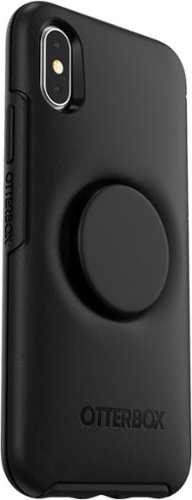
Secure an iPhone X/XS with this OtterBox Otter + Pop Symmetry case. The polycarbonate and synthetic rubber construction provides impact protection, and the integrated PopSockets PopGrip accessory keeps fingers in place during one-handed phone use. There~s no need to remove this OtterBox Otter + Pop Symmetry case as it~s compatible with wireless charging.
Customer Rating
5
Great protection meets stick on functionality
on June 5, 2019
Posted by: TravisJ
from La Grange, KY
I’ve always had a thin phone case on my device and was never really turned on to the idea of adding a pop socket to the back of my case, adding to the thickness and awkwardness of having this thing kind of sticking from the back of my phone. Then came Otter Box and pop socket innovation to bring a thin protective case with an integrated pop socket to satisfy picky mobile users like myself.
My favorite things about this case is how it integrates the pop socket into the design without adding bulk. The case is thin enough that it easily slides in and out of pockets. It has a tight fit on the phone which keeps dust from working its way between the device and case. Being able to prop the phone up using the pop socket helps with movie watching or projecting music. Finally, the pop socket is removable. So if you’re tired of the same look or want to add a splash of color, you simply push in and twist on the pop socket and it pulls away so a new one can be added.
Now some improvements that could be made in the next generation. Slightly making the pop socket lower on the phone would have helped with one handed use. It works fantastic as a phone stand, but I’m finding difficulty reaching to the lower items with its placement in the center of the case. Also, instead of a concave design around the pop socket, slimming down the profile of the pop socket and making it flusher with the back would have been neat as well.
My complaints are minor because I would recommend this to anyone who was looking for otter box protection without giving up thinness and usability.
Mobile Submission: False
I would recommend this to a friend!
Share this review:


0points
0of 0voted this as helpful.

Enjoy flavorful lattes, macchiatos and cappuccinos with this Ninja specialty coffee maker. Six brew sizes offer full coffee shop function and versatility, while the dishwasher-safe parts are easy to clean. This Ninja specialty coffee maker features a fold-away frother that turns milk into a silky-smooth froth, and the gold-tone permanent filter withstands daily use.
Customer Rating
5
Intuitive Design for Coffee Drinkers
on June 5, 2019
Posted by: TravisJ
from La Grange, KY
I’ve been looking for a replacement for my current coffeemaker that still gives me the same choices for making single cups of coffee but cheaper and just as fast as my other caffeine machine. On the plus, with just a turn of a dial, push of a button, and a few more scoops, you have a carafe full of hot goodness.
Pros:
There’s a lot of things I like about this coffee maker. The option to make different cup sizes is probably my favorite. I don’t know the exact sizes of all of my cups, so I had to practice finding the correct setting for my cup size. The drip saver feature on this helps a lot with this because if you’ve made too much you can always activate the drip saver and swap cups out without spilling a drop. I usually make the carafe on the weekends and will fill a large coffee cup 3 times using it.
Secondly, as silly as this sounds, it’s the scoop and milk frother. It’s mostly how each is nestled stealthily into the design and is there when you need it and blends into the design when you don’t. The scoop has two sides with two different sizes. Small images are etched into the plastic which shows the suggested scoops for the size settings on the coffee maker. The frother is easily attached and removed and after using it, I just rinsed it under the faucet and re attached it.
Finally and most importantly, how does the coffee turn out? Well, pretty darn good. I USUALLY drink coffee black. I’m almost always in a hurry and tend to drink a single cup before I have to get ready for work. I started off on the high end of the spectrum for the suggested scoop amounts for the cup size. I found the low end of the spectrum is much tastier. Single cups of coffee are made in just a couple of minutes, a few more minutes for the carafe. My wife brewed over ice and she typically prefers cold brew and rarely regular coffee, but found the over ice to be “pretty good”.
Cons:
Not really any cons. If I had one complaint it would be that the specialty setting doesn’t seem to do anything different other than make a smaller amount. I did use it to try and make a mocha, but I am no barista. I’m pretty sure, with a skilled hand and a solid recipe will be making delicious drinks in no time.
Other Thoughts:
Overall, I really like this coffee maker. I have best of both worlds with a single cup brewer, that can go the extra mile for a carafe. The drip stop is used way more than I thought I would, and the design is elegant but functional, which is the way design should be.
Mobile Submission: False
I would recommend this to a friend!
Share this review:


0points
0of 0voted this as helpful.

Now you can game faster and more accurately, with G502 LIGHTSPEED featuring superfast 1 ms wireless connectivity. A next-gen HERO sensor delivers 25k DPI class-leading performance and energy efficiency~get up to 60 hours of uninterrupted gaming. 11 programmable buttons help you optimize gameplay with custom keybinds and macros. Primary buttons feature metal spring tensioning for fast and crisp actuation. Six adjustable weights let you find the right mouse feel. LIGHTSYNC RGB gives you ~16.8 million colors to create an exciting and immersive gaming environment. The hyper-fast scroll wheel lets you speed through long menus and documents.
Customer Rating
5
Eliminates all excuses not to go wireless
on May 24, 2019
Posted by: TravisJ
from La Grange, KY
What was already a top-rated mouse design gets even better using Logitech’s light speed technology. The mouse comes with a USB adapter for charging, a case for holding the additional weights that can be added, the mouse of course, and a USB wireless dongle.
Things I love:
The design. My hand just kind of naturally falls into the curves and grooves of the mouse. Each button is just a slight movement away and it doesn’t feel like a chore to have to find them on the mouse. The mouse doesn’t feel like a wireless mouse. And by that, I mean the way it moves on the screen, no noticeable lag whatsoever, no cord to snag the back of my desk. I’m not a professional gamer by any means, but input lag or latency is nonexistent for me using the G502.
The design. My hand just kind of naturally falls into the curves and grooves of the mouse. Each button is just a slight movement away and it doesn’t feel like a chore to have to find them on the mouse. The mouse doesn’t feel like a wireless mouse. And by that, I mean the way it moves on the screen, no noticeable lag whatsoever, no cord to snag the back of my desk. I’m not a professional gamer by any means, but input lag or latency is nonexistent for me using the G502.
Things I Like:
The customization options check the boxes. You can use the downloadable software to change what each button does, change DPI modes to your liking. You can use the G-shift button to open even more button options, as well as use it as a Johnny on the spot sniper button when you need to fine tune your shot by slowing down your DPI to a crawl.
The customization options check the boxes. You can use the downloadable software to change what each button does, change DPI modes to your liking. You can use the G-shift button to open even more button options, as well as use it as a Johnny on the spot sniper button when you need to fine tune your shot by slowing down your DPI to a crawl.
RGB is all the rave and it’s customizable on the G502 as well as weights that can be added to the underbelly to make the mouse a bit heavier if that’s your thing.
This is also compatible with Logitech’s power play mouse pad. This will charge your mouse as you game so there is no cables and no downtime whatsoever while your connected.
Final Thoughts:
There’s not anything about this mouse that I don’t like. I’m not using it for a competitive edge but having the feel and design of a wired gaming mouse, but without the cord to drag around the desk or having to wrap it up when I want to go somewhere, is extremely convenient for me. I’m so glad they kept the design of it’s wired brother. My only concern down the road is replacing the internal rechargeable battery which I see no clear way to do, but it isn’t going to deter me from enjoying this mouse at all.
There’s not anything about this mouse that I don’t like. I’m not using it for a competitive edge but having the feel and design of a wired gaming mouse, but without the cord to drag around the desk or having to wrap it up when I want to go somewhere, is extremely convenient for me. I’m so glad they kept the design of it’s wired brother. My only concern down the road is replacing the internal rechargeable battery which I see no clear way to do, but it isn’t going to deter me from enjoying this mouse at all.
Mobile Submission: False
I would recommend this to a friend!
Share this review:


0points
0of 0voted this as helpful.
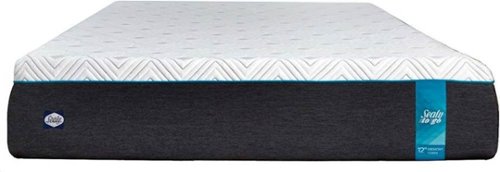
Sleep well on this 12-inch Sealy To Go memory foam mattress. Distinct layers include 3 inches of 3-lb. memory foam for responsive comfort, a 4-inch transitional layer of advanced comfort foam and a 5-inch base for support. This Sealy To Go memory foam mattress is topped with a luxurious circular knit 350 GSM cover for softness.
Customer Rating
5
Comfy Mattress for Restless Spouses
on May 7, 2019
Posted by: TravisJ
from La Grange, KY
First thing I noticed about this mattress was that it was shipped in a box to my front door. Not a large mattress shaped box, but more commonly, mattresses are vacuum compressed, rolled, and put in a box to make shipping them somewhat more of a reality. Unpacking should really be a two-person job, but I managed to do it solo. I managed better than I thought I would.
Once I unpacked and placed into position, I couldn’t resist laying on it sans-sheets. Immediately I noticed how the foam absorbed any movement I made laying into the bed. It didn’t feel like my old mattress where, in the act of laying in it, you create a well that pulls anything around you down into it. No, due to the memory foam, I felt like whatever part of the bed was supporting my weight, had little affect on the area around it.
As for what really matters, comfort, I really enjoy it. Climbing into bed is a little different due to the foam having a different type of compression than your typical mattress. The mattress supports by contouring to your body’s natural shape and supporting the areas that don’t typically get support due to the way other pillow top beds work.
My favorite part of this bed is how little I notice movement on it compared to my old, yet still fairly new mattress. When my wife climbs into bed, I don’t seem to feel the movement quite as much as I did before. Tossing and turning isn’t as disturbing as it once was. I was a decently heavy sleeper before, but still occasionally woke up here and there throughout the night. Now, other than forgetting to turn off an alarm, I’ve slept solidly throughout every night I’ve been on this mattress.
My only complaint is taking the leap of faith of choosing a mattress online. It’s not so much a complaint on the product itself, but rather the experience of being able to lay down and experience the comfort before making the purchase. Some may find that concerning, honestly, I’m glad I did.
Mobile Submission: False
I would recommend this to a friend!
Share this review:


+4points
4of 4voted this as helpful.
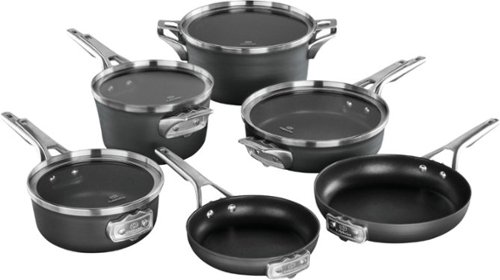
Use your stove top to its full potential with this Calphalon Premier 10-piece space-saving hard-anodized nonstick cookware set. This collection of pans also includes one stock pot, letting you prepare a wide range of recipes and cleanup with ease. Fit this Calphalon Premier 10-piece space-saving hard-anodized nonstick cookware set into two neat stacks to better organize your shelf, cupboard and cooking area.
Customer Rating
5
Clutter Free High-Quality Cookware
on March 31, 2019
Posted by: TravisJ
from La Grange, KY
Most cookware sets these days tend to have some stacking mechanism that kind of works. This cookware set has it thoughtfully engineered directly into the design which is more functional than elegant, but beauty is in the eye of the beholder.
Things I Like
- The ability to stack without the bottoms of the pans rubbing the inside of the pot or pan beneath. There are clever notches cut out on the handles that support and allow the pans to nest inside one another. The dip and notch come together to secure the pots, pans, as well as the lids to neatly stack, not only making it easier to organize your cabinet space, but also when pulling one pot or pan, you don’t ruin your whole stacking mechanism.
- The build quality of this set is the best I’ve owned. The handles are solid and riveted to the pans. They’re much heavier than my older set which I attribute to ensuring durability and function.
- Cooking. I was surprised at how much of a difference high quality cookware cooks compared to budget pots and pans. Hash browns are my go-to breakfast item on Sunday morning. Once my pan and olive oil were up to temperature away I went to crisping up my shredded potato. What was impressive was how evenly they cooked on the bottom and how well the pan held its heat.
- Cooking X2. My wife and I really enjoy not having to break out the super heavy cast irons when we want to sear off meat then finish it in the oven. Having oven safe cookware up to 450 degrees is comforting in knowing you don’t have to dirty up extra dishes. We seared off two small portions of steak then finished them in the oven at 400 degrees. They turned out delicious and juicy, with a nice brown sear on the outside.
- Non-stick surface. After topping my hash browns with shredded cheese, I didn’t have any issues sliding the finished product onto a plate. Crispy cheese bits and all. When I was done cooking and the pan had cooled, I just wiped the inside out with a damp cloth and let it air dry before putting it away again.
- The ability to stack without the bottoms of the pans rubbing the inside of the pot or pan beneath. There are clever notches cut out on the handles that support and allow the pans to nest inside one another. The dip and notch come together to secure the pots, pans, as well as the lids to neatly stack, not only making it easier to organize your cabinet space, but also when pulling one pot or pan, you don’t ruin your whole stacking mechanism.
- The build quality of this set is the best I’ve owned. The handles are solid and riveted to the pans. They’re much heavier than my older set which I attribute to ensuring durability and function.
- Cooking. I was surprised at how much of a difference high quality cookware cooks compared to budget pots and pans. Hash browns are my go-to breakfast item on Sunday morning. Once my pan and olive oil were up to temperature away I went to crisping up my shredded potato. What was impressive was how evenly they cooked on the bottom and how well the pan held its heat.
- Cooking X2. My wife and I really enjoy not having to break out the super heavy cast irons when we want to sear off meat then finish it in the oven. Having oven safe cookware up to 450 degrees is comforting in knowing you don’t have to dirty up extra dishes. We seared off two small portions of steak then finished them in the oven at 400 degrees. They turned out delicious and juicy, with a nice brown sear on the outside.
- Non-stick surface. After topping my hash browns with shredded cheese, I didn’t have any issues sliding the finished product onto a plate. Crispy cheese bits and all. When I was done cooking and the pan had cooled, I just wiped the inside out with a damp cloth and let it air dry before putting it away again.
Things I didn’t Like
- These pans are a bit heavy. Like mentioned earlier, I attribute this to the good build quality of the set. The handles are metal, and the cookware is thicker than my old set. I was used to handling most of my old cookware with one hand, but I’ve been using both hands more often with this set. It’s not a pain point for me but could be for others.
- Aesthetics. This isn’t the best-looking set of cookware you’ll come across. Cookware for me is a tool, and if they engineer function over design, that’s perfectly fine with me. I found it easy to ignore the looks after I started cooking with them.
- Lids. The lids all have long handles like you would see on a sauté pan opposed to knobs or small rectangle handles you could grip from the top. This design choice is to optimize the ability to stack the lids with the cookware. They are also notched to stack with the pots and pans, but that means you must align them up with the handles on the cookware. It’s a trade off you’ll make if you’re used to just popping the lid off and on again like I’m used to.
- These pans are a bit heavy. Like mentioned earlier, I attribute this to the good build quality of the set. The handles are metal, and the cookware is thicker than my old set. I was used to handling most of my old cookware with one hand, but I’ve been using both hands more often with this set. It’s not a pain point for me but could be for others.
- Aesthetics. This isn’t the best-looking set of cookware you’ll come across. Cookware for me is a tool, and if they engineer function over design, that’s perfectly fine with me. I found it easy to ignore the looks after I started cooking with them.
- Lids. The lids all have long handles like you would see on a sauté pan opposed to knobs or small rectangle handles you could grip from the top. This design choice is to optimize the ability to stack the lids with the cookware. They are also notched to stack with the pots and pans, but that means you must align them up with the handles on the cookware. It’s a trade off you’ll make if you’re used to just popping the lid off and on again like I’m used to.
Final Thoughts – I’m enjoying this set of cookware very much. I’m surprised at how more evenly it cooked compared to some of my older stuff and I’m really enjoying the idea I can safely put it in my oven at 350 degrees without pushing the limits of the build materials. I expect to have these for many years before I see any signs of wear.
Mobile Submission: False
I would recommend this to a friend!
Share this review:


+2points
2of 2voted this as helpful.

Get the tools to achieve victory with this 17.3-inch Dell Alienware gaming laptop. Featuring an NVIDIA GeForce RTX 2070 graphics card with Max-Q design, this laptop smoothly handles visually intensive titles at high settings. This Dell Alienware gaming laptop delivers vivid colors and makes games look sharp and detailed with its 17.3-inch Full HD display.
Customer Rating
5
Great build quality, 60 FPS on AAA Titles
on March 22, 2019
Posted by: TravisJ
from La Grange, KY
Design: Alienware is known for making laptops that immediately stand out as gaming laptops. The M17 doesn’t look like a business notebook, but it doesn’t scream the Alienware “Look at me” that you might be used to seeing. Construction seems very solid. Very little flex in the monitor and the keypad seems very solid. I’m not even mad that the RGB on the keyboard is 4 zones, but for some who want the subtle, “yeah, it does that” factor, it’s there. The keyboard has chiclet keys and seem well enough for typing. The dedicated macro keys are a nice touch. The track pad has an OK feel to it but I wouldn’t say it’s anything special.
Performance: The i7-8750H is a 6 core powerhouse for mobile processing. With the new Cinebench-20 score of 2482, it holds it’s own against some of last years desktop processors. This benchmark, though, was performed at the cost of keeping thermals down. Using the Alienware Command Center, I ran the benchmark using the “Balanced” setting for thermals which caps the output at 60 watts. Using the “Performance” setting is where you get the most output all around – 90 watts and high temperatures.
Graphics: RTX 2070 Max-Q? No problem. Mind you this is a 1080p display, I didn’t have any hiccups running Apex or Anthem on this at 60fps at max settings.
Display: Here is where I may differ from a lot of folks. I don’t mind the 1080p 60hz on a thin and light. It’s not the new hotness 144hz refresh rates but it doesn’t need to be in this form factor, although, it could be. What is an eyesore is the glossy, thick bezel. They thinned it up on the sides a bit, and probably did thick top and bottom to help re-enforce the large lid, but glossy bezels was someone’s design choice, and a poor one. A nice firm matt finish would have been perfectly fine.
Sound: I got what I expected. Sound on laptops haven’t been super impressive. Honestly, I Bluetooth my favorite headphones and use them in lieu of the built-in ones. Not that they’re bad, and the Alienware Command Center does a pretty good job with their preset EQ settings, but there’s better solutions.
I/O and Whatnot: USB-C thunderbolt 3, 3x USB-A 3 ports, Ethernet, HDMI, Mini DP, and Alienware’s proprietary gaming amplifier port, headphone jack.
Other Thoughts: I did a lot of reading on this laptop and the one thing you’ll constantly come across is thermals. I find that the computer performs just fine with the “cool” profile setting in the Alienware Command Center and an under volt using XTU. Now, this shouldn’t have to be the solution, but it’s been a perfectly fine solution for me and under these conditions, I still get the gaming performance mentioned above.
Conclusion: Most would say a 17” laptop would end up as a desktop replacement, but I’ve punched up this whole review from my lap in one setting. I think if you’re looking for a large screen, small form factor, but can still game some of the newest AAA titles at 60fps, then you should consider the M17. It’s large enough to get that full screen gaming experience on the go but thin enough to not feel like your lugging around a block of aluminum.
Mobile Submission: False
I would recommend this to a friend!
Share this review:


+1point
1of 1voted this as helpful.
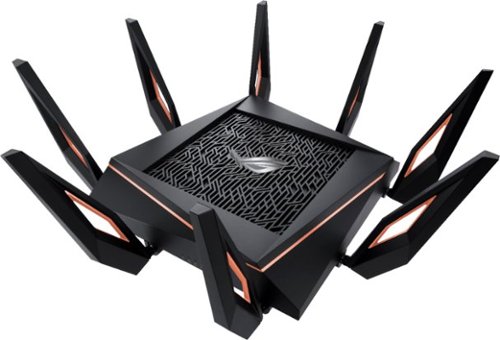
Make sure your wireless connection reaches every room in your home with this ASUS ROG Rapture gaming router. Speeds of up to 11000 Mbps deliver interruption-free connectivity throughout intense games and binge-watching sessions. Built-in network security defends against potential breaches, and the 4X capacity makes this ASUS ROG Rapture gaming router ideal for households running multiple devices.
Customer Rating
5
Fantastic Router Ahead of its Time
on February 19, 2019
Posted by: TravisJ
from La Grange, KY
I’m always blown away with the features ASUS packs into their routers. This one is no different. If you don’t mind the dead spider look of this awesome router, you shouldn’t need to shop for anything more for several years. This router has a lot of features, so I’ll focus on the ones that really stand out.
Pros:
- Aesthetically, I love it. It’s a power house router and it displays that very loudly. My wife however hates the looks and can’t wait to relocate it. Through the web-app you can control different features of the RGB logo on top. ASUS didn’t get lazy with the antennas either. They have a great design and really make this router look high end.
- Speed of this router is blazing fast. My wireless AC negotiates at 866 mbps. That’s nearly gigabit speeds over the air. 108 MB/s transfer speeds. Perfect if you want to set up a media server, connect and backup to your NAS wirelessly, transfer files between devices over the network quickly. With wireless AX on the forefront, its speed has yet to reach its potential.
- Gameboost / QOS feature is a must have if you game online. We do a lot of streaming in our home and knowing someone watching a video isn’t going to impact my game is reassuring. You can even set a dedicated button on the router to turn this on or off, depending on your bandwidth needs.
- The auto port forwarding is very nice for someone who is used to going through the trouble to find the ports and manually forward them.
- Traffic analyzer allows you to see what devices are using your network. This can be useful if you’re on a metered connection or want to see what devices are using the network at what times.
- AiMesh Node was easy to set up. I have another ASUS router that was compatible with AiMesh. Once I changed the operation mode of the older router, the setup on the GT-AX11000 went smooth as butter. The router dedicates a band to maximize the throughput of the mesh node.
- Aesthetically, I love it. It’s a power house router and it displays that very loudly. My wife however hates the looks and can’t wait to relocate it. Through the web-app you can control different features of the RGB logo on top. ASUS didn’t get lazy with the antennas either. They have a great design and really make this router look high end.
- Speed of this router is blazing fast. My wireless AC negotiates at 866 mbps. That’s nearly gigabit speeds over the air. 108 MB/s transfer speeds. Perfect if you want to set up a media server, connect and backup to your NAS wirelessly, transfer files between devices over the network quickly. With wireless AX on the forefront, its speed has yet to reach its potential.
- Gameboost / QOS feature is a must have if you game online. We do a lot of streaming in our home and knowing someone watching a video isn’t going to impact my game is reassuring. You can even set a dedicated button on the router to turn this on or off, depending on your bandwidth needs.
- The auto port forwarding is very nice for someone who is used to going through the trouble to find the ports and manually forward them.
- Traffic analyzer allows you to see what devices are using your network. This can be useful if you’re on a metered connection or want to see what devices are using the network at what times.
- AiMesh Node was easy to set up. I have another ASUS router that was compatible with AiMesh. Once I changed the operation mode of the older router, the setup on the GT-AX11000 went smooth as butter. The router dedicates a band to maximize the throughput of the mesh node.
Other Thoughts: It’s hard to find any real cons, maybe a couple of small improvements that could be made.
- There’s no bottom mounting for this router. It would be nice to have a wall or ceiling option should I decide to clear up some desk space.
- The router is big with all the antennas. This could be a problem for some who have a limited amount of space for networking hardware.
- I did sign up for the Gamer Private Network through WTFast. Signup was easy enough, but I personally didn’t see a significant difference. I typically do pretty good on pings anyways, but I’ll be keeping an eye to see if I notice improvement.
- There’s no bottom mounting for this router. It would be nice to have a wall or ceiling option should I decide to clear up some desk space.
- The router is big with all the antennas. This could be a problem for some who have a limited amount of space for networking hardware.
- I did sign up for the Gamer Private Network through WTFast. Signup was easy enough, but I personally didn’t see a significant difference. I typically do pretty good on pings anyways, but I’ll be keeping an eye to see if I notice improvement.
Final Thoughts: This is the router you want to complete the ultimate gaming setup accompanied by the ultimate gaming router. Theirs nothing subtle about this router and no compromises. It’s easily ahead of its time and will finally be able to fully stretch it’s legs later this year. I’m definitely looking forward to wireless gigabit networking.
Mobile Submission: False
I would recommend this to a friend!
Share this review:


-3points
1of 5voted this as helpful.
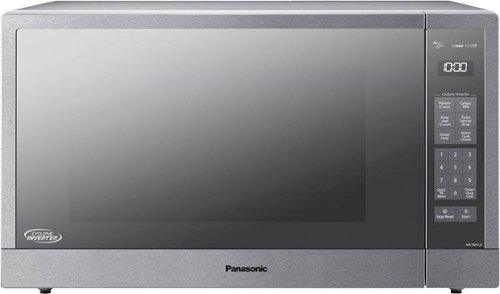
Cook delicious meals with this Panasonic cyclonic inverter microwave oven. Boasting a 2.2 cu. ft. capacity and 1,250 watts of cooking power, this appliance easily accommodates large dishes and heats food quickly. This Panasonic cyclonic inverter microwave oven ensures meals are cooked to perfection by automatically adjusting settings to best match your food.
Customer Rating
5
Large, Clean Design, Great Upgrade to a Modern Mic
on January 25, 2019
Posted by: TravisJ
from La Grange, KY
This is a very large microwave that does a fantastic job at reheating, thawing, and cooking your food. One of the first things I tried in it was thawing out frozen burger patties. I used the turbo thaw setting and entered the weight of the ground beef. Following the instructions in the manual, the burger was ready to go in less than 4 minutes. They recommend a “Standing” time after thawing to allow the thaw process to complete, which is just a few minutes for the amount of meat I had, and it was ready for my cast iron.
The presets for the frozen food seemed like they worked well. I’m used to cooking everything on high and stirring every couple of minutes. While the settings on the presets take more time on the microwave, I felt like I had a more even heating with less stirring, which over all, probably took about the same amount of time. Again, I followed the manual’s instructions, and only stirred when the microwave tone sounded to let me know to turn/stir the food. Overall, I was pleased with the results. Reheating food netted very similar results. I toned the power down a bit, which is easy to do, and ran it for a few minutes. Again, less stirring and more even heating, I had leftover spaghetti sauce ready to go.
The build of the microwave seems very solid. The door is large, opens with a large push button in the bottom right corner which doesn’t take a lot of pressure to actuate. The inside has a LED light which I thought was a nice touch. The inside was easy to wipe down too. There was some dried spaghetti sauce on the walls and “roof” of the microwave. I effortlessly wiped this clean with a damp cloth. The door has more glass than it does stainless, which makes me worry about finger prints. I may end up wiping this down more often than I would care to just to keep the clean look. My only other gripe about the build quality is the buttons themselves. These are push buttons and not touch buttons. I think at this price point, touch sensitive buttons would have been a nice addition.
Another nice touch is when you leave the cook time on the microwave and shut the door, after a few minutes the clock comes back on. This is going to save me down the road when my wife goes to check the time and it’s there instead of the 20 seconds left the last time I used it. Now, the only feature I’m excited to try but haven’t had the opportunity to use yet is the “Keep Warm” setting. You don’t usually think of your microwave keeping food warm unless your reheating every 10 minutes. This uses a very low power setting to keep food at a consistent temperature. I’m very curious to see this in action and hope to use it soon.
I would recommend this to anyone, especially if you’re looking for a microwave replacement. I feel like this checks all the microwave boxes and adds a few of its own to keep the competition innovating. Again, the only gripe is wanting the touch buttons, but this nuke box does everything it says it does, so a minor complaint in my opinion.
Mobile Submission: False
I would recommend this to a friend!


Share this review:


+9points
9of 9voted this as helpful.
TravisJ's Review Comments
TravisJ has not submitted comments on any reviews.
TravisJ's Questions
TravisJ has not submitted any questions.
TravisJ's Answers
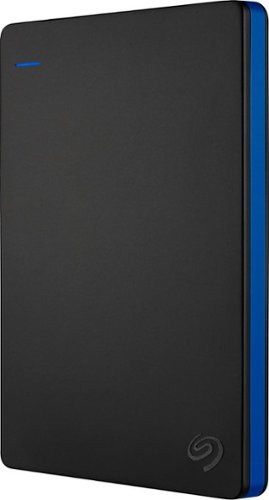
Store more than 50 PlayStation 4 game titles on this 2TB Seagate game drive. Its USB 3.0 port provides fast loading of full-size games so you can play smoothly, and its tough aluminum enclosure protects the drive from damage. This plug-and-play Seagate game drive is automatically recognized by any PS4, PS4 Slim or PS4 Pro console.
I've gotten quite tired of always uninstalling and reinstalling my games to make room and I was thinking about buying one of these. So, since all my games are hard copy, does that matter? For example, with this, will I be able to reinstall hard copy games
According to Sony’s website you can use from 250GB to 8TB in external storage to install games.
7 years, 6 months ago
by
TravisJ

Listen to your playlist in peace with these Sony headphones. They have a 40mm dome driver to deliver the full depth of audio, and the noise cancelling feature minimizes outside disturbances for a better listening experience. These Sony headphones have a battery life of up to 30 hours for extended jam sessions.
Would you be able to use these headphones to workout at the gym? Is the clamping of the headphones to your ears tight enough so it doesn't slip out as i do certain lifts? Are replaceable ear pads available for this model that are more comfortable?
These will work fine at the gym. They come with 4 different sized wing tips and ear tips so that you can customize the fit to your ear. Since these are new, It's unlikely to have 3rd party ear tips or wings at the moment.
8 years, 7 months ago
by
TravisJ