


TravisJ's stats
- Review count179
- Helpfulness votes263
- First reviewNovember 6, 2016
- Last reviewJune 8, 2026
- Featured reviews0
- Average rating4.8
Reviews comments
- Review comment count0
- Helpfulness votes0
- First review commentNone
- Last review commentNone
- Featured review comments0
Questions
- Question count0
- Helpfulness votes0
- First questionNone
- Last questionNone
- Featured questions0
- Answer count2
- Helpfulness votes0
- First answerOctober 28, 2017
- Last answerNovember 20, 2018
- Featured answers0
- Best answers0
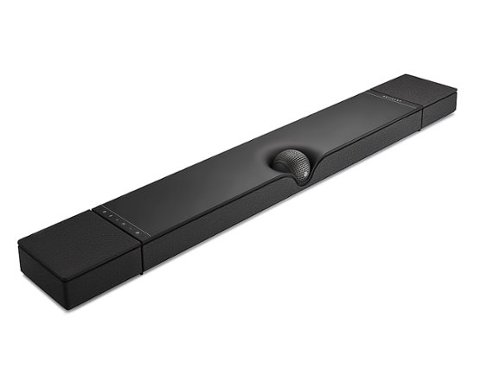
Devialet Dione is the latest embodiment of Devialet~s engineering and acoustic expertise: an intensely immersive sound bar that~s equally advanced and intuitive. Seventeen autonomous high-end drivers deliver dynamic midrange and crystal-clear treble, while eight built-in SAM-powered subwoofers remove any need for additional equipment, making Devialet Dione a truly all-in-one soundbar. Devialet Dione is powered by a suite of patented Devialet technologies that render it exceptional: SPACE provides a distinctly enveloping specialization effort, while AVL equalizes sound levels in real time. On the aesthetic front, an incomparable thinness-to-performance ratio and iconic central ORB~ that adapts to whatever in-home placement you choose. A plug-and-play way to enjoy a vivid, cinematic viewing experience in a 3D, 5.1.2 configuration.
Customer Rating

5
Truly a Luxury Audio Experience
on November 24, 2022
Posted by: TravisJ
Sound bars are usually a good way to boost your TV’s bland, built-in speakers. I never really thought it would have me hearing sounds I never knew were in the shows we watch or make look out the window when a movie has thunder in the background. Truly delivers a premium experience to your ears.
You’ll want to make sure your tv has ARC or eARC HDMI port. This allows you to connect the soundbar via HDMI and allow other HDMI devices to play audio through the soundbar. Also, setup uses an Android or iOS app, so a smartphone or tablet is needed for optimal setup. You can also connect with the included optical cable, but HDMI ARC seems to be the preferred method.
You get (almost) everything you need in the box. More on that in a bit. There is a full-size cardboard cutout with mounting position and wall anchor cutout. Along with the soundbar, they include an HDMI and optical cable, some spacers for wall mounting, rubber feet to stick to the back, and obviously a power cable. One thing you’ll find missing is wall mounting anchors and screws as well as a remote. A few screws and wall anchors seem like a low expense addition to make sure you have everything you need for that clean wall mount look. I am, however, forgiving of the remote since my remotes easily control the volume of the soundbar as well as the app being very intuitive. I’d probably lose it anyways.
Following the included manual, it was easy to get it on the wall and setup for first use. I was puzzled with the preferred orientation as it leaves the cutout for I/O on the bottom where soundbars are usually mounted below the TV. The work around it seems is you can run them underneath as the mounting spacers leave some room for the cables. I used Bluetooth and WiFi to get the soundbar setup and connected to the app. As with most connected devices, I immediately checked to see if there were any firmware updates and installed them. It did so conveniently quick. Built in microphones will help with a sound calibration that helps optimize the sound based on the acoustics of the room your setup in.
After installation I had to let my wife get back to her show before I could test a range of noises and immediately you could tell the difference. Even in a food competition show, I was hearing the people more clearly, picking up on some of the shows background tones and low suspenseful rumbles when the show wanted to emphasize the drama. It was clear my sound experience wasn’t as good as it could be. So a bit later I started running it through its paces like I do with any new sound device.
Usually, the first is a Dolby Atmos rated video or movie. With Atmos 5.1.2 surround sound, you can hear the channels at play. The room fills with sound as you hear the blades of a helicopter or the low rumble of a jet passing overhead. The bass at the right pitch had things rattling on my entry-way table that I didn’t know would rattle. The best way to describe it is luxury sound. One of my favorite things to listen to is thunderstorms. You get the soothing static sound of the rain, the low rumble of thunder from far away and can hear it as it approaches. Even more aggressive thunder, that sharp cracking of intense lighting, followed by low rumbles. For me this is one of the most natural sounds you can replicate on an audio device. It just fills the room and surrounds you.
The app that you can download will allow you full control over the soundbar. Aside from adjusting volume, you can change various settings to adjust the sound. There’s a setting for bass reduction to tone down some of low bass sounds, room calibration which uses built in microphones to calibrate room sound. You can also turn off the microphones if your privacy conscious. If you want certain sound profiles for per source settings, you can change that too. I do occasionally run into an issue where my app doesn’t connect automatically. However, I believe this could be an issue with my WiFi network settings where it randomizes MAC addresses. Another small detail I noticed was the LED lights turn off when you’re not tapping the buttons, so they don’t distract from whatever your watching.
There isn’t anything not to like about Devialet’s Diode soundbar. Anything I could say would be nitpicking. I really enjoy the unique design and high build quality. If I was going to knock some points off it would be the lack of a remote, whether I use it or not, the option would be nice. As well as including drywall anchors for wall mounting but I can understand wanting to avoid the liability of doing so.
There isn’t anything not to like about Devialet’s Diode soundbar. Anything I could say would be nitpicking. I really enjoy the unique design and high build quality. If I was going to knock some points off it would be the lack of a remote, whether I use it or not, the option would be nice. As well as including drywall anchors for wall mounting but I can understand wanting to avoid the liability of doing so.
In closing this is an absolute amazing sound bar. They truly had the customer in mind and pulled out all the stops to delivery luxury sound for the modern home.
I would recommend this to a friend!



Share this review:


+1point
1of 1voted this as helpful.
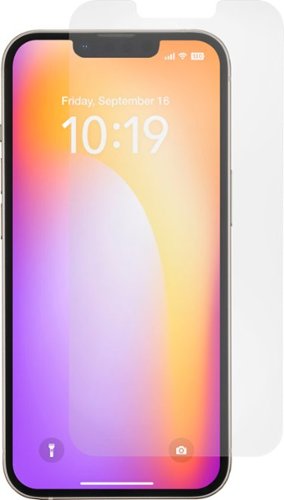
Insignia - Anti-Reflective Glass Screen Protector for iPhone 14 Plus and 13 Pro Max (2-Pack) - Clear
Keep your screen ultra-protected from the hardest falls with the Insignia Anti-Reflective Glass Screen Protector for iPhone 14 Plus and 13 Pro Max (2-Pack). Made of thin, .33 mm tempered glass, this screen protector will fit most cases and will fully protect your screen with edge-to-edge coverage. It has anti-reflective technology that provides extreme clarity in strong outdoor light and eliminates other lighting impacts. Its 9H hardness rating protects your screen from everyday accidental falls and won~t affect the sensitivity of your touchscreen. It also includes everything you need for easy application, ensuring a bubble-free appearance.
Customer Rating
5
Solid Build and Easy Application
on November 3, 2022
Posted by: TravisJ
No problem recommending this screen protector. First thing I noticed when I took them out of the box was they felt “heavy”. My most recent screen protector experience had very thin, flimsy glass. With Insignia’s screen protector, it seemed thick enough that it will hopefully actually protect the screen underneath. Came very well packaged and crystal clear.
In the box you get two sets of the following: a package containing the screen protector and a package containing, wet and dry wipes, cloth wipe, and a dust sticker. Also there is a guide that clips onto your phone for very easy alignment. The packaging is easy to open and I like how the packaging is designed to repackage and store the spare screen protector if you don’t need the 2nd one right away.
Application was very easy, although instructions weren’t super descriptive. I’ve put on a screen protector or two so I didn’t feel it I needed them detailed, but plenty of first timers out there who may need more guidance. You do the wet wipe, which sometimes in cheaper kits aren’t very wet. That wasn’t a problem with Insignia. Go back over it with the dry wipe, then use the microfiber cloth to buff out any residue left on the screen. The last step for me is using the sticker to remove any dust that falls between the final wipe down and actually applying the screen protector. Next comes the guide.
The guide isn’t anything special but it worked really well for me. Snap it onto the front of the phone, making sure it’s secure. After peeling off the backing, I aligned the top of the screen protector where the notch is with my notch on my iPhone and made sure it was flush with the alignment tool. I didn’t push too hard against the top but I wanted to make sure when I dropped it down it didn’t move. I let it down slowly and dropped it into place and gave the middle a little push and watched the adhesive spread. Use the microfiber cloth to smooth out any air bubbles and your done.
I’m the kind of person who starts over with the 2nd screen if the first one doesn’t drop down almost perfectly. Didn’t have to do that. I’ve used several different alignment tools and screen protectors and simplicity and patience is sometimes the best method. The cutout is very precise. I love a new screen protector as your finger just glides across the glass with almost no friction. No issues with glare or at least not any more than my phone’s screen. One thing I noticed that others may find useful, I had some minor scratches on my screen. Only noticed when the screen was off. With the screen protector, the adhesive “fills in” the micro scratches so I don’t notice them anymore. It’s not going to work miracles, but it hid my tiny little imperfections.
I’ve got nothing negative to say about the product. Instructions could be a bit more detailed but the screen protector works really well, very easy to apply, and they give you everything you need to get a perfect application.
I would recommend this to a friend!
Share this review:


0points
0of 0voted this as helpful.

Experience more bandwidth and gigabit+ speeds. eero Pro 6E supports gigabit+ speeds for more of your wifi needs~from VR/AR and 8K streaming to using the latest Wi-Fi 6E devices. Tap into the power of Wi-Fi 6E for more capacity and lower latency than Wi-Fi 6.
Customer Rating

4
Very Fast Wide Coverage WiFi 6e
on October 25, 2022
Posted by: TravisJ
This triband Wireless 6e router uses the latest in wireless technology to provide a low congestion 6ghz band signal to allow for faster and cleaner connections to your router to assist in offering the fastest speeds on your local network. Eero makes it so that anyone, no matter the tech level, can purchase and connect this mesh system, as long as they can download an app and follow directions.
I loved the unboxing experience of this router. With 3 units, everything is packaged very neatly inside the box so you can grab one at a time and go through the setup process with each. The first step is getting the app and setting up an Eero account. Then follow directions for adding a router to your home network. It’ll guide you through the steps of disconnecting your old router and connecting your new one to your modem. Once complete, you can then use the app to set up additional units providing a wide range of wifi coverage across your home or property.
My modem fairly centered to the living room but I wanted to expand wifi out to my front yard and garage. When adding the additional access points, I didn’t have any connection problems and was able to get good signal putting one in my bedroom (using only wireless internet connections and a power cable) and another in my garage. I didn’t want to fall back on my wireless connection while looking up how-to videos in my garage, so this was ideal.
This is what I call an “app managed” router. This seems to be a more popular approach, but it simplifies the setup and management process for those who are not quite as savvy with adjusting technical settings of their home network. This is a plus and a minus in my book. On one hand, it makes things much easier for the majority of people, on the other hand, it also restricts you from fine tuning your network to your liking or wireless environment. With that being said, it’s very easy to see what is connected to your router as well as the ability to group different items to make parental controls and monitoring a walk in the park.
I made a completely new network with the setup of this router so I could add each item one by one and group them based on function or type. For example, smart home devices, PCs, and personal devices (phones, tablets, watches) all got grouped in their respective categories. Although I do not have kids, I could see where this would be useful if you wanted to create groups for individual children for game consoles or phones to limit screen time.
As for customization, it doesn’t leave you completely in the dark. You can still do, what I now consider a standard features, port forwarding and DHCP reservations. You can also adjust your DNS server, turn on or off your UPnP, as well as a feature called client steering which makes sure you’re on the router with the strongest signal and therefore likely the fastest connection. There’s also “Thread”, which is a low power wireless standard that devices can connect to. The device also has Zigbee built in so if you’re Smart home is built on this standard, you can use the eero as a hub.
Performance seems right in line with what I expect with a clean 6ghz wireless signal. My PC which is one of my few 6e devices, negotiates at 2.1 gbps at the highest, but averages around 1.2 to 1.4 gbps. This is, on paper, FASTER than a wired connection. The reality is, depending on if your device is WiFi 6e capable and distance to your router, you may or may not see those speeds. BUT I will say, using fast.com to test my speeds, under the best conditions, I was hitting my advertised speeds (1 Gig Fiber) from my ISP which is very impressive considering I’ve only seen these speeds under wired connection (940 download and 800 upload on Eero wireless router). As for local network file transfers, well I have a windows PC as a server, and lets say SMB isn’t the fastest file transfer protocol, but I transferred a file across the network at 74 MB/s average. This was from a NVMe drive to a HDD, which is a common setup for network file backup.
Another added bonus is if you want to wire your devices to the access points, each one comes with 2 ethernet ports. If you have a device that’s ethernet only or want to spread out wired devices so it doesn’t crowd the desk, this makes that convenient.
The biggest downfall of this router is the subscription based parental controls and monitoring. Instead of building these into the product like other routers, eero has opted to get a few more bucks out of you by charging $99.99/year for these features. You don’t have to make the purchase, and the router works fine without them, but there are routers available that include this in their purchase price without a subscription.
Another thing I would have liked to have seen would have been a QoS feature where I can prioritize traffic on the network by device. This is great for streaming or gaming devices where it’s network traffic is important to be prioritized to sustain the quality of picture and latency. It’s hard to see this labeled as “Pro” and not have some of these features. Hopefully this can be added in the future with a firmware update.
All things said, I’m happy with this product, but there’s room for improvement. I have no complaints about the setup process, performance, or coverage. If you don’t have a technical savvy person in your home but need the coverage, you’ll find this is easy to setup, deploy and enjoy.
I would recommend this to a friend!
Share this review:


0points
0of 0voted this as helpful.
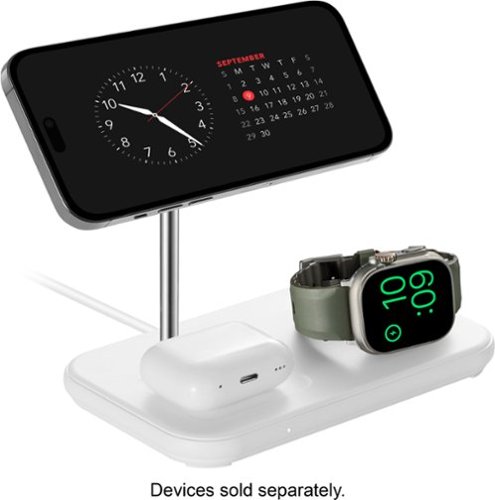
Charge your devices simultaneously and efficiently with this Best Buy essentials 3-in-1 Magnetic Wireless Charger with Apple Watch Charger Holder. It~s compatible with magnetic charging and can charge up to three devices at once. Simply snap your iPhone on the stand, your AirPods on the below charging pad and connect your Apple Watch charging cable to use the built-in ring and charge them all simultaneously. The LED light assures you your devices are charging, and the included 5 ft. power adapter lets you place the charging stand where it~s most convenient to you.
Customer Rating
5
Great 3-in-1 Wireless Charger!
on October 5, 2022
Posted by: TravisJ
This 3 in 1 wireless charger from Best Buy essentials works great and is exactly what I need to charge the Apple Trinity (iPhone, Apple Watch, Airpods). In the box you get the charging base, power adapter, and a usb a to c dongle. You’ll need to use your existing Apple Watch charger, but it easily fits into the ring. On the bottom you can pop off the panel and there’s a place to plug in to a usb type A slot (or you can use the dongle if yours is a type C). Once you get the cables managed and plug the power adapter into the base and the wall, you’re good to go.
The magnetic holder for the iPhone is very strong. I love how when I’m laying and bed and go to put it on charge, the charger “grabs” the phone. It isn’t so strong that it moves the base station, but you know it’s aligned properly. I simply just twist it away from the magnetic mount and it comes right off.
Charging my Airpods pro is even easier. You must have the wireless charging case for it to work, but there’s a rectangle cutout that you sit the case in, and charging starts right away. Charging the Apple Watch is just as easy. Align it with the magnetic charger with the watch and charging begins. The only call out for the watch is the USB port only does 5 watts of charging, so you won’t get the 7.5-watt fast charging with the newer Apple Watches. Although I did test my 7.5-watt charger and it fit in the ring just as easily and charged just fine.
I usually charge my apple watch after I get home since I wear it at night for the sleep tracking. No issues with charge speed or charging. Phone gets charged every night along with my Airpods and I wake up with both fully charged and ready to take on the day. Great Product!
I would recommend this to a friend!
Share this review:


0points
0of 0voted this as helpful.
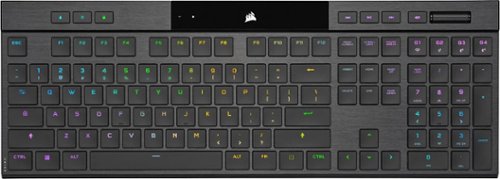
Meet the CORSAIR K100 AIR Wireless RGB Mechanical Gaming Keyboard, an ultra-thin keyboard that places outstanding performance and productivity in a sleek brushed aluminum frame. Its unbelievably thin profile ~ just 11mm at its slimmest point ~ makes the K100 AIR the stylish centerpiece of your entire desktop and workspace. Hyper-fast, tactile CHERRY MX Ultra Low Profile mechanical keyswitches deliver a responsive, satisfying mechanical keyboard experience ~ you will want to use the keyboard for everything.The K100 AIR offers three ways to connect to your PC, Mac, and devices for optimal, hyper-fast wireless versatility: sub-1ms SLIPSTREAM WIRELESS, Bluetooth, or USB wired. Connect to multiple devices wirelessly and switch between them with the press of a button, with secure AES 128-bit encryption. Wired mode enables CORSAIR AXON Hyper-Processing Technology to transmit keystrokes up to 8x faster than standard gaming keyboards, helping you stay one step ahead of opponents during competition. The K100 AIR offers endlessly customizable lighting and workflows for total control over your setup. Four dedicated G keys are fully programmable to perform custom actions, shortcuts, and macros to elevate your productivity. The K100 AIR shines with brilliant per-key RGB backlighting, for nearly limitless customization for up to 20 lighting layers simultaneously, powered by AXON. Unlock full control over lighting, key remapping, and more with powerful CORSAIR iCUE software. With up to 200 hours of wireless battery life and all the premium features in CORSAIR~s thinnest gaming keyboard ever, the K100 AIR enables you to play elevated.
Customer Rating
5
Very Thin, Full Featured, Mechanical Keyboard
on October 2, 2022
Posted by: TravisJ
There’s a ton to love about Corsair’s latest offering for wireless mechanical keyboards. I think this is one of the thinnest keyboards I have ever used. Even so, the key switches feel great, and it doesn’t impact my ability to type quickly, and, you still get the full Corsair experience with full customization of the keyboard lighting and functionality.
The Design - the design is SUPER thing and there’s a lot to love here. The keyboard has a really nice-looking brushed aluminum key base with a textured hard plastic bottom. The two pieces come together to make a very thin but rigid full sized keyboard. The keys are spaced appropriately for me and are very easy to type on. Fingers don’t feel cramped together or forced into position. The Cherry MX Ultra Low Profile switches feel amazing. They’ve got a tactile feel and don’t sound too clicky. They’re stiff but don’t require an unnatural amount of force to actuate. If you’ve used Corsair keyboards before, then many of the button layouts will be familiar with profile switching, brightness control, and a multi function windows lock button as dedicated keys and a LED panel with illuminated indicators that let you know the status of the keyboard. I was also delighted to see 4 dedicated macro keys above the numpad which also serve as a way to switch between connection modes. Finally, media keys take up the top right part of the keyboard.
Features – There’s a lot of features packed into this keyboard which you can setup to your liking using the iCue software. Aside from what can be done without iCue (more on that later) you can set up layers and layers of RGB. Also, you can reassign keys to perform different functions, including keystrokes, macros, launch programs, and even integration into Voicemod and Elgato Streamdeck. If there’s a repetitive key combo your constantly hitting, you can assign it to quickly execute with a dedicated G-Key. Also, Corsair iCue is also one of the most widely used plugin for RGB lighting and very compatible with 3rd party lighting effects. As far as features outside of iCue software, I sometimes record macros to reduce keyboard input commands within software used at work. If things change, I can go in and re-record those macros on the fly. This makes for quick work navigating through application menus and executing commands.
Connectivity – Probably one of the most useful features for me is the ability to pair three Bluetooth devices, plus whatever the slipstream receiver is plugged into. I have a work laptop, gaming laptop, and a personal desktop as well as an iPad. My work laptop and desktop share monitors. It’s nice having one keyboard and one mouse to share between the two when I want to switch from work to play. Although not used this way as often, This keyboard is thin and light enough to throw into my backpack so I have a full size keyboard when I want to get some work done (I’ve grown to using a numpad fairly heavily). Switching between the dongle and Bluetooth takes less than a couple seconds. If you frequently switch between machines this will be a luxury.
Performance – Most people don’t consider too much about performance when talking about keyboards but a lot goes into low latency and response time as well as all the lighting layers and hardware profiles. Using what Corsair calls their Hyper Processing Technology, Axon, it can deliver polling rates up to 8,000 when wired and 2,000 using slipstream technology. I’m not sensitive enough to small delays in keyboards to personally tell a difference, but what I can tell you, I can’t the difference when it’s wired or wireless. Knowing that I’m not going to notice lag when gaming helps keep a clean aesthetic on my desktop by forgoing the wires, only needing them for a charge.
Gaming – Gaming performance is just like using a wired keyboard. As mentioned above, I can’t tell the difference with it plugged in or wireless. The difference is you don’t have the cords in your way so you can position the keyboard wherever you need to. Inputs are smooth and because it’s a full size keyboard, there’s no concerns with hitting the wrong key because keys are too close. WSAD keys are fully customizable so you can quickly see them and get your hand positioned and because each key is individually mappable, if you wanted to color code your buttons, you can do that too. The key switches feel good when gaming and are very responsive.
Other thoughts – I like how the keys at top are flush with the keyboard. It just helps add to the aesthetics. USB C charging is nice to see and should be standard on ALL electronics at this point. Dedicated on/off switch so you don’t accidently smash keys in transport. A nice little pocket for your dongle is cut out at the top, and again, should be the gold standard if your device comes with a dongle. The only thing that is concerning about this design, is I worry that, because it IS so incredibly thin, is it more prone to damage? For example, if I throw it in my backpack, and lean back against it, is it going to bend or warp? It feels very sturdy in the hands, but I know aluminum isn’t known for it’s hardness. Time will tell. Finally, I like how much you can do on the keyboard without the need for iCue, right out of the box. Preset color options using FN+1-0, keyboard macros, device connectivity, checking battery levels are all available before you ever install iCue. After iCue is installed, you can power up what you can do when your without the software with hardware profiles.
Final Thoughts – If you need a highly customizable, full sized, full featured keyboard, that is wireless, ultra low latency, mechanical, onboard macro recording, with connections to multiple devices that can switch seamlessly, I’m not sure what other boxes you would want to check. I love this keyboard and look forward to daily driving it. It may even end up being the keyboard I just use for everything.
I would recommend this to a friend!
Share this review:


0points
0of 0voted this as helpful.

Feel the action with 4K HDR visuals, ultra-fast 144Hz refresh rate, and Full Array Local Dimming contrast that makes game worlds come alive with detail and vibrance. Built for extraordinary gaming performance with support for Nvidia G-SYNC and HDMI 2.1 VRR compatibility, the INZONE M9 is your path to victory.
Customer Rating
5
Amazing 4k LCD Monitor with Local Dimming HDR
on September 5, 2022
Posted by: TravisJ
This monitor checks a lot of boxes that you would like to see in a gaming monitor. It has 4k resolution, 144Hz refresh rate, HDR 600 certified, as well as some aesthetic notes that should blend in well with any build. It also brings 95% DCI-P3 spectrum coverage.
The screen looks fantastic for gaming. At 4k resolution HDR videos are smooth thanks to the 144Hz display, have rich vibrant colors, and amazing fast response time of 1ms. The dimming zones really help the LCD panel do HDR close to what LED panels can do. With LED the individual pixels turn off but because LCD is backlit, the dimming zones help the screen achieve true black reaching HDR 600 certification.
The design of the monitor has PlayStation vibes. I like the black and white color scheme of the display and stand. There’s a recessed channel on the back that has a LED light that you can change the color of. The stand is adjustable up and down and you can change the tilt but there’s no side to side without moving the whole stand, or any rotation at all. It is VESA compatible, and this is how I have mounted mine without any issues. There’s two standard HDMI, Display Port, and USB C display port. There are also three USB 3 type A ports for peripherals. There’s a “joystick” on the back for adjusting settings.
You can download software from Sony that will allow you to adjust the monitor settings without having to tinker with the joystick on the back. I love this and much prefer this than having to awkwardly reaching behind my monitor. I can sit comfortably at the distance I’ll use the monitor and fine tune it to my liking. Among other things, you can adjust brightness, sharpness, cool/warm feel, response time as well as display settings based on what program is running. This is great if you have a preferred setting for editing photos or playing games. There’s FPS crosshairs and dots you can turn on that stay centered on the screen. Also you can turn on a FPS counter. There’s also adjusting of the response time as well as adjusting the LED light on the back.
As far as gaming goes, you’ll need some decent hardware to play 144Hz at 4k. I was getting around 40-50 FPS playing Destiny 2 at max settings. I ultimately tuned the in-game graphics down to 2k resolution which still looked fantastic but consistently ran at a capped 120 FPS. This isn’t a limit to the display but just a call out.
Overall there’s a lot to like on this monitor. 4k, 144Hz, 1ms Response, HDR, 95% DCI-P3, and software based menu. The only thing I would like to see is maybe a bit brighter LED light with more RGB options. Perhaps integration into Corsair iCue or similar software.
I would recommend this to a friend!
Share this review:


0points
0of 0voted this as helpful.
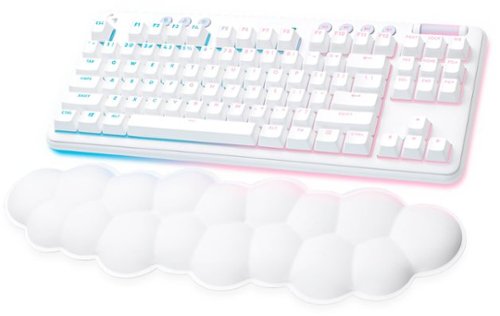
The G715 Logitech Wireless Gaming Keyboard from the Aurora Collection delivers low-key style with high-key performance so you can express yourself and play your way. Float away with its dreamy white design and comfy, cloud-shaped keyboard palm rest. With a tenkeyless layout and adjustable height, this is an ideal compact mechanical keyboard for gaming that gives you that good game feeling, all-day long. Pack it up, place it anywhere, and play your best with G715~s rechargeable 30 gaming-hr battery life (with full lighting), Logitech LIGHTSPEED wireless, and Bluetooth connectivity. Use the USB-C to USB-A cable (included) for quick and streamlined recharging. Logitech LIGHTSYNC brings your gaming to life with four responsive Play Moods that reflect your state of play in 16.8M programmable RGB colors. Get your creative juices flowing, show off your style, and even create your custom animation effects on your wireless TKL keyboard with free G HUB software.
Customer Rating
5
Wireless Keyboard with Ample Customization and RGB
on September 2, 2022
Posted by: TravisJ
I’m excited about the G715 line of keyboards. It borrows from the popular G915 TKL design language and improves on that design by adding customizable keys colors and a cover plate that you can mold around your setup color scheme.
Customization is the goal. With swappable top plate and key caps, you can extensively customize the look of your keyboard. The white base is a nice break from the typical black you see on most modern gaming keyboard, but my favorite part of the design language is the RGB lighting on the bottom side of the keyboard as well a sleuth of preset lighting effects. You can buy a set of pastel green or pink keys as well as different colored top plates. I’m looking forward to seeing additional colors added so I can do a blue/white color scheme for basketball season because why not.
Using the Logitech GHub software, you’re able to customize the RGB key colors, the RGB light strip on the bottom, as well as creating and assigning macros to the function keys. There’s a difference between what’s available depending on your connection type as far as RGB presets. I’m assuming it’s because of the processing that some of the effects require, but you’re limited to what you can select when using the Bluetooth connection as opposed to connecting the dongle.
I like the tactile feel of the key switches. I believe Logitech is calling these GX Brown Tactile switches. If you like them to be a bit clicky while still feeling a bit of resistance on the down press, these are probably the ones for you. I do think these feel a bit different than the tactile switches that were on the G915, so your milage may vary. I’m not a mechanical keyboard enthusiast by any means so absorb what you will with those opinions. All in all, I think it’s a good typing experience and gaming on it isn’t bad either. I like knowing that I have the endurance of a mechanical keyboard for years to come.
Build quality is pretty good. It is made of hard plastic and has some heft to it so it doesn’t slide around. There’s kick stands that are on the bottom and a slot to store the adapter. I’m a big fan of any device that requires a dongle, has a place to store said dongle built into the design. This also uses a USB Type C charge port. I’m avoiding any device that doesn’t have one so this is a nice addition some of the newer product lines coming out. The cloud shaped wrist rest is also neat. I do prefer something a tad bit taller because of how I’m positioned but that might be just me. I do worry a bit about the top cover plate that you can swap out being a bit thin. If this gets knocked off during transport in your backpack or is left out to the elements, I imagine it wouldn’t be hard to break.
I would recommend this to a friend!
Share this review:


0points
0of 0voted this as helpful.
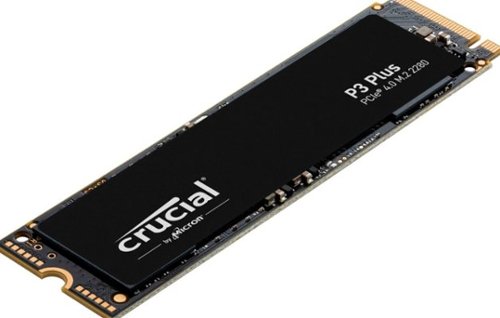
Valuable Gen4 performance is here. Introducing the Crucial P3 Plus Gen4 NVMe SSD, delivering impressive speed with sequential reads/writes up to 5000/4200MB/s1 while providing data protection for optimal security. Engineered by Micron with the latest Gen4 NVMe technology, the Crucial P3 Plus comes in generous capacities2 and offers flexible backward compatibility for most Gen3 systems.
Customer Rating
5
Fast Affordable High Speed NVMe Storage
on August 9, 2022
Posted by: TravisJ
I’m using this as a game storage drive in my laptop. More and more laptops are ditching the SATA connection in favor of ultra fast NVMe storage. Being able to populate those slots with higher capacity drives lets you spend less time installing games and more time playing them. When transferring my game files over I just used windows copy/paste. The transfer peaked around 791 MB/s and maintained around 760 MB/s until it hit smaller files, where it fluctuated all over the place. CrystalDiskMark showed read speeds of 5,025 MB/s and write speeds at 3744 MB/s.
Installation was easy. The drive is keyed so you can’t install it in the wrong slot. Crucial includes an extra if needed to hold it down to the board. Once installed I used windows disk partition to format the drive using GPT partition and NTFS file system. Assign it a letter and hit the go button. If you’re replacing a drive I would recommend matching the drive letter to the previous drive (provided it’s already been removed) so any installed programs or games don’t have to be redirected.
As for perceived performance, games loaded without a hitch. Steam installations go about as fast as my internet connection will allow it so I know I’m not bottle necked by the SSD. This is my first Crucial drive and so far I’m impressed with the speed and ease of use. They include a 5-year warranty and they’re one of the largest memory and storage manufacturers in the world so I would imagine you don’t get that big without being reliable.
I would recommend this to a friend!

Share this review:


0points
0of 0voted this as helpful.
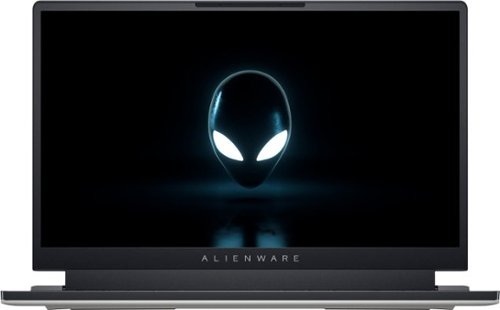
Introducing the new Alienware x15 R2 - our thinnest 15" laptop redefines how a gaming PC should look and feel, with new NVIDIA GeForce RTX graphics, Alienware Cryo-tech, Dolby Atmos and Dolby Vision.
Customer Rating
5
Portable Gaming Powerhouse
on August 8, 2022
Posted by: TravisJ
Alienware has taken their innovative “x” series design and stuffed the latest CPU and GPU’s from Intel and Nvidia respectively into a slim chassis. Using a i7-12700H and a Nvidia 3070ti, they’ve paired it with 16gb of 5200mhz DDR5, this laptop slays anything you throw at it. Using 4 cooling fans and their proprietary cooling thermal interface Element 31, you get to run the toasty 12700H at turbo speeds just a bit longer than the rest.
Performance – Intel did good with their P and E core architecture CPUs. The highest multi core score I was able to land in Cinebench was 18,180 pts. Single core clocked in at 1,794. As for perceived performance, everything seems to just work fast. Programs loading, game load times, boot times, all just seem snappy. The only thing to watch for is the voltage lock on this CPU. If you like to undervolt to help with temperatures, you’ll be unpleased to find voltage and cores are locked on this one. This wasn’t the case for the 11700H which did not have the “K” moniker but was still adjustable. Not Alienware’s fault, but just a watch out.
Gaming – Not going to run into any issues here. Almost every game runs easily at 60fps on max settings. Time spy gave me a total score of 11,289 with a GPU score of 10,977. For thin and light laptops, I think the 3070ti is probably where you start getting diminishing returns on heat vs performance output. When holding the laptop in your lap while gaming, you’ll notice it starts to get a bit uncomfortable with the amount of heat output. If I do game with it in my lap, I use a laptop cooling pad to help with this.
All games played without activating turbo mode. Destiny 2: 1080p – Max settings – 180FPS cap. FPS average 120-135. Temperature Average 85, 100 peak. Halo Infinite: High Settings (Ultra exceeded recommended available VRAM). FPS average 100-110. Temperature Average 86. CoD Warzone: 60 FPS Average on max settings. Temperature Average 91.
Keyboard and Trackpad – Alienware has one of the best keyboards on a laptop that I’ve typed on. I’ve used a dell XPS laptop before and this is reminiscent of their keyboard which I liked very much. I’m not a keyboard aficionado or anything but I can appreciate a decent keyboard. Trackpad isn’t too bad either. It is a bit of a fingerprint magnet though.
I/O – The port selection on this could be a bit better but I’ve adapted. Two USB-C, one of which is thunderbolt 4. Thunderbolt 4 does afford you several options as far as external monitors, docks, and dongles. Super happy that they do include a 2.5ghz Ethernet USB C adapter. Looping WiFi into this category, you’re also given the lates wireless 6e standard which gives us the 6ghz band for higher bandwidths. Unfortunately, I don’t have a router capable of testing these speeds. There’s also a micro SD slot, HDMI, and a USB-A to round it out on the back. There’s an audio jack on the right and the power connector on the left. Internal I/O is where I’m a bit disappointed to find the RAM soldered on. You do get dual M.2 slots for NVMe storage but being able to increase the RAM down the road would have been nice too since only a 16gb model is offered in the 15” at the time of writing this review.
Audio – The x15 comes with Dolby Atmos support. The sound is a bit better than most other laptops I’ve heard but it’s only a bit better than typical laptop audio. I can appreciate Alienware is trying here and I hope they continue to improve here.
Build Quality and Design – Alienware has always been a bit different than the competition in regards to design. They have a sturdy chassis with little to no flex in the lid or body. The keyboard is solid and there isn’t any flexing when typing or applying light pressure. Also, the way the laptop dissipates heat, the keyboard doesn’t get hot when playing games. Each key and the alien head power button are all RGB capable as well as the alien head logo on the lid and the “Tron” ring around the rear I/O and exhaust vents. You can use the Alienware Command Center to set up default profiles, game profiles, as well as fan curve and a slight GPU overclock.
Battery Life – I tested this by starting my stopwatch on my phone as I unplugged the PC and just used it like I normally would but avoided playing any games. I left the Alienware Control Center fan profile to “performance” and the power setting to “balanced”. I watched YouTube videos, browsed the internet using Firefox. Screen Brightness was at 75%. 2hr and 33m it was running on battery saver at 15% Battery. @ 2hr and 50m I was down to 6% and decided to plug it in. Your mileage may vary, but I’d assume 3 hours is all you get. Even though you can’t adjust voltage, I did use Throttlestop to set a low power profile that turns off turbo boost. I imagine this will help me squeeze some more battery life out of it.
Final Thoughts – I’ve always been a fan of Alienware’s bold design choices and lack of fear on pushing the envelope on innovation. I’m a gamer and I feel like a gamer when I use this PC and, more importantly, game on it. From the design to the performance, Alienware is selling a top notch laptop that is worthy of competing against the best of the best. I do feel like future models would benefit from maybe one more USB type A port but more importantly for me, upgradable RAM slots. All in all, a fantastic gaming device.
I would recommend this to a friend!





Share this review:


+3points
3of 3voted this as helpful.

Blaze through battlefields with a competition-ready wireless gaming mouse with 26,000 DPI, a slimmed-down design and magnetic-snap fast-charging.
Customer Rating
5
Flexible Tri Mode With the Alienware Aesthetic
on July 5, 2022
Posted by: TravisJ
One of the things that I’m starting to enjoy more is the ability to be mobile without any hassle. I use several devices daily, each serving a more specific purpose. A personal laptop for gaming, paying bills, and reading the morning news. A work laptop for, well work. And when I want to watch a movie, or don’t feel like lugging around my backpack, I use an iPad. What’s great about the AW720M, is I can use it across all 3 devices with ease.
In the box you get all you need for your wireless experience. There’s the 2.4ghz dongle, a braided cable that feels more like my sweatpants draw string than the typical nylon feeling braided cables which I think could be the new standard. I’m also greeted with a couple of strange looking adapters. One is the cable adapter used to wirelessly charge as well as connect the dongle. The other goes into the USB-C charging port (NICE!) in the front of the mouse and the charging dongle “snaps” onto the front magnetically to provide charging. Also in the packaging is a removal tool for the magnetic insert for the mouse which is nestled nicely in the front and not really that noticeable at first glance. All of the dongles come in a small plastic box that snaps open and shut with foam cutouts for the dongles. More to come on how this works later.
The mouse itself is ambidextrous. You have your main left and right click with a clickable single axis wheel (you’ll need to use CTRL for any side scrolling) as well as two side buttons. As a bonus, those two side buttons exist on both sides giving you a total of 7 clickable, mappable buttons. As a right-handed person, I found it a bit awkward trying to reach the buttons on the right side of the mouse, but I imagine they’re there more for our left-handed friends and not so much for gaming. The thumb buttons though for the right-handed folks are easy to reach and have a nice, rounded feel to them, they’re made to be found and used. I have medium-small sized hands and don’t have any concerns with the feel of the mouse. It rests comfortable in my palm, and I feel like my fingers rest correctly in the attenuation zone of the left and right mouse buttons.
The bottom of the mouse is where you control the power and connection. The button on the right is straight forward, power on and off. The button on the right might confuse you just a bit if you haven’t read the instructions. In the up position you’ll connect to the 2.4ghz dongle that is attached to your PC. Move it to the middle position to connect to a Bluetooth device. Initial pairing is done by taking the switch and holding it in the bottom position. I’m not sure if you can hold and let go or if you must hold until paired, but I did the latter and had success every time I did it this way. Also on the bottom is your optical sensor which goes up to 26,000 dpi.
Connecting it to my computer didn’t require any instructions. I plugged the dongle into my USB-C port and turned the mouse on, ensuring I was in the 2.4ghz dongle mode. Started working right away. Since I have an Alienware laptop, the Alienware command center app detected my mouse and after a bit of poking around, I was able to find the settings. From here you can do all the typical things with high end gaming mice. RGB Lighting for the Alienware logo, DPI scaling for each of the 5 profiles you can change from using the button on the bottom of the mouse, as well as button assignment and firmware updates. Since I don’t game on my work PC, I opted for a Bluetooth connection with it.
I do have a couple of things about the design I wish was a bit different. This isn’t so much the mouse as the magnetic charging dongle. I think the wireless receiver connected to the dual port USB C adapter is a bit much for the front of the mouse. I would have liked to see just a magnetic adapter for the cable and the dual-purpose dongle goes into the USB C port on my computer. At least this way I can leave the dongle plugged into my computer and I can pull out the cable when I need it to try and keep my desktop looking clean. I would also like to see a way to nestle the dongle into the mouse instead of a separate carrying case. I wouldn’t want to leave the dongle in and place it in a bag for the amount it sticks out from the port. Being able to nestle it inside the mouse would be nice. I get the feels the design is aimed more at desktops than they are laptops with these design choices.
I know in the grand scheme of things, the design of this mouse doesn’t really set itself apart from other top brand mice, but Alienware is still trying to step outside the box with the included adapters, taking a flagship gaming mouse and including Bluetooth functionality so you can really use with almost any device and switching between the two is seamless. Very easy to recommend this mouse.
I would recommend this to a friend!
Share this review:


0points
0of 0voted this as helpful.
TravisJ's Review Comments
TravisJ has not submitted comments on any reviews.
TravisJ's Questions
TravisJ has not submitted any questions.
TravisJ's Answers
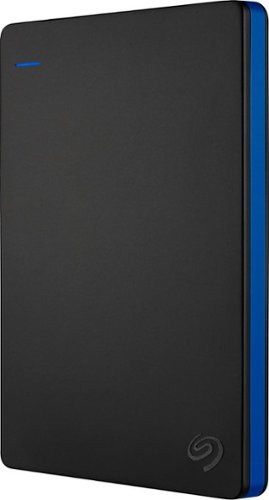
Store more than 50 PlayStation 4 game titles on this 2TB Seagate game drive. Its USB 3.0 port provides fast loading of full-size games so you can play smoothly, and its tough aluminum enclosure protects the drive from damage. This plug-and-play Seagate game drive is automatically recognized by any PS4, PS4 Slim or PS4 Pro console.
I've gotten quite tired of always uninstalling and reinstalling my games to make room and I was thinking about buying one of these. So, since all my games are hard copy, does that matter? For example, with this, will I be able to reinstall hard copy games
According to Sony’s website you can use from 250GB to 8TB in external storage to install games.
7 years, 6 months ago
by
TravisJ

Listen to your playlist in peace with these Sony headphones. They have a 40mm dome driver to deliver the full depth of audio, and the noise cancelling feature minimizes outside disturbances for a better listening experience. These Sony headphones have a battery life of up to 30 hours for extended jam sessions.
Would you be able to use these headphones to workout at the gym? Is the clamping of the headphones to your ears tight enough so it doesn't slip out as i do certain lifts? Are replaceable ear pads available for this model that are more comfortable?
These will work fine at the gym. They come with 4 different sized wing tips and ear tips so that you can customize the fit to your ear. Since these are new, It's unlikely to have 3rd party ear tips or wings at the moment.
8 years, 7 months ago
by
TravisJ