


Jturn's stats
- Review count180
- Helpfulness votes202
- First reviewNovember 22, 2014
- Last reviewJune 11, 2026
- Featured reviews0
- Average rating4.1
Reviews comments
- Review comment count0
- Helpfulness votes0
- First review commentNone
- Last review commentNone
- Featured review comments0
Questions
- Question count0
- Helpfulness votes0
- First questionNone
- Last questionNone
- Featured questions0
- Answer count9
- Helpfulness votes4
- First answerJune 3, 2016
- Last answerJuly 9, 2020
- Featured answers0
- Best answers1
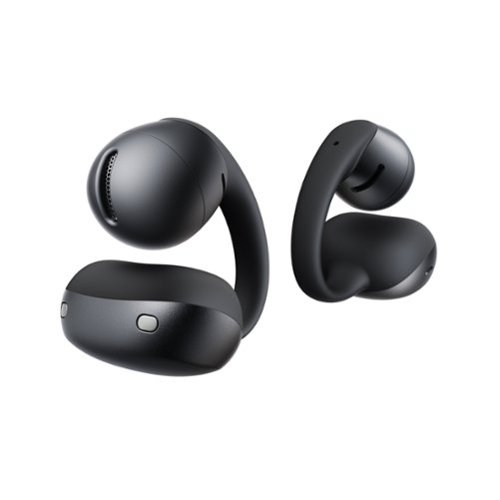
Listen in an effortless style. OpenDots Air combines an open-ear design with a compact clip-on form that fits securely and comfortably. Designed to blend naturally into your look, it wears more like an accessory than a device~easy to put on, easy to live with.
Posted by: Jturn
The Shokz OpenDots Air are one of the more innovative takes on wireless earbuds I've used in quite some time, ditching the traditional in-ear form factor for a lightweight clip-on design that sits on the outside of your ear. With all-day comfort, surprisingly good sound quality, and a reasonable price, this is a strong option for anyone looking for an unobtrusive set of earbuds that affords you awareness of your surroundings.
The best feature of these is the comfort. The clip-on attachment mechanism is more sturdy than I expected and holds the earbuds in place without slipping or falling off your ear. This is crucial for me, as I was looking for a set of earbuds for working out, and the OpenDots Air have been phenomenal for that. With normal in-ear buds, my ears tend to get uncomfortably hot during longer workout sessions. With the OpenDots, this has not been a problem; they've been a joy to work out with and have the added benefit of letting you maintain full awareness of your surroundings while out for a run, which is important for a number of obvious reasons. They're also IP55 rated, so sweat isn't an issue. Overall, these have been my favorite workout earbuds and will be in my gym bag for the foreseeable future.
While comfort is important, it wouldn't mean much without at least decent sound quality. Thankfully, the OpenDots really surprised me; they offer a well-balanced sound profile with an unexpectedly solid bass response. This can be tweaked further using the Shokz app, with four preset EQs and two additional customizable slots, and the bass boost mode in particular helps round out (and boost) the low end when you need a bit more punch. Call quality has been excellent too. The OpenDots Air feature two AI-powered noise-canceling microphones on each bud that do a solid job of isolating your voice from background noise, which has made them a reliable pick for taking meetings at home or on the go. Bluetooth 6.1 with multipoint pairing also makes these a great set for meetings, letting you stay connected to your phone and work laptop simultaneously and switch effortlessly between leisure listening and calls.
While comfort is important, it wouldn't mean much without at least decent sound quality. Thankfully, the OpenDots really surprised me; they offer a well-balanced sound profile with an unexpectedly solid bass response. This can be tweaked further using the Shokz app, with four preset EQs and two additional customizable slots, and the bass boost mode in particular helps round out (and boost) the low end when you need a bit more punch. Call quality has been excellent too. The OpenDots Air feature two AI-powered noise-canceling microphones on each bud that do a solid job of isolating your voice from background noise, which has made them a reliable pick for taking meetings at home or on the go. Bluetooth 6.1 with multipoint pairing also makes these a great set for meetings, letting you stay connected to your phone and work laptop simultaneously and switch effortlessly between leisure listening and calls.
Battery life of the OpenDots Air has been strong as well. They're rated for about 36 total hours of listening time (factoring in the battery life of the buds along with the recharges from the case). In my two weeks of ownership, I've had to recharge them only once, which is an excellent charge cadence for my usage.
With all the positives, my one real gripe has been the touch controls. The OpenDots use a mix of taps and pinches, and the pinch mechanic in particular feels different from the tap-and-swipe scheme on other earbuds I've used. It's not bad, just unintuitive at first, and it took some muscle memory to fully internalize. The controls are customizable in the Shokz app, which helps, but there's still a learning curve out of the box. It's also worth noting that the open-ear design means you won't get any meaningful noise isolation, so in louder environments like a busy coffee shop or a crowded gym, external sound can easily overwhelm whatever you're listening to. That's fundamental to the form factor rather than a flaw, but worth knowing going in.
Overall, these are a great set of earbuds. They have a unique feature set that makes them a strong option for those who don't like tuning out the outside world or who want a more open set for working out. If you're looking for a pair of earbuds you can effortlessly wear all day without thinking about it, these are well worth your consideration.
I would recommend this to a friend!
Share this review:


0points
0of 0voted this as helpful.
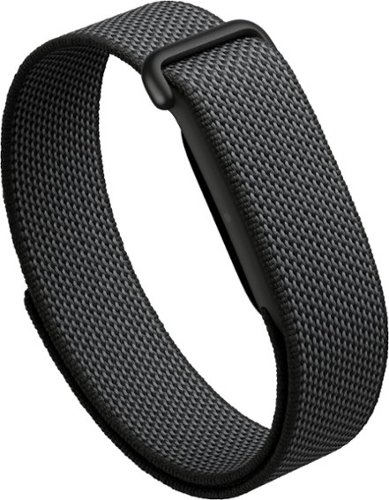
Meet the invisible power of effortless tracking. The new Google Fitbit Air is the unbelievably comfortable, exceptionally smart activity tracker designed to transform your health.~ The lightweight, micro-adjustable fit sits quietly and securely, so you can wear it through work, workouts, and sleep without noticing it. Google Health brings out your best with effortless tracking and personalized coaching that~s built with Gemini and made for you.~ And with up to a week~s worth of battery, it keeps up with your busy life.~
Customer Rating

5
Fitbit Air: A Welcome Return to the Basics
on June 8, 2026
Posted by: Jturn
The Google Fitbit Air is one of the more refreshing wearable trackers I've used in a while. Fitbit (owned by Google for quite some time now) has seemingly gone full circle back to the basics of what made their original Fitbit tracker such a hit while pulling in over a decade of fitness tracking enhancements to make the Air fit into the modern market of wearable fitness trackers. With a streamlined design, extraordinary battery life, and a reasonable price point that doesn't lock you into a perpetual subscription for the basics, this is a strong option for anyone looking for a dedicated fitness tracker without all the noise that comes with a full-featured smartwatch.
Comfort is the first thing I noticed. The included fabric "Performance Loop" band took a day or two to get acclimated to, but at this point it has completely disappeared on my wrist. I genuinely forget that I'm wearing it, which is exactly what I want out of a 24/7 tracker. The unobtrusive style fits in with a wide range of clothing styles, blending in whether I'm at a work event or out for a jog. Google has also released guidelines for making your own bands, which speaks to their investment in the idea of this being a lifestyle piece that adapts to anyone's individual needs. As someone who owned the first Fitbit wrist wearable back in the day, this device feels like it brings the ecosystem full circle. That original wearable was a slim, no screen step tracker, and the Air is very reminiscent of that ethos: minimalist, focused on the data, and completely out of your way.
Battery life for the Fitbit Air is another strong selling point in an era of watches that require near daily charge routines. With those styles of watches, I've always felt like I was sacrificing persistent tracking in the interest of adding features which I didn't necessarily need or want. With the Fitbit Air, I've charged it just one time in the week and a half that I've owned it, and charging has become a complete afterthought. This is exactly the experience I've always wanted out of a full fitness tracker of this type.
On the topic of pricing, the Air comes in at $99 with no mandatory subscription, which is a refreshing change of pace compared to the other options in the market. More importantly yet, the vast majority of the device's tracking functionality is available for free with only a Google account. That includes the important core metrics like HRV, SpO2, resting heart rate, and breathing rate, as well as activity tracking, manual workout logging, smart wake alarms, and most importantly for me, full sleep tracking with sleep stages and a daily sleep score. I've found the sleep tracking to be incredibly useful (as someone who has struggled with sleep the past couple of years) for understanding how my sleep routine impacts my recovery, and the fact that it doesn't require a premium subscription is a huge win. Where Google Health Premium comes into play ($9.99/month or $99/year) is on the AI side of things. The premium tier unlocks the Google Health Coach, which delivers personalized daily summaries of your activity and the previous night's sleep, giving you a more comprehensive and easy to understand summary of where your body is at for the coming day. It also adds adaptive fitness plans, proactive insights, and access to workouts and mindfulness libraries. The subscription is somewhat costly, but those features do add a lot of value if you're the type of person who wants guided coaching layered on top of the raw data.
With all the positives, my only real gripe here is with the complete lack of any on band information display. While the understated, streamlined design is undoubtedly a positive for me, I do wish they'd added some measure of at-a-glance information here; either a row of LEDs akin to the original Fitbit to indicate step count progress, or even a battery-efficient display to show the time on demand with a double tap. Either of these would be a great compromise to maintain the essence of the design while adding tangible functionality that wouldn't substantially impact the battery life.
Overall, I'm very happy with the Fitbit Air. It nails the fundamentals: comfort, battery life, and a clean design that stays out of your way, all at a reasonable price point that doesn't hide the core experience behind an expensive perpetual subscription. If you're looking for a no fuss, set it and forget it fitness tracker that just does its job in the background, this is a strong option that deserves your consideration.
I would recommend this to a friend!


Share this review:


0points
0of 0voted this as helpful.
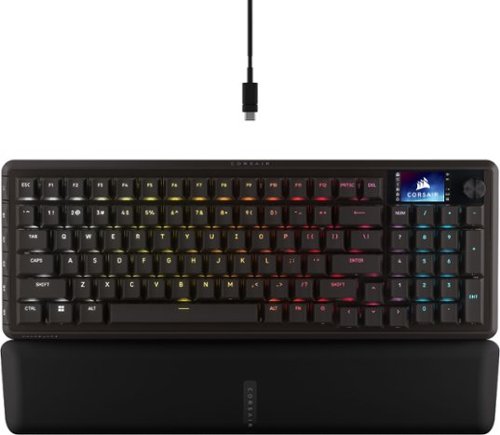
CORSAIR~s VANGUARD 96 WIRELESS shrinks a full keyboard with arrow keys, a tenkey pad, an LCD screen, rotary dial, and 6 programmable G-keys into a super-compact frame. Featuring wobble-free pre-lubricated CORSAIR MLX switches, it~s also hotswappable, supporting compatible 3-pin and 5-pin switches. The stunning LCD screen takes personalization to the next level with animations, stats, and game integration support. Quad-layer sound dampening provides satisfying keypress acoustics, and 8,000Hz wireless hyper-polling delivers lightning-fast inputs via SLIPSTREAM WIRELESS. VANGUARD 96 also features Elgato Virtual Stream Deck integration, FlashTap SOCD handling, and easy customization via our web-based utility, CORSAIR Web Hub.
Customer Rating
5
Incredibly Versatile Yet Compact
on April 24, 2026
Posted by: Jturn
The Corsair Vanguard 96 keyboard is one of the more versatile keyboards I've used, combining a 96% layout (which actually feels more compact than the number would suggest) with a great number of extra features that would usually expand the footprint of the keyboard. With premium switches, an onboard screen, and solid software running the show, this is a strong option for gamers and productivity focused users alike.
Upon hooking up the keyboard, I immediately noticed the switches. On board are the Corsair MLX mechanical switches, which have a solid tactile feel while being very quiet thanks to the sound dampening in the frame. As a developer daily driving this keyboard for work, this is an incredibly comfortable keyboard to type on (also owing to the included, very high quality soft-touch magnetically attached wrist rest) and doesn't come with the concern of noise on calls that others I've had do. This setup also affords a large amount of flexibility as well, given the switches are hot-swappable with other 3 and 5 pin switches. This feature is a differentiator; it means you have the flexibility of having Corsair's great software support in concert with whatever switch you deem your favorite down the line. On the topic of software, it seems Corsair is making a shift away from the bloated app installation and has transitioned to a web based version of iCUE. I'm not entirely sure how I feel about this yet; I love the fact that it's one less app running on your gaming PC stealing your frames, but being web based has its own set of trade offs. Time will tell if this is the path forward for Corsair's line of products but I like that they're making an attempt at a better user experience.
Beyond the switches, other controls on this board include the volume/control dial next to the LCD screen, which allows for some decent on the fly customizations. Nestled in on the left side of the keyboard are the six programmable G-Keys. These keys unlock the true versatility of this board and amazingly, they've been added in a way that doesn't add to the footprint of the keyboard. These can be configured in a number of ways and function very similar to other accessories like a Stream Deck. I've bound a couple of these to specific gaming functions in Call of Duty (for instance, I relocated my map hot key to one of these). The possibilities are nearly endless here, and again, the fact that they've integrated these into the frame is an amazing use of space and design techniques.
Connectivity is another strong suit of the Vanguard 96 Wireless. For this, you have three options that cover all the bases: direct wire via a detachable USB-C connection, wireless via the included dongle, or Bluetooth. Like the rest of the keyboard, this wealth of connection options unlocks a lot of versatility, allowing you to quickly swap between a gaming PC, your work laptop, and your phone. Of note here, the advertised 8kHz polling rate (which likely means something to competitive gamers) is available in both wired and wireless dongle connections. Predictably, it's not available via Bluetooth connection. If you decide to use the keyboard in wireless mode, you'll get over 100 hours of battery life (according to Corsair, and confirmed in my personal usage). In a practical sense, this has meant I go weeks between charges, which is a very substantial amount of time in my book.
My experience with the keyboard has been very positive, but there are a couple of downsides to mention here. First, while the build quality feels top notch in most of the package, the main board/chassis is made of plastic. This is a bit baffling, as every other board I've used in this range employs some version of metal (mostly aluminum) to provide an incredibly solid base. Given the wealth of features here, I can overlook that design decision, but it's worth noting nonetheless. Next, as mentioned earlier, the 8kHz polling rate is not available in Bluetooth connection mode. This again shouldn't be a surprise, but it's also worth noting. Finally, the layout here may not be for everyone. For me, this is a great layout that sacrifices zero buttons for a smaller footprint. However, I'll acknowledge that some of the non-primary keys (arrow keys, right shift, Home/Pg Up/Pg Down/End, etc) have been either relocated, crowded, or shrunk to accommodate the smaller footprint. Again, for me, the trade off is worth it, but there are times when using the arrow keys requires just an extra moment to look down to ensure I'm hitting the right keys.
Overall, this is a great keyboard. It packs quality switches with a versatile layout and flexible connectivity options. If you can deal with the smaller form factor, this is a strong keyboard that deserves your consideration.
I would recommend this to a friend!

Share this review:


+1point
1of 1voted this as helpful.
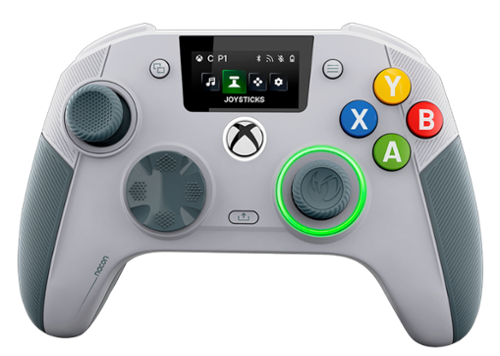
The REVOLUTION X UNLIMITED wireless controller by NACON, officially licensed for Xbox, is compatible with Xbox One, Xbox Series S, Xbox Series X, Windows PC, and Android. Precise, high-performance, and customizable, it will allow you to stay in control of your game, whatever your playing style. Ergonomic and wireless, it frees your movements and offers you total gaming comfort. Eliminate your opponents thanks to increased responsiveness and formidable precision. Chain victories in your favorite battle royale or FPS/TPS shooter, thanks to an arsenal of fully customizable features and settings, even in the middle of the game, via the integrated control screen. Discover the ultra-high-performance PC mode with very low latency, with a gyroscopic aiming function to stay one step ahead. Designed by and for competitive players, and adapting to all your video games, the REVOLUTION X UNLIMITED will allow you to dominate the competition!
Customer Rating

4
Ultimate Customizability
on April 17, 2026
Posted by: Jturn
The Nacon Revolution X Unlimited is one of the more customizable controllers I've used featuring a ton of configuration options to meet any usage scenario. With upscale features and a wealth of connectivity abilities, this is a great choice for those looking for a new controller, provided you'll be gaming on an Xbox, PC or Android device.
The endless features of this controller are the star of the show here. You have Hall effect thumbsticks with magnetic sensors to basically eliminate stick drift. The sticks feel amazing with the perfect amount of resistance that makes long gaming sessions comfortable throughout. The controller also has mechanical and clicky sounding OMRON switches for the d-pad and the ABXY buttons. This is said to offer faster actuation with these buttons, which is always a positive when gaming. Around back, you also have four customizable buttons. The two lowest are in a spot that took some getting used to for me; I found myself accidentally pressing them with my fingers until I adjusted my grip style to accommodate the extra buttons. In terms of the triggers, you can leave them as full throw or you can activate the locks to allow for faster activation. I've found a number of scenarios while gaming where having the trigger locks available was a hand saver (Death Stranding, as an example where you routinely have to hold down the triggers for various functions). Overall, the quality of buttons is top notch and performance is top tier.
Beyond the buttons, the Revolution X Unlimited boasts a number of other great features. Connectivity wise, you can use the included wireless dongle, you can connect it via Bluetooth, or you can connect it via the included USB C cable. This gives you a lot of options and freedom, allowing you to swap between devices virtually seamlessly (say between your PC and Xbox or via Bluetooth to an Android phone). Additionally, it has a large screen which serves well for changing options, including audio settings, button mappings, and wireless connections. Finally, the controller comes with a fantastic storage case, which I find to be a great extra touch as someone who tends to travel and game on the road a lot.
With all the positives, there are a couple of negatives. Namely, this controller is not an option for you if you game on a Playstation system or an iOS device. For whatever reason, they've decided not to include support for those two platforms which may be a deal breaker for some. Also, the size of this controller took some getting used to. It is quite bulky, even compared to the standard Xbox controller, so for some with smaller hands, you may want to try before you buy.
Overall, this is a great controller. It has a ton of premium features that help justify the price for those looking for an upscale controller to level up their gaming experience. If you can handle the price and the connectivity limitations aren't an issue, this is a strong contender.
I would recommend this to a friend!
Share this review:


-1point
0of 1voted this as helpful.
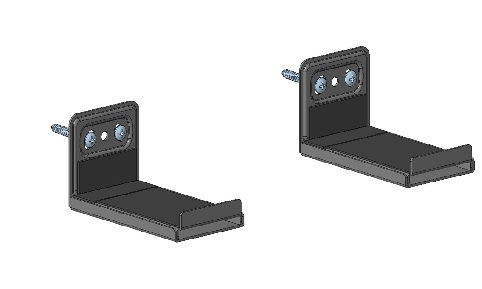
Must own a soundbar and be willing to mount it to their wall in a fixed position. The soundbar mount has adjustable depth for compatibility with most soundbars. Sleek design blends well with most environments.
About This Item
It’s just a wall mount—until it saves you space and elevates your soundbar audio. The Insignia Fixed Soundbar Wall Mount for Most 22 lb. Soundbars has a steel construction that delivers a sleek appearance with a low-profile design. Holding up to 22 lbs., this wall mount can also be adjusted from 4.1 to 6.3 in. deep for wide compatibility. And it’s backed by Best Buy, so we’ve provided everything you need for an effortless installation, ensuring your soundbar will be safe and secure on the wall. Let us help give your living space a modern look with the support and materials you can trust.
Features
• Wall-mounted design
Securely attaches your soundbar to the wall.
• 22 lb. max capacity
Works with most soundbars weighing up to 22 lbs.
• Sturdy steel construction
Delivers years of dependable use.
• Adjustable brackets
Adjusts from 4.13–6.3 in. deep to hold soundbars of different sizes.
• Simple installation
Comes with everything you need, which includes adjustable brackets (2), a hardware kit and a User Guide.
• Backed by Best Buy
For quality and reliability that you can trust.
Posted by: Jturn
The Insignia Fixed Soundbar Mount system is a simple and effective way to elevate your soundbar. This offers the benefit of not relying on an existing TV wall mounting system, opening up range of flexible placement options you may not otherwise get.
The kit feels high quality, a mix of steel and rubber (which serves to provide a grippy surface for the soundbar). Max weight from the manufacturer is said to be 22 lbs, though I suspect that's on the low side of what this could support. Mounting to the wall is simple, achieved either by mount to a stud directly or using the included drywall anchors. For me, I had easy access to a stud so the decision was easy. The only complaint here is that they should've had two vertically aligned holes in the center to make stud mounting easier.
Aside from the free floating design of this mount, the best feature by far is the width adjustment, allowing this mounting system to accommodate a vast array of all types of soundbars, regardless of depth. This is achieved via a set screw that you can tighten on the bottom to set the depth. It's a simple design but well considered and much appreciated.
Overall, not much more to say about this. It works well, does exactly what it's designed to, and is a great option for those looking for a free floating mounting system for their soundbar.
I would recommend this to a friend!
Share this review:


0points
0of 0voted this as helpful.
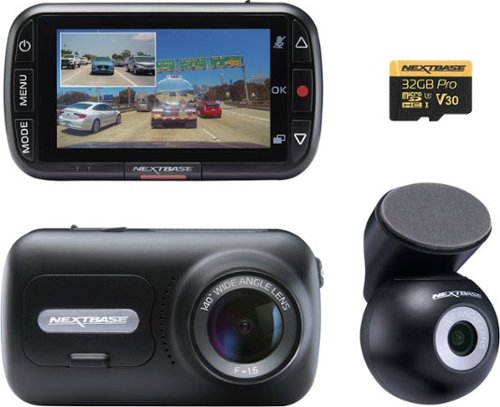
Drive with confidence using the Nextbase 320XR Dash Cam Bundle, a complete front and rear camera solution that captures everything happening on the road~whether you're driving, parked, or navigating busy streets. This easy-to-use system records in crisp 1080p Full HD, giving you reliable protection from every angle. The front camera captures wide-angle footage of the road ahead, while the included Rear Window Camera monitors what's happening behind your vehicle. It~s perfect for catching tailgaters, rear-end impacts, or knocks in parking lots. The rear camera attaches neatly to your rear window using an adhesive mount and connects to the front dash cam with a long cable~ideal for both cars and SUVs. The 320XR comes with a 32GB microSD card pre-installed, allowing you to record up to 3 hours and 20 minutes of front and rear footage before older files are automatically overwritten. No extra accessories are needed~just install and start driving. When parked, Intelligent Parking Mode automatically records if motion or impact is detected near your vehicle. For continuous protection while parked, a Hardwire Kit is recommended. With a clear 2.5-inch display and simple on-screen controls, it's easy to view and manage your footage directly on the dash cam. The Click & Go PRO mount uses a magnetic connection for secure placement and quick removal. You can also view and save clips on your PC or Mac at home. The 320XR doesn~t require an app or Bluetooth~just straightforward, dependable protection for your vehicle, front and rear.
Customer Rating
4
A Great No Frills Dual Camera Dashcam
on January 2, 2026
Posted by: Jturn
The Next base 320xr offers a stripped back, no frills feature set at a competitive price point that makes it an attractive two camera solution for those that don't need the extras.
The mounting system for this dashcam is great. The base attaches to your car using adhesive and the camera attaches to the base via a magnetic connection for both the front and back cameras. This means that it's very quick and easy to remove the camera which is a huge positive. I wish all car mounted accessories used this type of magnetic system because it's really that good. I do wish they'd have transitioned to a USB-C based power connection (this does have a USB-C input for the rear camera, but the power port is the ancient USB mini style connector). My vehicle is not equipped with any 12v outlets (which has been a very annoying situation to deal with in general) so I've had to come up with an adapter setup that allows me to use this camera. What my vehicle has in abundance is USB-C ports, so if this had as USB-C port for main power, my install would've been much simpler.
Picture quality on the recordings is decent. Both front and rear cams record in 1080p which is ok, but the resulting footage isn't always the clearest. In particular, I've noticed that in suboptimal lighting, license plates are not always legible which is problematic in situations such as hit and runs where you wouldn't have time to jot the plate down. Similarly, night footage can be very grainy, losing finer details compared to cameras with larger sensors with greater resolution.
While being a fairly basic camera, one feature that I think deserves discussion is the parking mode on the 320xr. When enabled if the camera senses an impact or movement it will take a 30 second video clip. Anyone that's come out of a store to see their vehicle has been hit with no one in sight knows that this is a VERY good feature to have. Given the camera has an onboard battery, you can even use this feature without having the cam wired to an always on power source.
This camera bundle is a great option for those looking to get a basic, reliable camera to protect yourself while on the road. Having coverage in both the front and back means you'll have video evidence if someone hits you, and enabling parking mode means you'll have that evidence even while you're not driving your vehicle. If you can live with modest video quality, the 320xr is worthy of your consideration, especially at this price point.
I would recommend this to a friend!
Share this review:


0points
0of 0voted this as helpful.
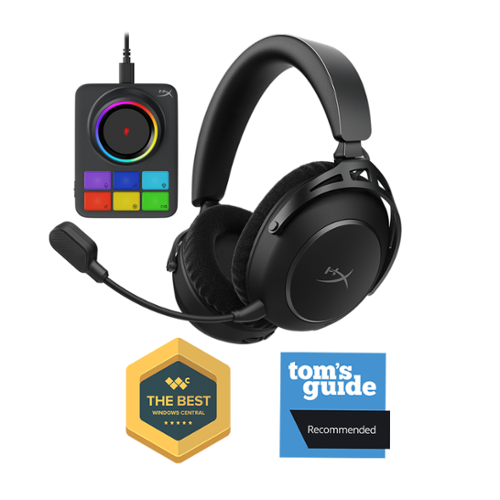
Stay immersed, hear and control every detail, and maximize your performance with the HyperX Cloud Alpha 2 Wireless. Designed to never take you out of your game with industry-leading 250 hours~ of battery life, meaning fewer interruptions and more playtime, the longest battery life on a simultaneous dual wireless gaming headset~. The multi-layer 53mm dual-chamber drivers provide immersive, high-fidelity sound with deep bass and crisp highs, ensuring you never miss a single in-game cue. The customizable RGB base station acts as your command center, letting you fine-tune your audio settings, adjust volume, and switch between devices seamlessly. This is the first reprogrammable RGB Base Station on a wireless gaming headset~. Whether gaming, streaming, or multitasking across devices, the HyperX Cloud Alpha 2 Wireless delivers superior performance, comfort, and innovative control to keep you ahead of the competition.
Customer Rating

2
Great Feature Set Held Back by a Subpar App
on December 26, 2025
Posted by: Jturn
That Cloud Alpha 2 headset has the makings of a great headset, with features that rival more expensive headsets. Unfortunately, the Windows app makes it a frustrating experience that has me reaching for other headsets over this one.
Features and confirm wise, the Cloud Alpha 2 headset is very good. In particular, the control unit is amazing. Being able to very quickly tweak the levels is something that I've always wanted to be about to do, and this control unit makes that a reality. The fact that the headset also supports two volume levels (one for chat, one for game) is also a phenomenal feature. Anyone that plays games with their friends and struggles with either hearing chat consistently or hearing the game can understand just how amazing this feature is, and being able to change the levels on the fly is awesome. Beyond the feature set, the headset is also very comfortable. Even after multiple hours long gaming sessions I didn't notice any discomfort with this headset. And it sounds great while doing it, too. Sound quality here is equally good and makes not only gaming but content consumption an enjoyable experience.
All the positive aside, the app is ultimately what kills it for me with this headset. To start, I was unable to get it to update the firmware. I tried multiple times, multiple ways and never ended up getting past the control unit update phase that would timeout with an "update failed" error. The control software on the version I have frankly doesn't work that well either. The level sliders aren't responsive with the headset, and setting routinely seen out of sync. I could assume most of these app issues would be resolved with a firmware update, but without a wait to actually do it, I can't know for sure.
One other issue with the Cloud Alpha 2 is that the mic quality isn't very good. In contrast to the sound quality of the speakers, the mic sounds very low fidelity which is a disappointment. Coming from the Bose Gaming Headset, which conversely has an immensely high quality microphone, it was immediately obvious to me and my gaming partners that the Cloud Alpha 2 was a major downgrade. This has been the case for a lot of headsets, and I was hopeful this one would hold a candle in terms of mic quality but it unfortunately does not.
Overall, I've been sadly disappointed with my experience with the Cloud Alpha 2s. Great sound quality, a comfortable fit, and a stellar control unit are all tainted by an app that doesn't work and a mic that isn't very hi fidelity. I wanted to like these but I'll ultimately be reaching for something else on my next gaming session
No, I would not recommend this to a friend.
Share this review:


0points
0of 0voted this as helpful.
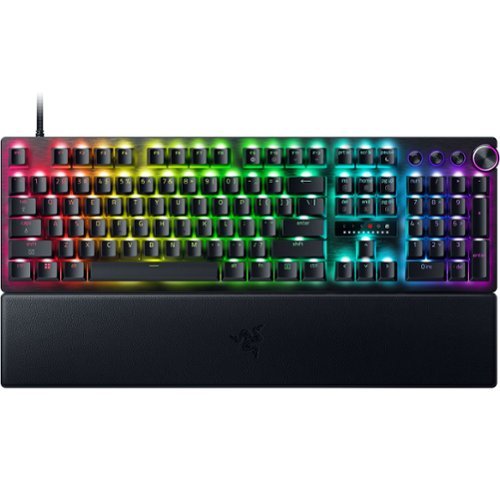
Blitz through the competition with our fastest, most responsive analog optical keyboard~designed with and made for pros. Supercharged with 8000 Hz HyperPolling, Razer~ Snap Tap, Rapid Trigger Mode, and adjustable actuation, play like the world~s best with hardware that meets their highest demands.
Customer Rating
4
Top Notch Gaming Performance
on December 11, 2025
Posted by: Jturn
The Huntsman v3 Pro keyboard is one of the better performing mass produced keyboards on the market. It offers a strong spec sheet marrying gaming performance with customizability, presenting a strong product that's really only missing a full fledged display.
Having owned well over a dozen keyboards in the past 10 years, I can confidently say that this one is one of the better performing boards on the market. The obvious banner feature here is the ability to throttle up to an 8khz polling rate. Anyone that competitively games will understand how this feature is useful. Beyond this, however, the keyboard offers analog optical switches that have a bunch of very significant benefits (that could merit their own review). Firstly, the keys have adjustable actuation point configuration, meaning you can not only set actuation point per key (for example, if you want your WASD keys to be more input sensitive than the other keys), but also set up actuation profiles. This is a hugely beneficial feature for anyone that not only games, but also conducts business with the keyboard; you can set a hyper fast actuation for gaming while setting a less touchy actuation configuration for typing. Next, the keys have "Rapid Trigger Mode", which effectively means that you can trigger the key input without having to full release the key. This was a feature I didn't realize I wanted, but as soon as I started using it in FPS games, it was immediately obvious what a beneficial feature this is. Finally, the keyboard also features "Razer Snap Tap" which allows you to actuate a second key without releasing the current key. Both of these two features provide an insanely responsive experience while gaming that I've not had previously. Coming from a Steel Series Apex Pro, this surprisingly felt like an upgrade which I was unsure of before using the Razer.
You can customize more than just the keystrokes; being 2025, there's an obvious inclusion of LED lighting on this board. From what I've seen, the options for customization are quite extensive, allowing micro adjustments to fit your needs along with different themes/functions. I personally don't fully utilize LED lighting since I find busy lighting distracting, but thankfully I can set a theme to my liking as well. Overall, the LED implementation with this board is solid.
There are couple of things I'd like to see improvement on. The omission of a true display on the board (in line with my previously Steel Series Apex board) would be very valuable while trying to change settings on this board. While the app can be used, it's nice to be able to change things on the fly without digging through the app. A series of keybinds helps this a bit, allowing for setting changes, but the process is complicated enough that they included a spec sheet showing the keybinds. Additionally, the media buttons on the top leave something to be desired. The volume scroll is not very ergonomic (especially compared again to the Steel Series Apex Pro), and the 3 additional buttons (which could've doubled as scroll wheels as well) are unintuitive as to what they're controlling. Again, I realize the app helps with this, but some more thought should be put into this small section of the keyboard for the next iteration. It'd also be nice to see an included accessory USB port given that this is a USB-C board that could easily integrate one, but the market trend seems to be going away from this so it's not unexpected. The last thing I'll mention is that while the keyboard including a wrist rest is a huge positive, I wish it was more padded. That's a subjective gripe on my part but I prefer padded wrist rests for long gaming and typing sessions.
Overall, this is a great keyboard. It has a few things that I personally find to be shortcomings that may not be an issue for others. But it's completely undeniable that Razer has absolutely nailed the. performance aspect of this board. Even the most demanding of gamers will be satisfied with how responsive and customizable the Huntsman V3 Pro is.
I would recommend this to a friend!




Share this review:


+1point
1of 1voted this as helpful.
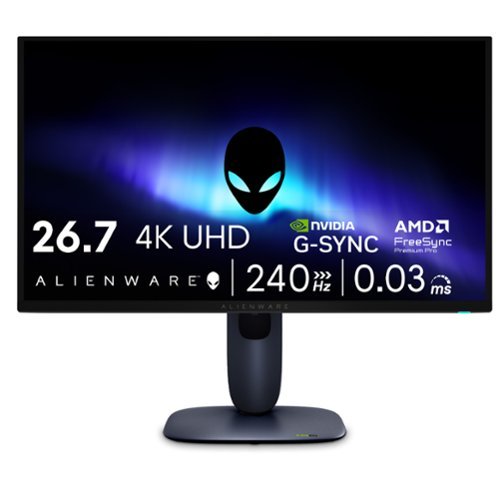
Meet our first 27" 4K QD-OLED Gaming Monitor. Experience ultimate visual fidelity and peak QD-OLED performance in a sleek 27" panel. Immerse yourself in new worlds with the world's highest pixel density in a QD-OLED monitor at 166 PPI* with 4K resolution, incredible color accuracy and Dolby Vision HDR.
Customer Rating
5
OLED Quality With Alienware Performance
on November 14, 2025
Posted by: Jturn
The Alienware AW2725Q is a brilliant display, with all the benefits of an OLED panel combined with ultra high refresh rates you'd expect out of an Alienware display. I've replaced a 27" 1440p 144hz LCD panel and the upgrade has been nothing short of monumental. I only wish this panel had a few additional features to protect panel health.
Gaming performance and picture quality on this panel are absolutely top notch. In recent years, people looking for a gaming panel were usually torn between a lower refresh rate 4k panel and a higher refresh rate 1080p or 1440p panel. This panel gives you the best of both worlds (assuming your PC can push the kinds of frame rates that make this beneficial, but that's another matter). Games look absolutely phenomenal on this screen, as one would totally expect from a QD-OLED panel, with insanely rich colors and infinite blacks that make the content sparkle in HDR. The PPI bump here over 1440p is substantial (166 vs 109), leading to significantly sharper graphics. This is actually most notable on text; besides gaming, I also use mine as an extended monitor for my development setup, and compared to the 1440p monitor this replaced, the jump to 4k makes text look significantly sharper, which helps with eye strain over the course of the work day. Overall, given the tuning out of the box and the sheer quality of this panel, I have zero complaints about this monitor's picture quality.
Ports on this monitor are what I'd call adequate. You have two HDMI ports, one of which supports FRL with eARC (giving you Dolby ATMOS passthrough for those looking to utilize this as more than just a gaming display), along with a DisplayPort 1.4 port. All three ports support 4k240hz display input, which is a huge positive for anyone looking to use this for multiple PCs or input devices. In addition to the display inputs, this monitor also includes three 5gbps USB A ports, along with a 5gbs USB C port, allowing you to use this as a USB hub (via the 5gbps USB B upstream port). Overall, this monitor has enough for my needs and I'm glad to see they didn't skimp on high speed HDMI/DP ports.
The only thing I'd like to see added to this monitor is a group of settings for panel care. Samsung OLED monitors, as an example, have a number of different settings to help ensure your panel lasts a while through various dimming techniques, pixel shifting, and other settings. This monitor has a setting or two in the maintenance menu for pixel refreshing, which is good to have, but other, more proactive settings would be beneficial to help ensure users won't be dealing with burn in any earlier than necessary.
The AW2725Q is a phenomenal monitor. It gives you an insanely high PPI at an insanely high refresh rate, making it a stellar choice for anyone who's looking to game in 4k. It's also great as a productivity monitor, providing accurate colors and deep blacks. My only concern is long term panel health. Overall, I highly recommend this monitor.
I would recommend this to a friend!
Share this review:


0points
0of 0voted this as helpful.
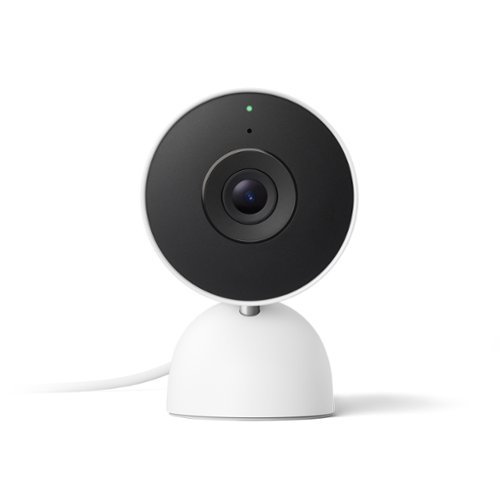
Meet the smarter, sharper wired Nest Cam Indoor with 2K video and Gemini. Get more peace of mind about the things that matter with the intelligence of Google Home. It provides more details, summarizes what happened, and lets you search video history simply by asking for something.~,~,~
Customer Rating
4
Incremental Upgrades with AI Smarts
on October 30, 2025
Posted by: Jturn
The latest update to the series of Nest Cams promises incremental upgrades with the inclusion of AI smarts. As an owner of both 1st and 2nd generation indoor nest cams, I was interested to see how this newest 3rd generation stacks up. In short, if you're coming from a 2nd gen cam, I don't feel like there's enough here to warrant the upgrade. If you're coming from the 1st gen, the decision is a little more clear; this camera offers enough upgrades that it's probably worth consideration.
Physically, this version looks nearly identical to the 2nd gen; the mounting plate appears identical, as does the overall design, allowing you to either mount this on a wall or just place it on a flat surface. Similarly, picture quality overall appears very similar as well with the exception of what appears to be a wider field of view on the new version, which could be good or bad depending on your usage. The newest version does get a bump to 2k over 1080p, which gives it a slight bump in sharpness, but in practice, this isn’t a huge leap forward. The bump from the first generation feels more substantial, however, as you get not only the resolution bump but also the inclusion of HDR (which the 2nd generation also had). Overall, the picture quality here is very good and works well day and night.
One of the biggest features being advertised here is the inclusion of Gemini integration. At current time, I haven’t had much of a use for these features yet. This should give users the ability to search timelines using natural language, as well as giving more logical event descriptions. It’s not clear, however, what Gemini features specifically will be exclusive, if any, to the gen 3 that won’t be available via the Home app with gen 2 or gen 1 cameras. Thus far, it seems like a bit of a gimmick that will likely grow in usefulness over subsequent updates.
The elephant in the room with all Nest Cam products is the fact that in order to unlock full functionality, you need a subscription. While this isn’t unique to Nest cams on the surface, what makes this more of an issue here is the fact that there’s no ability to have localized storage as your primary source of storing footage. What this means in practice is that, without the subscription, you get 3 hours of “events” playback, which gives you the bare minimum of footage to look back on. Other products on the market have the option to store footage using onboard storage, allowing much more flexibility in how you use your camera. This subscription issue gets extended further with the 3rd gen Nest cam, as one of the banner features this year is the deeper integration of AI/Gemini. This, predictably, requires a subscription to fully utilize.
One final downside I’ll note here is the fact that the power cable is hardwired into the camera (which again, is in line with the 2nd gen camera). This is an issue for 2 reasons. First, if the included 10ft cable isn’t long enough, you’ll need to figure out an extension cord instead of simply buying a longer cable instead. Second, if the cord gets damaged, you’re basically out of luck with the camera. I wish they’d go back to a removable USB cable as they had with the first generation camera.
Overall, the 3rd gen Nest Cam is one of the better cameras on the market, especially if you’re already in the Nest ecosystem. While the lack of true onboard storage means you’ll be tethered to a pricey subscription if you want full video history, the upside is that a single Nest subscription gives you access for all devices you may own.
I would recommend this to a friend!
Share this review:


0points
0of 0voted this as helpful.
Jturn's Review Comments
Jturn has not submitted comments on any reviews.
Jturn's Questions
Jturn has not submitted any questions.
Jturn's Answers

Performance meets versatility. From intensive video and graphics files to high-octane gaming, the most powerful Surface laptop yet combines speed, graphics, and long battery life with the versatility of a laptop, tablet, and portable studio. Tackle your biggest demands with quadcore powered 10th Gen Intel~ Core~ processors, blazing NVIDIA~ graphics, and high-resolution PixelSense~ Display designed for Surface Pen* and touch.
Is there an HDMI port?
Performance meets versatility. From intensive video and graphics files to high-octane gaming, the most powerful Surface laptop yet combines speed, graphics, and long battery life with the versatility of a laptop, tablet, and portable studio. Tackle your biggest demands with quadcore powered 10th Gen Intel~ Core~ processors, blazing NVIDIA~ graphics, and high-resolution PixelSense~ Display designed for Surface Pen* and touch.
Are there additional memory slots to increase RAM on the 15inch 16gb ram 256Gb storage, model?
No, there is no ability to upgrade the RAM or the hard drive on any of the Surface Books. What you buy is what you'll be stuck with.
5 years, 11 months ago
by
Jturn

Completely customize your Wi-Fi Smart Color Thermostat to match your lifestyle and decor. The ENERGY STAR~ certified smart thermostat lets you choose the temperature, schedule, display color and the devices you use to control it all.
Want to replace RTH230B with RTH9580WiFi. Wires connected:G, Y, W has(black wire), R(red wire), Rh(red wire). Also I see a white wire that is not connected to current rth230. How do I know which wire is used for the "c" terminal for the new rth9580WiFi?

Since they're not labeled at the thermostat terminal, you'll need to check at your furnace to see what's connected where. Having the extra wire is great, since you should be able to use that for your common.
8 years, 5 months ago
by
Jturn
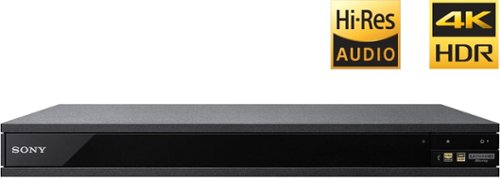
Experience immersive entertainment options with this Sony 4K Blu-ray player. Its Ultra HD resolution provides exceptionally detailed screen images with increased brightness and more realistic color, and its support of Dolby Atmos and DTS:X provides cinema-quality sound. This Sony 4K Blu-ray player supports high-resolution audio formats for more accurate music reproduction.
Does the on-screen display provide information on the video and audio bitrates? Does the display provide data on the audio output?
Yes. The Display button displays bit rate and format information for both audio and video.
9 years, 1 month ago
by
Jturn
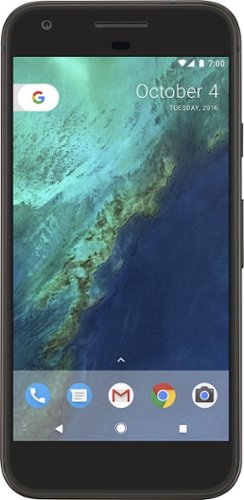
Bring the power of Google directly to your fingertips with the Google Pixel. A large 32GB of storage keep data secure, while unlimited cloud storage transfers data as needed, and it's completely automatic. The large 5-inch screen is protected by Corning Gorilla Glass 4 to ensure the Google Pixel remains scratch-free.
so i wanna get the pixel but with out getting a verizon contract how would i do so?
Your best option is probably to buy the phone directly from Google. The phone will come unlocked and will work as advertised with VZW and Project FI (meaning it should work well with Sprint and TMo).
9 years, 7 months ago
by
Jturn
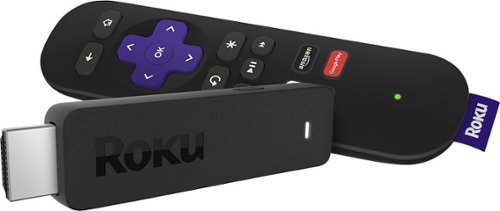
Enjoy HD programming with the Roku Streaming Stick. Plug it into any flat-screen television that has a built-in USB port to view streaming media. This device provides more than 4500 channels on demand and features more than 450,000 movies and TV episodes. Control the Roku Streaming Stick with the included remote or with your smartphone via the Roku Mobile App.
How can you connect the Roku to my theater Amplifier 5.1 sound system?
If your amplifier has an HDMI input, you'll need to plug the stick directly into the amplifier vs. plugging into your TV. The stick doesn't have any external audio outputs.
10 years ago
by
Jturn
Enjoy HD programming with the Roku Streaming Stick. Plug it into any flat-screen television that has a built-in USB port to view streaming media. This device provides more than 4500 channels on demand and features more than 450,000 movies and TV episodes. Control the Roku Streaming Stick with the included remote or with your smartphone via the Roku Mobile App.
The display shows it plugged into two places on the back of the tv. One is obviously the hdmi port, what is the other end plugged into?
Enjoy HD programming with the Roku Streaming Stick. Plug it into any flat-screen television that has a built-in USB port to view streaming media. This device provides more than 4500 channels on demand and features more than 450,000 movies and TV episodes. Control the Roku Streaming Stick with the included remote or with your smartphone via the Roku Mobile App.
Does the stick had profiles for different Netflix users?
Yes. It has the latest Netflix interface, meaning it has full support for profiles (unlike some of the older Roku devices).
10 years ago
by
Jturn
Enjoy HD programming with the Roku Streaming Stick. Plug it into any flat-screen television that has a built-in USB port to view streaming media. This device provides more than 4500 channels on demand and features more than 450,000 movies and TV episodes. Control the Roku Streaming Stick with the included remote or with your smartphone via the Roku Mobile App.
can I download google play store and down load free games like I have on my cell phone?
No. This device does not run Android. If you want the ability to side load apps, you'll need to look at either a Fire device or one of the hundreds of Android based streaming boxes available.
10 years ago
by
Jturn