


Jturn's stats
- Review count180
- Helpfulness votes202
- First reviewNovember 22, 2014
- Last reviewJune 11, 2026
- Featured reviews0
- Average rating4.1
Reviews comments
- Review comment count0
- Helpfulness votes0
- First review commentNone
- Last review commentNone
- Featured review comments0
Questions
- Question count0
- Helpfulness votes0
- First questionNone
- Last questionNone
- Featured questions0
- Answer count9
- Helpfulness votes4
- First answerJune 3, 2016
- Last answerJuly 9, 2020
- Featured answers0
- Best answers1

Take your movie night to the next level by connecting with the Rocketfish RF-HG050AOC24 50' 4K UltraHD In-Wall Rated Fiber Optic HDMI Cable with HDR Support. Enjoy your movies, shows or games in 4K UltraHD resolution with up to 18Gbps of bandwidth. The fiber optic cable offers superior signal transmission across greater distances, which allows you to run 50 ft. of cable without a downgrade in quality. Featuring a PVC cable jacket, the HDMI cable is in-wall rated to run across the room or to another room in your home. Designed to plug and play, you~ll be ready to watch your favorite content in no time.
Customer Rating

5
A Good Option for Longer Runs
on December 10, 2024
Posted by: Jturn
This Rocketfish 50' fiber optic HDMI cable is a very good option for those looking for a cable to run longer without losing quality or introducing noise or latency. Being in-wall rated gives you the opportunity to hide this cable for maximum placement flexibility. In my case, I'm using this to connect a ceiling mounted projector to my home theater system. It's worked well without any issues and has eliminated some of the odd issues I'd been previously experiencing that were likely related to electrical interference. In general, my system doesn't require transmission abilities about the supported 4k@60hz bandwidth of this cable. If you need higher throughput, this cable may not work for you. That said, for me, I had zero handshake issues or format issues with my particular setup.
There are a couple caveats with this type of cable (not specific to this brand, all fiber optic based HDMI cables). First and foremost, the cable is directional so you have to make absolutely clear which direction you're installing this cable in. Additionally, you need to be more mindful of the angles with this type of cable; no right angle bends here. The bend radius can't exceed 8 inches, as per the guidance on the box, so if you need to run through some more extreme angles, this isn't the cable for you.
Overall, this is a solid cable if you need something to run behind walls over a long span. As long as you're mindful of the directionality and non-bending requirements of this cable, it will likely work great for you.
I would recommend this to a friend!
Share this review:


0points
0of 0voted this as helpful.

With the magic of AI and automation behind the scenes, it~s never been easier to fix flaws, fine-tune specific areas, and add motion to quickly bring your vision to life.
Customer Rating

3
Features, Now With a Subscription
on November 15, 2024
Posted by: Jturn
Adobe Photoshop Elements has long been the tool of choice for those looking to get into Adobe's industry standard ecosystem of editing tools without the need for the full suite of CS tools, and likely more importantly for many, without having to pay for the recurring subscription for those tools. While the latest iteration of PS Elements is functionally a great product, Adobe's decision to attach a subscription service to it will likely make it a non-starter for many.
The new features here are frankly very good. Notably, the AI assisted Remove Tool is accessible here, allowing you remove unwanted objects from images. I've long had access to a similar feature on my Google Pixel phone, and for the most part, Adobe's implementation works well. To be honest, it's downright easier to just use my phone when the scenario calls for it, but it's nice to have none the less. The other big feature here is the photo combine feature. This again is apparently AI assisted (and is also something that's been available on Pixel phones for a while) but it's been working pretty well for me. Juxtaposing a part of a photo onto another photo isn't something I do often, but it'll be nice to have the ability when I do need it.
Performance has been pretty solid for me. I'm running a Windows 10 computer with an AMD 5900x and an Nvidia 3080. Unlike some past iterations of this, I've not run into many performance hiccups, everything seeming to be pretty reliable. Your mileage may vary, as always, depending on your specific editing rig.
Overall, I personally can't get past the fact that they've attached a subscription model to Elements for 2025. The only bright side here is that you'll get 3 years of access, which isn't nothing, but honestly, I feel they've missed the mark on this by adding a subscription. It seems to be in line with Adobe's overall, vast strategy to keep people invested in their ecosystem, and frankly, I'm not on board given the plethora of alternatives on the market in late 2024 (paid and free alike, AI assisted or not).
No, I would not recommend this to a friend.
Share this review:


+1point
1of 1voted this as helpful.

Own the moment, online and offline, with an open ring design that~s comfortable for all-day wear. With convenient smart features, it~s easier than ever to access and enjoy your entertainment.
Customer Rating
3
Interesting Concept, Questionable Package
on October 30, 2024
Posted by: Jturn
The Sony LinkBuds Open wireless ear buds seem to exist in a fairly small section of the market. Whereas a lot of noise reducing headphones have implemented various microphone assisted methods for allowing ambient noise to pass through. The LinkBuds Open, on the other hand, trade the noise cancellation for being ambient-noise forward. It works as expected, but the execution leaves something to be desired in certain respects.
As with all earbuds that don't have form fitting tips that place the buds more deeply into the ear canal,
sound quality will ultimately come down to how well they fit in your ear and how well you can place them in your ear overall. For me, these tend to miss the mark; while I'm able to get them into my ear fine, the included ear "molding" simply isn't large enough for my ears and don't allow for a snug fit which lends to a number of issues. I find that I need to routinely reposition the buds every few minutes, and by extension, any form of physical activity with these is simply out of the question for me. As mentioned previously, this poor fit has a downstream impact on audio quality of these buds, which is generally pretty good if you can get the fitment correct, but which I have persistent issues with. While most ear buds these days come with a few fitment options, that's not the case with these, so I'm stuck with a pair of subpar fitting buds.
sound quality will ultimately come down to how well they fit in your ear and how well you can place them in your ear overall. For me, these tend to miss the mark; while I'm able to get them into my ear fine, the included ear "molding" simply isn't large enough for my ears and don't allow for a snug fit which lends to a number of issues. I find that I need to routinely reposition the buds every few minutes, and by extension, any form of physical activity with these is simply out of the question for me. As mentioned previously, this poor fit has a downstream impact on audio quality of these buds, which is generally pretty good if you can get the fitment correct, but which I have persistent issues with. While most ear buds these days come with a few fitment options, that's not the case with these, so I'm stuck with a pair of subpar fitting buds.
I really like the concept of these buds. They aim to solve a problem that exists in society today; people being completely removed from their surroundings at the expense of those around them and at times their own safety. My issues stem from the fact that they don't fit my ears correctly, and I feel it would've been prudent for Sony to include at least one other molding to help with this. If you have smaller ears and are looking for ear buds that don't completely remove you from your surroundings, these could be a great option.
No, I would not recommend this to a friend.
Share this review:


0points
0of 0voted this as helpful.

The Google Pixel Watch 3 is designed for performance.~ The cutting-edge Actua display is bigger, brighter, and ultra responsive.~ Beat your best times with advanced running features from Fitbit, then use all-new readiness and cardio load tracking to balance rest. And stay on top of your day with help from Google.
Customer Rating

4
A Very Solid Smartwatch
on October 4, 2024
Posted by: Jturn
The Pixel Watch 3 is a very good smartwatch, packed with a wide range of features that makes it a joy to use. The only real downfall here is that I wish I'd gone for the larger variant.
I've had a number of smartwatches over the years, primarily in the WearOS ecosystem. The Pixel Watch 3 is the first one that feels like a truly coherent and complete package. The UI is well thought out, and the crown dial is a phenomenally effective user interface that helps with traversing the various menus on the device. Performance, similarly, feels very good here; reasonable responsiveness and fluidity with not much in the way of lag. Overall, whatever they've done with seemingly limited horsepower has worked, as everything works very well here.
Included with the Pixel Watch 3 is a plethora of health features powered by Fitbit. The Fitbit app provides a cohesive and centralized location for all the watch's various health tracking statistics, from sleep quality to physical readiness and workout results. After wearing the watch for a few nights, a couple of additional heatlh statistics were unlocked; namely, recovery and readiness metrics. To be honest, I'm not sure exactly what goes into these, or how Google/Fitbit calculates them, but they give some easy to understand information on how your body is doing and whether you're primed for a workout or not. Additionally, the app provides a number of sleep related metrics; sleep quality, heart rate, blood oxygen levels, and skin temp. These stats all give me a comprehensive look into how well I'm sleeping at night to degree I haven't previously had. Finally, the built in ECG function deserves a mention here, as well. By initiating the ECG app and touching an opposing finger to the side of the crown, you get a 30 second ECG rating that, as with the other metrics, helps to give you a view into your health that you wouldn't normally have, helping to alert to potential health issues. Overall, I've been quite surprised, pleasantly so, at just how much health tracking they've crammed into this watch.
At this point, I have a few negative points about the watch that I'll discuss. First, as mentioned previously, this size just isn't quite right for me personally (being a male with average to above average wrists). Really, this isn't a negative as Google has given users more options this time, but I'd recommend going for the larger size if you have large wrists. Additionally, battery life is held back by the smaller package. While it does get a full day of battery life, that feels a bit pedestrian when the larger model gets upwards of double that. The larger size and better battery life would be huge positives. Finally, I've found that the face glass is prone to scratching more than I'd have expected. After a week or two of usage, I actually have a few hairline scratches in the device, which has me concerned for the long term viability and durability of the screen. Given the rounded bevels on the screen, screen protectors aren't really a great option either.
Overall, the Pixel Watch 3 feels like a foundational device that gives me virtually everything I want in a smartwatch. App selection is solid, health tracking features are awesome, and sleep monitoring/tracking work well. If you're in the market for a watch and have an Android phone, the Pixel Watch 3 is a great option. Just make sure you consider which size is right for you.
I would recommend this to a friend!
Share this review:


0points
0of 0voted this as helpful.

Rank up to Premier Cross-Platform Performance. The Turtle Beach Stealth 700 wireless multiplatform gaming headset for PC, PlayStation, Steam Deck and mobile is redesigned for a 3rd generation of premium gaming prowess. The all-new CrossPlay wireless system with dual USB transmitters and simultaneous Bluetooth connectivity deliver quick and easy connection to PC, gaming consoles & mobile devices. Huge, 60mm Eclipse Dual Drivers deliver 24-bit audio quality for unparalleled PC audio performance, and the Gen 3, flip-to-mute mic with high-bandwidth mic performance allows for exceptionally clear voice accuracy. Plus, using the Swarm II companion app, you can adjust your microphone & audio settings to your exact, customized preference. Dominate for hours in complete comfort with an 80-hour battery life, and memory foam ear cushions.
Customer Rating
3
Great Sound and Features, Bad Mic
on October 3, 2024
Posted by: Jturn
The Stealth 700 headset has a wealth of features that make it a great headset for a wide number of scenarios. There's just one problem... The mic sound is quite bad, regardless of eq setting applied.
Setup was less than straightforward. The headset required a firmware update out of the box, and uses the mobile app to facilitate this. Multiple times trying to connect lead to a failure in the app finding the headset. Only after initiating the connection in the app, turning off the headset, and turning it back on was I able to successfully connect. After that, it was a matter of plugging both USB sticks in and letting it update.
Once updated, I realized just how truly stacked the 700 is with features. As mentioned, the headset has Bluetooth, allowing you to connect to a smartphone, along with two USB connectors, allowing you to also connect to a PC and ANOTHER device as well. What I didn't realize is that you can be connected to one of the USB sources (say a PC playing call of duty) and your phone via Bluetooth simultaneously, say to listen to music. The headset has volume wheels for both sources, allowing you to finely tune how loud each is. This feature is fantastic and could be highly useful for one additional reason beyond playing and listening to music: console players that want to use discord. This could be a huge feature for some players that have long wanted to use discord but couldn't because of lack of console support. Overall, the source switching has worked flawlessly for me. As mentioned, using Bluetooth has been great, and switching between USB sources has been painless. All of this, of course, in a completely wireless package, giving you freedom to roam while gaming if needed.
Audio quality is great with this headset. The app has a number of predefined EQ curves, some of which are ok, some of which are pretty unusable, but you can also set your own EQ curves as well. The flexibility in this regard is awesome. What's not so awesome is the sound quality of the mic. Immediately upon jumping online with my friends, they said "what's wrong with your mic?" Even after tweaking EQ settings, changing to the various predefined curves, the sound quality hasn't improved substantially. It's hard to describe the sound, other than robotic, and with too much reverb, which makes your voice sound hollow. This was noticed both in discord and in call of dutys in game chat, and also with the latest software update.
Overall, this is close to being a perfect gaming headset. Comfort is great, even after hours of use, and the added features really make the 700 stand out from the crowd. Unfortunately, it is completely held back because of a subpar sounding microphone. Perhaps my unit is faulty, which would make sense, because every other aspect of this headset is phenomenal.
I would recommend this to a friend!
Share this review:


0points
0of 0voted this as helpful.

Samsung's 34" Odyssey OLED G8 Ultra-WQHD Gaming Monitor features OLED technology for a wider color spectrum and vibrant images. 175Hz refresh rate, 0.03ms response time (GtG), and AMD FreeSync Premium Pro allows for faster, exhilarating gameplay without image tearing. 34" 21:9 Ultra-WQHD display with 110 pixels per inch for stunning detail and clarity. Glare Free technology significantly reduces glare from external light sources, so the OLED screen~s perfect black and color experience are presented without distractions. OLED Safeguard includes Thermal Modulation System, Logo and Taskbar Detection & Screen Saver to help prevent burn-in. A Slim Metal Design and Ergonomic Stand provides unparalleled style and comfort, with connectivity that enables access a variety of input options. Gaming Hub offers instant access to streaming with Smart TV Apps for access to mustsee shows and free live content. 3-Year warranty.
Customer Rating
5
Outstanding Monitor For Gaming and Productivity
on September 17, 2024
Posted by: Jturn
The G8 is an amazing display, providing phenomenal visuals and performance for both gaming and productivity. After using for about a week, I can confidently say that it has become the best display in my entire house.
Setup of the monitor straight forward; the directions walk you through assembly, which takes all of a minute and the only screen guide helps you get going once you've plugged your monitor in. Adjustments with the included stand are pretty limited; tilt and height. Thankfully, Samsung has included a 100x100 VESA mount for those looking to leverage an existing mount. One area with this monitor has seemingly improved from last year is that Samsung has made the decision to include full size inputs this year. Previously, the connections were mini sized inputs that required adapters; thankfully this is not the case this year. Additionally, Samsung has included a remote which, at first, seemed superfluous, but after using this for a bit has become a integral part of interacting with the monitor for me. It works very well, allowing you to tweak settings, change inputs, and navigate menus with ease. For me, having a remote works so well that it seems obvious that all monitors should come with them.
A large chunk of the time, I've been using this monitor for work. As a software developer by trade, having the extra wide widescreen has been amazing for my productivity. In my case, I'm using this monitor with a Mac, which has been nothing short of a great pairing. I can't speak much to how Windows looks from a text/productivity perspective, but those using a Mac will be pleased with how things render. One thing of note here... being this is an OLED screen which, by its nature, is susceptible to burn in, one needs to be mindful of things like not leaving the monitor on a static image too long. Thankfully, the monitor has some mitigation tactics to help with this; pixel shifting, brightness reduction settings, etc. For me, I've enabled all these settings on my Mac input and reduced overall brightness and contrast to help prevent burn in. Overall, while this is marketed as a gaming monitor, I've found that it's a phenomenal productivity monitor as well. However, gaming...
Gaming has been incredible on this monitor. I'm coming from an Acer Predator IPS monitor, which was very good in its own right, with a 4ms GtG response time and pretty low latency. Plugging in the G8 for the first time, though, it was immediately noticeable how insanely responsive this panel is, owed to the OLED technology. Motion is virtually blur-less, and input is basically immediately registered, giving what feels like a boost in abilities for those that play game types like FPS. It's hard to overstate how much of an upgrade this feels like coming from a stellar IPS panel. Add to that the fact that the aspect ratio has increased from 16:9 to 21:9, and overall this feels like a huge upgrade from top to bottom, even without making the jump to 4k. Realistically, that's the only thing that could improve this monitor, though that would require top of the line gaming hardware to fully utilize the refresh rate. Overall, the hype you've likely seen around OLED gaming monitors is warranted. This thing is an absolute beast.
Finally, I'll discuss quickly the "smart TV"-esque features this display has. Onboard, the screen has a number of apps that allow you to watch various services like Netflix and Youtube. These all work as expected and unlock the full possible picture quality of the screen (versus using your PC which can be hamstrung on full quality video with some streaming services). Additionally, the G8 has some other features like picture in picture and multiview, which enables you to show two sources at once, utilizing the full available width of the screen. These features all work great in my experience and add to the overall experience of using this screen.
The Samsung OLED G8 is an amazing monitor. My time with this thing has been nothing short of an absolute pleasure. It's helped transform my professional workflow, and it's completely transformed my gaming experience. If you're not set on making the jump to 4k, this is an awesome monitor to consider.
I would recommend this to a friend!

Share this review:


0points
0of 0voted this as helpful.

Meet the new shape of sound ~ Galaxy Buds3 Pro ~ now completely redesigned with improved hardware to bring you deeper into your audio.~ With Galaxy AI,~ your Buds create a great listening experience by optimizing sound based on your surroundings and how you wear them ~ while providing a snug fit for all-day comfort, no matter what you do. Buds3 Pro get how much you love your audio. From jamming while cooking to listening to your favorite show on a crowded subway to taking a work call, your Buds will adjust to the different sounds around you using Adaptive Active Noise Cancellation so you always hear what~s important. Plus, they~re packed with features to create a convenient listening experience ~ from auto-switching~ your audio between your Galaxy phone and your Galaxy PC to immersing you in the latest TV shows with 360 Audio, now available on Samsung TVs.~ And it doesn~t stop there ~ Buds make perfect companions for your Galaxy phone as you travel. Real-time Interpreter with Galaxy AI~ allows you to speak like a local as your phone translates speech right in your Buds so you never miss a word from your local tour guide. No matter what you listen to or how you listen, we~ve redesigned our Buds to give you a great immersive audio experience with Galaxy Buds3 Pro.
Customer Rating

2
Great Sound, but Issues to be Worked Out...
on September 16, 2024
Posted by: Jturn
My experience with the Galaxy Buds 3 Pro thus far has been a tale of two experiences; one of great sound quality, and one of frustrating software bugs/glitches. For me, they could be the new standard bearers for wireless ear buds in the industry if not for the issues...
I'll start this review off with the good. Overall, I've found the Buds 3 Pro buds to have VERY good sound quality, including noise cancellation. I've not taken these on a plane yet, which would be a true test, but in my usage, they do very well to filter out background noise. Beyond this, though, general sound quality is also great to my ears, providing a solid soundscape with a very present and effective low end. This can be aided even further by using the Wearables app to tweak the eq to a number of different curves, and also to tweak the features of the buds as well. Finally, the buds are very comfortable for my ears. They fit well and don't cause much in the way of discomfort over hours of consecutive use. So in a few important senses, these buds are very good. However...
The number of bugs has made it honestly a chore to use the buds over the past week. There are a number of bugs to discuss here; issues with connectivity, issues with only one of the buds playing sound, issues with the sound mode seemingly changing randomly, etc. These have cropped up persistently on every use. In my case, I'm using these with a Pixel 8 Pro... your mileage may vary if you're using a Samsung device, though I'd really hope Samsung wouldn't handicap these if you're not using one of their phones.
Beyond the software bugs, which hopefully can be resolved over time, I have a couple issues with the ergonomics of these that cannot be rectified with updates, which all revolve around what Samsung calls the "blades". The blade system is a bit of a mess for me. The touch controls are hard to use, even after a week. The swipes are hard to execute and the pinch mechanism is difficult to invoke as well (though I very much like the haptic feedback you get when executing either of these controls). Worst of all for me, having the blades makes it difficult to grab these buds when they're in your ear and makes it very difficult to put the buds back in their charging case. To me, this feels like a design decision that was made using an aesthetics-over-functionality mentality. For me, they simply don't work that well and greatly hold the buds back from being daily drivers for me.
Overall, I'm disappointed in my experience with these buds. They nail certain parts of the experience, primarily around sound quality, sound cancellation, and comfortable fit. However, the buds fail for me in a number of important ways as well; aforementioned usage bugs and ergonomic issues. I hope as time goes on, the bugs improve but my issues with the ergonomics of the Blade system will remain.
No, I would not recommend this to a friend.
Share this review:


+4points
4of 4voted this as helpful.
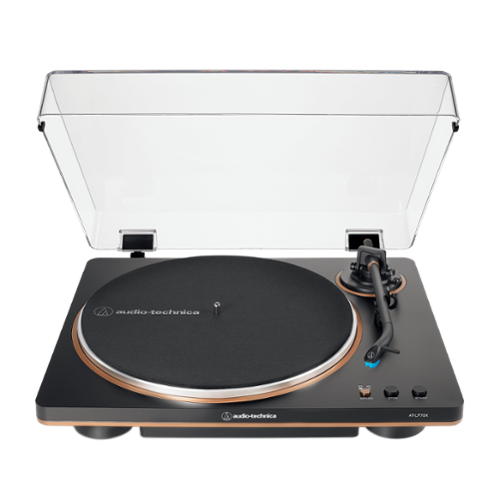
Fully Automatic Belt-Drive Turntable
Customer Rating
4
Solid Sound and Great Usability on a Budget
on August 20, 2024
Posted by: Jturn
The Audio-Technica AT-LP0x is a fully automatic turntable that provides decent sound with a ton of convenience. Given the prevalence of vinyl records these days, those looking for an above average sounding turntable with a lot of creature comforts would be well advised to consider the LP70x.
Setup of was straightforward. The included directions are adequate, showing with illustrations all the steps required to get the unit running (which amount to removing packaging materials and attaching the belt to the drive shaft). The unit was packed nice and securely. Two issues here, though; the included cables are both too short, especially the included audio cords. Honestly, these are bordering on useless if your setup/amp is at all buried in a home theater cabinet. That, along with the wall wart power cable, are my two main issues with the LP70x.
Once I had it setup, I ran the LP70x through the paces, spinning some of my favorites from Porcupine Tree as well as Steven Wilson's extensive catalog of solo material. I'm well attuned to these albums and how they "should" sound, not only in a general sense, but also on my particular sound system. The LP70x mostly delivered here up to expectations, with a relatively neutral response, though bass presence is better than expected. This is due to the cartridge included, which I'll discuss more about in a minute. Steven Wilson's Hand.Cannot.Erase in particular is one of my favorites to test out turntables, as it features a wide array of musical styles and lots of dynamics. Again, the LP70x performed admirably here, reproducing the sound in a way that makes it feel like not an entry level turntable.
Some additional thoughts on the LP70x... It has a replaceable stylus, which is unexpected given the range. While the options are limited, this added flexibility to upgrade the stylus to a more upscale AT version is a great feature none the less. Additionally, this is truly a fully "automatic" turntable, as the tone arm mechanically operates on its own, giving a bit more convenience to the overall experience. Finally, the styling here is very nice for those that need be concerned with how their components look as much as how they perform. The color aesthetic is visually appealing and fit in well with my existing mostly black hardware.
Overall, this is a great entry-level minded option with a couple of higher end features. The replaceable cartridge gives the user the ability to upgrade their experience down the line, and the automatic functionality mean this turntable is a breeze to use. Sound quality is solid given the price bracket, and overall, I'm very pleased with the LP70x.
I would recommend this to a friend!
Share this review:


0points
0of 0voted this as helpful.
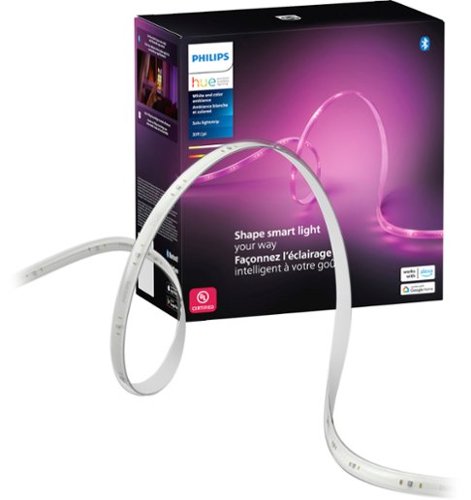
Enjoy a seamless blend of multiple colors of light at the same time in a single LED strip. The colors flow naturally together while casting a diffused rainbow of light to enhance your ambiance and room decor.
Customer Rating
3
Reliable but Lacking in Flexibility Color-wise
on August 20, 2024
Posted by: Jturn
The Hue Solo Lightstrip comes to the extensive Hue lineup as a 30+ foot option for those looking to spice up the lighting in their space of choice. The usual positives apply her as with all Hue products; you get scene integration, settings flexibility, and industry leading reliability. However, given the options on the market for lightstrips right now, the Solo feels lacking for one huge reason, which I'll get to in a minute...
Again, being a Hue product, you know what you're going to get in terms of setup and subsequent functionality. It's a plug and play affair here, literally, for those with existing Hue setups and bridges. This is how I've utilized my Solo, though it also supports bluetooth only operation, allowing you to connect directly to the lightstrip and subvert the bridge. In my experience, the bridge helps reliability in a tangible way that makes it worthwhile, but if you're not feeling it, you don't need them. Beyond that, I was easily able to integrate the Solo into my existing rooms and scenes. This could not have been easier, which is a huge bonus when compared to some other options on the market. However, a few of those options provide something that this does not...
The main downfall of this lightstrip is that it doesn't support simultaneous multiple colors. For instance, in a perfect world, the Solo would allow you to utilize all 33 feet of it to create an array of color options; for instance, where the first 10 feet could be blue, with a transition into red for the next 10 feet, with a transition back into blue. What you get instead is a lightstrip that has to be a singular uniform color. This is unfortunate, again, given the fact that this is a feature of many other options on the market, and overall limits flexibility in my opinion.
In summation, if you're looking for a single color lightstrip and want the most reliable lighting ecosystem on the market, the Solo is a great option. It brings along with it the plethora of benefits that come with all Hue products, and makes for a great product. I just can't look past the inability of this strip to show multiple colors simultaneously.
No, I would not recommend this to a friend.
Share this review:


0points
0of 0voted this as helpful.

The GOAT of esports mice returns in true winning form. All hail the Razer DeathAdder V3 HyperSpeed. From its ultra-lightweight ergonomics to top-tier wireless response, go for glory with a mouse that~s the winning pick for the world~s best players.
Customer Rating
5
Improvements to an Already Stellar Mouse
on August 6, 2024
Posted by: Jturn
The DeathAdder V3 HS seems to be in iterative update over the previously released DeadAdder V3 Pro. For the most part, that mouse was already a phenomenal option, but the V3 HyperSpeed improves on it in tangible ways that make it feel like a worthwhile upgrade.
Those familiar with Razer mice will have no surprises here. Setup and usability is exactly what you'd expect here. Crucially, so is wireless performance, with the V3 HS providing phenomenal tracking abilities with a host of additional features that make this a true gamer's mouse. Weight and balance both feel perfect, as does surface glide and tracking. One thing of note is that they've tweaked the glide pads on this one, changing from 3 smaller pads to two large pads as you can see in one of my attached photos. This has helped with glide for me, but only modestly. For those that feel they need to absolute best in tracking, the DeathAdder V3 HS features Hyperpolling, giving you the ability to supercharge the polling rate of the mouse up to 8000hz, giving you virtually zero input lag. Additionally, it features Hypershift, which allows you to map a secondary set of functions to the mouse inputs at the press of a button. Of note, these both require you to install the Razer Synapse app on your PC. Overall, I've had zero issues with wireless connectivity on this mouse (or other Razer mice I've had for that matter). Razer knows how to make a wireless mouse that functions without connection issues.
Ergonomics here are improved over the V3 Pro. The V3 HS has been reduced in size by what feels like 10%, giving it an even lighter feel in the hand, while also feeling less bulky. Those with overly large hands may still appreciate the added real estate of the V3 Pro, but to me, the smaller size makes it feel much more agile. One additional tweak is that the right side feels less sloped; for me, this was an issue with the V3 Pro where it was difficult at times to get a grip and lift the mouse. That's been resolved here for me, making it a better overall experience in every way ergonomically.
Finally, as with the V3 Pro, battery life here is nothing short of amazing. On standard operation (ie: not using Hyperpolling, for instance), Razer rates it at upwards of 100 hours of battery life. This seems accurate in my usage. This is one of those devices that seems like it never needs to be charged. This is undoubtedly owed in part to the fact that there are no frills here from an LED perspective; this is a jet black device with a single connection indicator LED at the top. That's it; nothing else to needlessly drain power. Some may like a fancier looking mouse; I vastly prefer the no-frills tradeoffs of having insane battery life, personally.
The only area of concern I have with this mouse stems from an issue I've developed with previous Razer mice; the scroll wheel. My first few hundred hours with the V3 Pro were mostly without issue, but as I've used it more over time, the integrity of the scroll wheel has gone downhill. Most notably, it tends to micro scroll on its own now, which is VERY noticeable in FPS games where scrolling changes your equipped weapon, for instance. More than a few times now, this issue has cost me a few lives while gaming. Prior to the DeathAdder V3 Pro, I used a Basilisk Pro for a couple of years, and the scroll wheel on that one also developed this same issue that eventually rendered that mouse completely unusable. The V3 HS feels a bit stiffer, the detents feel more defined, and the arc of the wheel also seems to be a bit flatter, but at this point, I'm not confident the issues with scroll registration have been resolved, so it's something I'll be watching closely for.
On first glance, this seems like a very similar mouse to the V3 Pro, and in many ways it is. If you suffered a bit with the ergonomics of the V3 Pro because of it's bulky size, the V3 HS is just what the doctor ordered. To me, it's simultaneously a small and huge step forward, iterating on the things that needing improving while keeping the things that worked well. Of the various gaming mice I've used across any of the brands you can think of that make wireless mice, this Razer DeathAdder V3 HyperSpeed feels like the best of all of them. Whether my issue with previous scroll wheels on Razer mice is resolved remains to be seen, but overall, this is my favorite gaming mice of all time.
I would recommend this to a friend!


Share this review:


0points
0of 0voted this as helpful.
Jturn's Review Comments
Jturn has not submitted comments on any reviews.
Jturn's Questions
Jturn has not submitted any questions.
Jturn's Answers
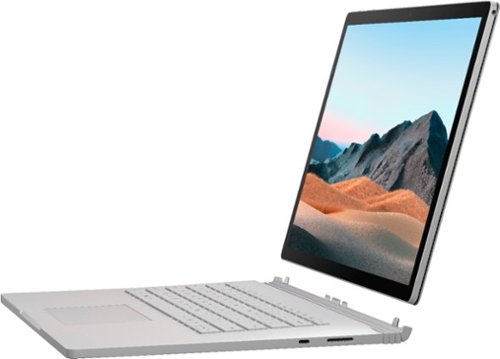
Performance meets versatility. From intensive video and graphics files to high-octane gaming, the most powerful Surface laptop yet combines speed, graphics, and long battery life with the versatility of a laptop, tablet, and portable studio. Tackle your biggest demands with quadcore powered 10th Gen Intel~ Core~ processors, blazing NVIDIA~ graphics, and high-resolution PixelSense~ Display designed for Surface Pen* and touch.
Is there an HDMI port?
Performance meets versatility. From intensive video and graphics files to high-octane gaming, the most powerful Surface laptop yet combines speed, graphics, and long battery life with the versatility of a laptop, tablet, and portable studio. Tackle your biggest demands with quadcore powered 10th Gen Intel~ Core~ processors, blazing NVIDIA~ graphics, and high-resolution PixelSense~ Display designed for Surface Pen* and touch.
Are there additional memory slots to increase RAM on the 15inch 16gb ram 256Gb storage, model?
No, there is no ability to upgrade the RAM or the hard drive on any of the Surface Books. What you buy is what you'll be stuck with.
5 years, 11 months ago
by
Jturn

Completely customize your Wi-Fi Smart Color Thermostat to match your lifestyle and decor. The ENERGY STAR~ certified smart thermostat lets you choose the temperature, schedule, display color and the devices you use to control it all.
Want to replace RTH230B with RTH9580WiFi. Wires connected:G, Y, W has(black wire), R(red wire), Rh(red wire). Also I see a white wire that is not connected to current rth230. How do I know which wire is used for the "c" terminal for the new rth9580WiFi?

Since they're not labeled at the thermostat terminal, you'll need to check at your furnace to see what's connected where. Having the extra wire is great, since you should be able to use that for your common.
8 years, 5 months ago
by
Jturn
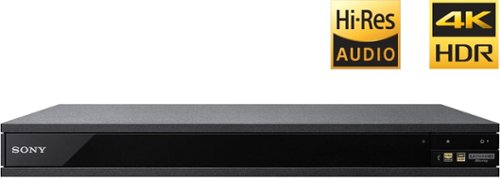
Experience immersive entertainment options with this Sony 4K Blu-ray player. Its Ultra HD resolution provides exceptionally detailed screen images with increased brightness and more realistic color, and its support of Dolby Atmos and DTS:X provides cinema-quality sound. This Sony 4K Blu-ray player supports high-resolution audio formats for more accurate music reproduction.
Does the on-screen display provide information on the video and audio bitrates? Does the display provide data on the audio output?
Yes. The Display button displays bit rate and format information for both audio and video.
9 years, 1 month ago
by
Jturn
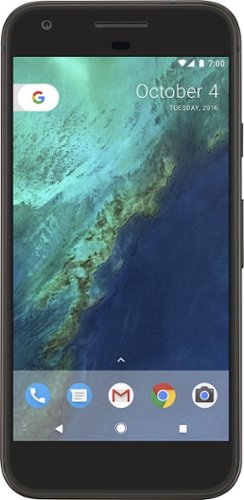
Bring the power of Google directly to your fingertips with the Google Pixel. A large 32GB of storage keep data secure, while unlimited cloud storage transfers data as needed, and it's completely automatic. The large 5-inch screen is protected by Corning Gorilla Glass 4 to ensure the Google Pixel remains scratch-free.
so i wanna get the pixel but with out getting a verizon contract how would i do so?
Your best option is probably to buy the phone directly from Google. The phone will come unlocked and will work as advertised with VZW and Project FI (meaning it should work well with Sprint and TMo).
9 years, 7 months ago
by
Jturn
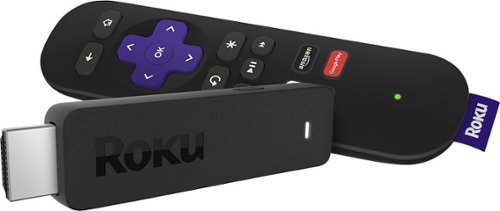
Enjoy HD programming with the Roku Streaming Stick. Plug it into any flat-screen television that has a built-in USB port to view streaming media. This device provides more than 4500 channels on demand and features more than 450,000 movies and TV episodes. Control the Roku Streaming Stick with the included remote or with your smartphone via the Roku Mobile App.
How can you connect the Roku to my theater Amplifier 5.1 sound system?
If your amplifier has an HDMI input, you'll need to plug the stick directly into the amplifier vs. plugging into your TV. The stick doesn't have any external audio outputs.
10 years ago
by
Jturn
Enjoy HD programming with the Roku Streaming Stick. Plug it into any flat-screen television that has a built-in USB port to view streaming media. This device provides more than 4500 channels on demand and features more than 450,000 movies and TV episodes. Control the Roku Streaming Stick with the included remote or with your smartphone via the Roku Mobile App.
The display shows it plugged into two places on the back of the tv. One is obviously the hdmi port, what is the other end plugged into?
Enjoy HD programming with the Roku Streaming Stick. Plug it into any flat-screen television that has a built-in USB port to view streaming media. This device provides more than 4500 channels on demand and features more than 450,000 movies and TV episodes. Control the Roku Streaming Stick with the included remote or with your smartphone via the Roku Mobile App.
Does the stick had profiles for different Netflix users?
Yes. It has the latest Netflix interface, meaning it has full support for profiles (unlike some of the older Roku devices).
10 years ago
by
Jturn
Enjoy HD programming with the Roku Streaming Stick. Plug it into any flat-screen television that has a built-in USB port to view streaming media. This device provides more than 4500 channels on demand and features more than 450,000 movies and TV episodes. Control the Roku Streaming Stick with the included remote or with your smartphone via the Roku Mobile App.
can I download google play store and down load free games like I have on my cell phone?
No. This device does not run Android. If you want the ability to side load apps, you'll need to look at either a Fire device or one of the hundreds of Android based streaming boxes available.
10 years ago
by
Jturn