


Jturn's stats
- Review count180
- Helpfulness votes202
- First reviewNovember 22, 2014
- Last reviewJune 11, 2026
- Featured reviews0
- Average rating4.1
Reviews comments
- Review comment count0
- Helpfulness votes0
- First review commentNone
- Last review commentNone
- Featured review comments0
Questions
- Question count0
- Helpfulness votes0
- First questionNone
- Last questionNone
- Featured questions0
- Answer count9
- Helpfulness votes4
- First answerJune 3, 2016
- Last answerJuly 9, 2020
- Featured answers0
- Best answers1
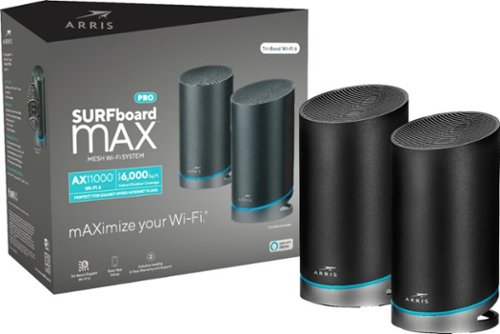
Increase your data capacity to handle all your home network needs with this ARRIS SURFboard mAX Pro Wi-Fi system. The latest Wi-Fi technology, 802.11ax, delivers faster speeds and a wider range to accommodate more users, while the quad-core processors support high-bandwidth applications like simultaneous 4K streaming. This Alexa-compatible ARRIS SURFboard mAX Pro Wi-Fi system features four Ethernet ports for flexible connectivity to WAN networks.
Customer Rating

4
Outstanding Performance, Frustrating Experience
on November 26, 2019
Posted by: Jturn
from WI
After spending about a week with the Surfboard mAX Pro, I've come to a couple basic conclusions. 1. The setup process was unnecessarily frustrating. 2. Settings/options are unexpectedly limited. 3. The performance of this mesh network is out of this world.
Set up of this unit is handled exclusively through their mobile app. Generally, router setup via an app is a quick and painless process, but that wasn't the case here. On my first try setting up the mAX Pro, the router simply would not connect to the internet. This is a fairly common issue, but given the fact that you can modify literally zero settings through the app during setup, this left me with only the option to factory reset the router and try again. After doing this and unplugging my modem three times, the router finally connected.
Setting up the second unit proved to be equally frustrating, as it seemed to hang on the required update. After factory resetting and placing it within inches of the primary unit, it eventually connected, updated, and was online. For the first hour I was online with the mAX Pro, I saw miserable performance, to the point that I couldn't really use the internet. This brought me to the realization that there's no way to modify or even look at settings through the browser on your PC. Everything has to be done through the app, which is really unfortunate, as the there are very, very limited settings options available there. Here's what you can manually update: DNS config, LAN IP reservation, WAN IP Config, and Port Forwarding. This means that the mAX Pro is strictly a plug and play system only; those requiring specialized setup will be out of luck.
Given the annoyances outline above, I was on the verge of giving up on the mAX Pro system. Thankfully, once the initial period of unusability passed, I was left with a WiFi network that completely surpassed my expectations. The two units are on the complete opposite ends of my house, a 2200 sq ft split level. Other mesh networks I've tried here needed to be placed significantly closer, making the satellite's onboard ports basically useless. Not so here. I was able to place the secondary node in my office, where I have plugged in my work laptop and gaming desktop. The end result of this setup is that I now have full speed internet access in every square inch of my house. No other unit I've tried has come close to this.
My day to day usage includes 30 or so devices connected at any one time: phones, streaming devices, smart home devices, PCs. My main devices are my work laptop (connected to my work network over VPN), my gaming desktop, and 2 phones. Over the course of the past week, we've had zero connection issues, zero slowdowns, and zero latency issues. The connection between the routers shows a consistent 2.1 gbps, which not only far outpaces my internet connection, but also gives me a flawless home network streaming experience. My primary desktop also serves as a Plex server, serving up my local media, including 4K HDR content. I've seen no buffering or stuttering which, again, is a first from other routers and mesh networks I've tried. Unfortunately, I have no WiFi 6/AX devices at current time, so I can't comment on how well that protocol works here, but based on the fact that the two units connect via an AX backhaul, I'm confident that things are as expected here.
Overall, mAX Pro is frustratingly close to being basically perfect. The performance is better than anything else I've tried, hindered only by a maddening lack of setup options.
Mobile Submission: False
I would recommend this to a friend!
Share this review:


0points
0of 0voted this as helpful.
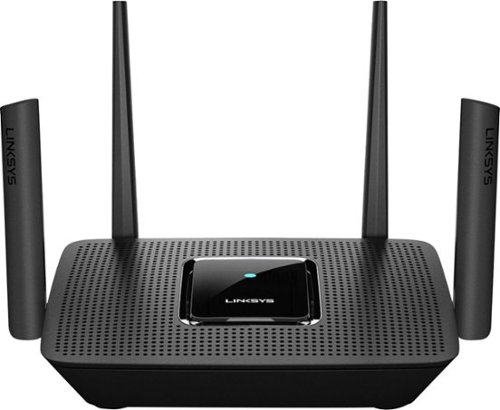
The MR9000 Max Stream~ AC3000 is a mega-performance Tri-Band router that's perfect for homes who want to maximize their entertainment experience. With up to 3 Gbps of superior speed and coverage up to 3000 sq. ft., you'll always have ultrafast Wi-Fi 5 throughout your home, and it supports up to 25 devices. Tri-Band and MU-MIMO technology also make it ideal for simultaneous streaming of HD movies, online gaming and more along with less dead zones, pixelated videos, and lag. The MR9000 is also mesh enabled, making it easy to expand your Wi-Fi. So, instead of investing in a new router, you can add coverage by simply adding Linksys Velop~ Mesh Wi-Fi 5 nodes for seamless Wi-Fi everywhere. Plus, with future proofing Intelligent Mesh~ technology that adapts to your Wi-Fi needs, you'll always be on the fastest path to the Internet. This router is also easy to set up with the Linksys app and keeps your family safe with features such as Parental Controls, making it easy to manage content and screen time.
Customer Rating

5
Strong Performing Router
on October 22, 2019
Posted by: Jturn
from WI
The Linksys MR9000 router is a strong performer, offering up great coverage, mostly modern features, and future expanability in a package that should last most for the foreseeable future.
As seems to be common these days, router setup was handled via a free mobile app. This involved nothing other than ensuring bluetooth was on, putting the phone near the powering up router, and waiting a bit. One issue I ran into was that I needed to unplug my modem, likely an IP/mac address issue or something of the like, but after restarting, the app handled the setup work fine. When this type of setup works as intended, it's significantly more convenient than the old ways of doing things.
After getting it setup, I ran through the usual speed test paces across various areas of my home. I live in a 2100 sq ft, bi level house, with the router being placed at one far side of the lower level. Generally, this has been problematic for most routers, as my bed room is on the complete opposite end of the house on the top level. Recently, I've turned to mesh networks to help alleviate this issue, which worked well. To my surprise, however, the MR9000 gave me roughly 70-85% of full throughput in my bed room, without the aid of any extenders/mesh nodes. This is easily the best performance I've seen, undoubtedly the result of some of the modern MU-MIMO features on board. Frankly, this is leaving me pondering whether I can get rid of my mesh network. Gaming garnered a similar impression; my gaming computer connected via WiFi had zero issues with latency, signal drops, or slow downs. This thing is made for consistent, reliable fast throughput.
Back on the topic of mesh networks for a moment; one of the great features on tap is the fact that you can expand your network by adding Velop nodes to create an expansive mesh network. This ensures you'll have future expandability regardless of what needs might arise. To my disappointment, however, I had a Linksys ME9000 tri-band extender laying around, so I attempted to get this setup as a mesh node. No go. For whatever reason, it seems Linksys hasn't enabled the ME9000 for use as a mesh node, though it clearly should have the capability since it has the back-haul 5ghz band to necessitate it. Plan to purchase new equipment to utilize true mesh network capabilities if you're buying this router.
One point I should mention is that it's a slight disappointment that Linksys didn't certify this as a WiFi 6 router. Frankly, it's the only real issue keeping this from being a completely future proof router. While there aren't a ton of devices today that can take advantage, there are more every day and it'll be not long before WiFi 6 is a must-have feature.
This router performed above my expectations in ease of setup and performance. As mentioned, it's rare that a single router (in this price range, anyhow) is able to blanket my entire house with usable signal. The icing on the cake is the ability to add nodes in the future if the need arises.
Mobile Submission: False
I would recommend this to a friend!
Share this review:


0points
0of 0voted this as helpful.

With 15 programmable controls, LIGHTSPEED wireless technology, hyper-fast scroll wheel, and the revolutionary HERO 25K sensor, G604 offers both versatility and high-performance with endless possibilities to play with mastery. Dual connectivity lets you toggle between Bluetooth and ultra-fast 1 ms LIGHTSPEED advanced wireless technology~even on separate machines. Extremely accurate tracking and class-leading power efficiency enables up to 240 hours of high-performance gaming with one AA battery.
Customer Rating
4
Highly Customizable and Feature Packed
on October 22, 2019
Posted by: Jturn
from WI
The G604 is a great option for anyone looking for a mouse that features great comfort, lots of features, and insane customizability.
The G604 is one of the more comfortable mice I've used (with the exception of the weight, discussed later). It has a thumb rest on the left side (unfortunately making this for right handers only), allowing you to avoid accidentally pushing any of the 6 side buttons by accident while still having a good hold of the mouse. Unlike other mice, the secondary feature buttons on top (ie: any of buttons that aren't left or right click) are positioned in such a way that they're also not easily pressed on accident, which is great for gamers to state the obvious. Additionally, the top features a textured panel that provides an extra amount of grip, again ensuring you have a solid hold of this mouse while using it. Overall, this thing is comfortable for hours on aned.
The G604 is packed with features, enabling use in a wide range of scenarios. Up top are buttons for DPI adjustment (+ AND - at hand at all times is awesome), the scroll release button (which toggles the scroll wheel from notched scroll to free scroll which is one of my favorite features for general day to day usage), the scroll wheels left and right scroll buttons, and the wireless mode button. This last button toggles the mouse between wireless USB, usable with the included USB receiver and the much appreciated USB extension cord, and Bluetooth. This is a HUGE feature for those of us that intend to use this mouse with multiple computers; in my case, I hooked it up to my work machine using Bluetooth and use the USB receiver with my gaming machine where input lag needs to be as low as possible. On the side of the mouse are the 6 programmable buttons, modifiable using the G Hub software. This is where the mouse truly shines. This allows you to assign any number of functions to any of the easily accessible buttons, which will be huge for not only MMO gamers, but additionally for those looking to take their day to day productivity to the next level. Those looking for an edge in FPS gaming may also consider this mouse, though I found the weight to be prohibitive. That's not to say others may not find this perfect, though, as the Lightspeed wireless protocol gives you a virtually zero latency experience with gaming. Finally, the convenience of wireless meets the performance of wired. This mouse frankly is a gaming beast.
The only two problems that I have with this mouse are that it is unexpectedly heavy as mentioned above, and that it is powered by a disposable AA battery (which may correlate back to the weight). Though this mouse is targeted towards MMO players, I was hoping to be able to use it to play some FPS games as well. Unfortunately, the weight is a bit prohibitive, providing more resistance than I find comfortable and overall doesn't work well for shooters in my opinion. The disposable battery is more of an annoyance than a true issue; thankfully the battery life means it doesn't need to be replaced too often. One other thing to note is that there are no lights on this mouse, which is undoubtedly to bolster battery life. I personally don't care at all, but some may.
This mouse hits a great balance of comfort, features, and performance, and should be at the front of anyone's list looking for a gaming mouse that can be used a wide array of scenarios from MMO gaming to day to day productivity.
Mobile Submission: False
I would recommend this to a friend!
Share this review:


0points
0of 0voted this as helpful.

Built for pros from the bottom up. A compact tenkeyless design frees up table space for low-sens mousing. Pro-grade Clicky switches give you an audible feedback bump. Programmable LIGHTSYNC RGB and onboard memory lets you customize and store a lighting pattern for tournaments. A detachable cable makes for easy transportation. Play to Win.
Customer Rating
4
Great TKL Keyboard, Missing a Couple Features
on October 22, 2019
Posted by: Jturn
from WI
For a while, I've been searching for a tenkeyless keyboard to replace my Logitech G513 Carbon keyboard, and was excited when the G Pro was released. Performance-wise, this one is easily on par with the G513 in terms of gaming performance, and feels even better for general day-to-day typing. There are a few things here missing, however, keeping this from being the top choice.
Build quality is generally on par with what you'd expect; decent heft, premium feel, and sturdy stance. It's made of a premium feeling plastic, so it's not quite as premium as the G513 Carbon, made of aluminum/metal, but it's good all the same. This particular board uses blue "clicky" switches, but it seems to be of a slightly different variant than my previous board, as the buttons aren't quite as high pitched clicky, and are actually more pleasant to type on. Additionally, this one comes with a removable USB cable, which is a great feature for anyone that needs to pack this thing up and move it.
Gaming performance is exactly what you'd expect; top notch, lag-free, and pro-grade. Running this through a battery of FPS style games, not once did I get a sense of lag or unregistered/misfired keys. This thing is a real gamer's keyboard. It's also a great keyboard to type on. Being a developer by trade, I need a keyboard to be comfortable to type on for long stretches of time, and the G Pro is very comfortable. For having blue keys, it's not unbearably loud like some, but also has the assured click feedback and key travel that makes it very easy to type on. Overall, this board is serving both my gaming and typing needs perfectly while very comfortably fitting on my desk space. As a bonus for those that like total control over key lighting, the G Hub software allows you the granularity to individually light any key on the board (and the G logo in the upper right), which allows this board to fit into virtually any LED lighting scheme you may have.
Now, the issues. First, no included wrist rest. No idea why they saw fit to not include this, but it's quite a disappointment to open an expensive keyboard like this and not find a wrist rest in the box. Next, no integrated USB port. This was a feature I grew quite accustomed to after using the G513 and was disappointed to see the G Pro doesn't have this. Not a deal breaker by any means, but would've been nice to have. Additionally, the lighting setup could be better. Not only do the secondary key functions (the media buttons and all secondary shift+press buttons) not light up at all, you can't switch lighting profiles at all using the lighting button (you can only switch between whatever is loaded currently and turning it off). Also related, my lighting profiles don't consistently sync when plugging in between computers. In my setup, I daily use both a Mac for work and a Windows desktop for gaming. I plug both my keyboard and mouse into my monitor (which has a 4 port USB hub integrated), and just swap the single USB cable coming from the monitor between the two computers. The G Hub software never has an issue loading up/recognizing my mouse, but it frequently doesn't fully recognize my keyboard, meaning it reverts back to the standard (and annoying) light strobe lighting profile. The only way to fix this is to completely unplug the keyboard and plug it back in. This happens on both the Mac and the Windows machine.
It feels like Logitech just missed the mark for making this THE TKL keyboard for gamers, but build quality and supreme performance make this a great option none the less.
Mobile Submission: False
I would recommend this to a friend!
Share this review:


0points
0of 0voted this as helpful.
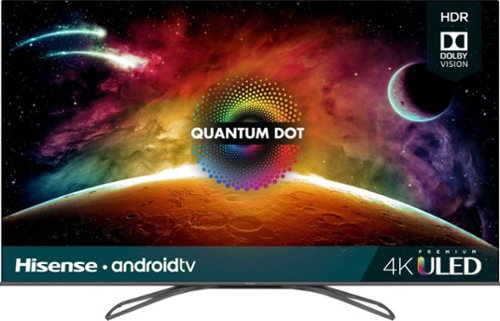
Watch your favorite shows in comfort with this 55-inch Hisense H9F 4K UHD TV. The Quantum Dot and ULED technologies deliver incredible picture quality, while the Dolby Vision HDR adds dramatic color, contrast and brightness to your games and movies. Download Google Play apps and stream live shows with Android TV on this Hisense H9F 4K UHD TV.
Customer Rating
4
Overall Great Image Quality w/ Some Quirks
on October 16, 2019
Posted by: Jturn
from WI
Hisense has really hit the price/features/looks/performance mix out of the park with 2019's H9F series of TVs. It checks nearly all the boxes in regards to desirable features for a 4K HDR TV, and should be at the top of the list for anyone looking for great picture quality in this price range.
The first striking feature of this set when you take it from the packaging is the design. It features a near bezel-less design, which looks incredibly premium, and has the screen elevated above the frame of the set. It's an interesting choice, and has durability implications; the set is quite fragile, as evidenced by my first order which showed up damaged, and their instructions explicitly state not to life by the screen when removing from the package. It's a tradeoff for a subjectively stunning design that's worth it. Assembly was pretty straight forward, requiring you to screw in the two support legs (assuming you're not mounting this on the wall, of course). Propping the set up on the styrofoam that came in the packaging made this is a breeze, also made simple by the set's light weight. After getting it assembled, setup was relatively simple with this unit, which runs the latest version of Android TV. This is a great option for anyone that has an Android phone, as you can add your Google account directly to the TV and also cast directly from your phone with ease. I can't speak to the experience for those using an iPhone, but I'm sure it's fine. The TV was hooked up, connected to the internet, and ready to serve up content within 3 minutes.
Android TV ships with a pretty decent selection of apps, all with 4K HDR compatibility, which is great for anyone that doesn't already have a 4K capable streaming device and wants to jump right in to high quality streaming. Overall, it feels a bit lacking when compared to something like a Roku, however, and is missing key apps available elsewhere (Apple related services, ATT Now, etc). There are some games available here, though I didn't test any out as it seems a bit pointless, but it's nice to have the option none the less. Overall, the interface will be familiar to anyone in the Android echosystem, and I have no complaints with Hisense choosing this as their platform.
After applying some base calibration settings, I fired up some varying content, from 720p through 4K HDR. Overall, the TV knocked it out of the park, with one notable exception I'll discuss in a minute. This is a TRUE HDR set; it gets incredibly bright and is able to throw out a full dynamic contrast range, which isn't always the case with TVs in this price bracket. Colors are exceptional as well, with deep, rich saturation, especially in HDR content, which is incredibly pleasing to the eyes. This feels like a true upgrade from my existing top tier 7 year old Panasonic Plasma in all ways except one; video quality in dark scenes. Being that this uses a full array local dimming lighting scheme and the Hisense gets deep black in most scenarios (especially in scenes with stark bright and dark contrast), when the scene is totally dark, things start to get a bit hairy. In certain scenarios, the backlights need to stay on to illuminate a small part of the dark scene, meaning the contrast ratio really takes a hit. Blacks look more grey, and worse, you start to see delays in the backlight zones turning on and off. It's visually distracting, but honestly, not unique to this set. It's a tradeoff with LCD technology that you simply have to accept.
The motion handling of this set is really impressive. When properly calibrated and setup, all manner of content from sports to movies to games all render with the proper cadence (which is incredibly important to me coming from a plasma TV that was amongst the best with motion handling). This set is surprisingly great for gaming. Input lag is unexpectedly not an issue at all when set to game mode, making for a great option for anyone intending to use this set for gaming when considering the great picture quality in conjunction with the low input lag.
I've had a few quirky issues with my set that have detracted a bit from the overall experience. The first is that ARC doesn't seem to work reliably when streaming from an onboard Android TV app. Initially, the ARC option wasn't available until I enabled the "Control over HDMI" option. After enabling ARC, I've seen consistent issues where the sound would alternate between coming from the hooked up soundbar and the onboard TV speakers. Additionally, when viewing high quality 4K HDR content from an Android TV app, I was seeing pretty severe screen tearing until I completely disabled all motion control related settings. I didn't investigate further, but I'm confident this shouldn't happen. Both issues are annoying to deal with, but could potentially be fixed in the future via software updates. Here's to hoping...
This TV has been a joy to use, aside from the minor issues outlined above. The picture quality makes this a very good viewing experience, and the style and extras make this a real home run.
Mobile Submission: False
I would recommend this to a friend!
Share this review:


+8points
9of 10voted this as helpful.

Create nutrient-rich meals with this NutriBullet blender combo. The 64 oz. blending pitcher shreds tough skins, pulverizes stems and crushes seeds to deliver creamy snacks, smoothies and soups. This NutriBullet blender combo features a powerful 1200W motor that operates quietly, so you can engage in conversations while blending fruits and vegetables.
Customer Rating
5
Powerful and Convenient
on September 6, 2019
Posted by: Jturn
from WI
After owning a Nutribullet (one of the models from about 6-7 years ago), I was excited to get my hands on the new version. This version promises to be not only more powerful, but also more versatile. After using it for about a week, I believe they've delivered on both fronts!
After years of being limited to the traditional Nutribullet cup size, they've finally released this version which includes a full sized blender and I couldn't be happier. For times when you're looking to mix up drinks (perhaps of the alcoholic persuasion) for an entire party, the original Nutribullet wouldn't cut it because it took too long. Now, you can blend up to 64oz at a time, meaning this can take the place of a traditional blender and an existing Nutribullet (as it is in my case). The unit didn't have any issues keeping up with what I threw at it, and has 5 different modes/speeds (including a pulse mode which is awesome) to help ensure everything is blended to the desired level. and the only real issue I have is that the blade doesn't pop out of the large container. I'm sure this is to ensure a proper seal, but one of the big benefits of the original Nutribullet concept is the fact that you can remove the blade and easily clean the entire unit. Not so with the big boy.
The included accessories are pretty decent. Besides the full sized container (and tamping stick), you get two, more traditionally Nutribullet-sized cups, one with a handle and one without, and they've also included two sealable drinking lids as well. The only real thing missing is a smaller cup, which some may use. Additionally, they've thrown in a book of basic recipes which can help anyone new to the smoothie game with coming up with a good tasting, nutritious smoothy. Recipes can be easily obtained online, but it's appreciated none the less.
Overall, this is a very versatile machine, and is well worth the look for anyone in need of a smoothy machine with the ability to do a full, 64oz blend.
Mobile Submission: False
I would recommend this to a friend!
Share this review:


0points
0of 0voted this as helpful.
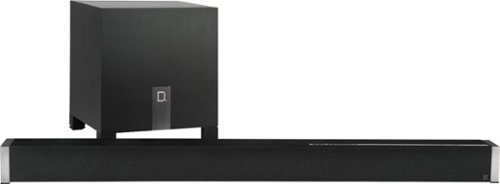
Boost your home theater's audio capabilities with this Definitive Technology Studio Advance sound bar system. The 5.1 channel system offers virtual surround sound and supports 4K and HDR content for your enjoyment. This Definitive Technology Studio Advance sound bar system has Chromecast built in to let you stream music wirelessly and control the speakers with Google Assistant voice commands.
Customer Rating
4
Amazing Build Quality + Great Sound Quality
on August 7, 2019
Posted by: Jturn
from WI
This soundbar is an effective marriage of build quality, features, and sound quality that might just be enough to convince those considering a multispeaker theater setup to think twice.
The first thing that struck me about the Definitive Technology soundbar is just how heavy the components are. Upon further inspection, I then realized that the cases are made of ridiculously high quality and premium feeling materials that give this a truly luxurious look and feel. This aesthetic will likely fit in with even the cleanest of theater/entertainment center setups and more than likely won't offend any of the style-particular spouses out there.
After getting the speakers situated in my space, I opened up the Google Home app and initiated first time setup, which was really nothing more than clicking "Add", selecting the soundbar, and letting the app do the rest of the setup. In my opinion, this is a great choice as it integrates this speaker with my other "smart home" devices which are already added to my Home app. Using the home app in this manner may be a pain for anyone not already tied into the Google Home ecosystem, though, as you'd have to go through the Home app setup prior to setting up the soundbar. I think overall this was a great choice, though, as it allows users to create an integrated home environment using the Home app as well as integrated Cast functionality. Speaking of which, Cast integration is something I require anymore with speakers as it's far easier and more effective than bluetooth for streaming music to speakers. I was very glad to see this included.
Sound quality here, for the most part, stands up to what you would expect in this price range. Particularly for movies, the sound space created by the Definitive Technology soundbar is expansive and gives a fairly convincing "surround sound" experience. It does not quite hold up to a fully fledged surround system, but it's as convincing as any soundbar I've heard at opening up a surrounded sound environment. The drivers have no issue pushing some serious sound, as tested by cranking the system to the point of it being excessive and demonstrating no audible distortion/compression. The subwoofer, similarly, is up to the challenge, pumping out deep and surprisingly full range bass without any audible bottoming out like you tend to hear with included soundbars. All in all, if your primary listening environment is geared towards watching movies, you will not be disappointed.
I fired up a few of my typical music selections, running the gamut from light and dynamic to thrashy and heavy, to run the soundbar through the paces, and overall, it was fine but didn't excel in the same way as it did with my movie listening experience. It kept the sound coloring to a minimum (a great thing) and had adequate bass, but felt a bit sterile. In the way that the sound space felt open and expansive with movies, it felt a bit closed off and central with music. Overall, it definitely gets the job done but doesn't necessarily excel with music.
Overall, this is an incredibly premium soundbar that works great for movies/entertainment, and well enough for music. The combination of absurd build quality and great sound quality make this a real winner.
Mobile Submission: False
I would recommend this to a friend!
Share this review:


0points
0of 0voted this as helpful.

Featuring a simple one-time setup under the mattress, Sleep is a sensor that helps improve sleep quality by offering advanced sleep cycle analysis, heart rate tracking, and snore and breathing disturbances detection. Learn how to improve your nights with a daily Sleep Score. You can also create a better sleep environment by taking advantage of a range of smart home capabilities that Sleep can support.
Posted by: Jturn
from WI
This sleep mat is a great option for anyone that's looking to get more insight into their sleep habits, but may dislike the wrist band style of trackers. Setup is as simple as could be; you download their app, you place the mat under your mattress at about chest level, sync it in the app, give it 10 minutes to calibrate, and it's ready to automatically track your sleep. That's the entire process. Honestly, I'm not sure how it tracks through the mattress (in my case, it's working through a full Select Comfort mattress and a 4" memory foam topper), but it seems to be incredibly accurate. I tend to have restless sleep from time to time, and looking in the app in the morning confirms my sometimes poor level of sleep. The tracker also measures your heart rate and breathing disturbances throughout the night (and the breathing disturbances tend to align with nights of poor sleep, predictably).
As an added bonus, the app not only links with Withings line of health trackers, it also has options for linking to Samsung trackers. This is great for anyone that has a Samsung watch and uses it for workout tracking, allowing you to see a comprehensive view of your overall health in one app.
Overall, this product is great. It does what it does incredibly well and offers a non invasive way of allowing you to track your sleep for a reasonable price.
Mobile Submission: False
I would recommend this to a friend!
Share this review:


0points
0of 0voted this as helpful.

Enjoy music while exercising with these JVC Gumy Sport in-ear headphones featuring a one-button remote and 3.3-ft. color cord. A built-in microphone allows for hands-free calls, and the nozzle-fit earpiece provides a secure fit during intense workouts. These JVC Gumy Sport in-ear headphones are sweat-proof, ideal for keeping up with an active lifestyle.
Customer Rating
4
Great for Running/Working Out
on June 13, 2019
Posted by: Jturn
from WI
The JVC Gummy ear buds are a great option for anyone that's looking for a cheap set of buds that stay in your ears during workouts. The sound quality on these is about what you'd expect for a set in this price range; decent, present bass, pushed mids, and slightly lacking highs. They get the job done, though. More importantly, to me at least, is that they have an incredibly comfortable and secure fit that means they stay put while running. As an added extra, they also have a mic which allows you to take calls with them, too. Overall, these are a solid pair of friendly priced ear buds that are effective for working out.
Mobile Submission: False
I would recommend this to a friend!
Share this review:


0points
0of 0voted this as helpful.

Meet Bose Frames. Bluetooth Sunglasses with a Soundtrack. The first audio sunglasses with built-in Bose speakers for an immersive audio experience unlike any other. A revolutionary personal audio experience hidden inside two classic designs, each enriched with premium accents and materials. Play music, take calls, and enjoy the sun with UVA/UVB protection. Bose Frames Rondo feature distinct rounded lenses with a smaller fit. Approved and tested for prescription lenses.
Customer Rating
4
Surprisingly Great Sound in an OK Looking Frame
on May 24, 2019
Posted by: Jturn
from WI
The Bose Frames (specifically this Rondo style of frames) is a tale of two situations for me; subjectively, the styling on them is just ok and could've been a bit better, but the sound quality and actual functionality of these things is really unlike anything else I've used. Whether you're a fan of Bose products or not, it's hard to ignore just how strikingly great these sound and how relatively little sound the surrounding environment gets.
I'll reiterate again; when I tried these, I was quite surprised by how great they sound. There was a surprising amount of bass, but the entire sound spectrum was well represented and even. These things are frankly a great alternative to ear buds if you're planning to wear shades anyways. I've used them while running, and this seems to be one of the best use cases for the Bose frames; you get good sound quality while also being able to hear your surroundings. Overall, there's not much more to say here other than that they sound great, let the world around you in, and don't really bother the people around you (as long as you're not in a dead quiet area, of course).
As mentioned above, I'm not the biggest fan of the style of these, or of the other more squared off version for that matter. I'm not sure if Bose is trying to make a fashion statement here, but I think they would've been well served to go with a more classic frame stylings to go with two available. In fairness, these do look quite stylish with certain face/head types/shapes, but I've found that they're not particularly flattering to me personally. One thing I was worried about was that the sides would seem bulky, but they honestly look fine and not really out of place.
The only real, non subjective complaint I have about these is that the button is pretty easy to accidentally hit. I've inadvertently turned them off a few times at this point. I think had they placed the button back a bit further, this wouldn't be an issue. One other thing they could've done was include a mechanism for controlling volume on the frames, instead of relying solely on the connected device for volume changes.
Overall, these are a pretty cool product, especially if they look good on you. The sound quality really makes these things shine. I just hope Bose works to expand on this product line to not only develop other styles, but to also bring prescription frame versions of these to market as well.
Mobile Submission: False
I would recommend this to a friend!
Share this review:


-2points
0of 2voted this as helpful.
Jturn's Review Comments
Jturn has not submitted comments on any reviews.
Jturn's Questions
Jturn has not submitted any questions.
Jturn's Answers
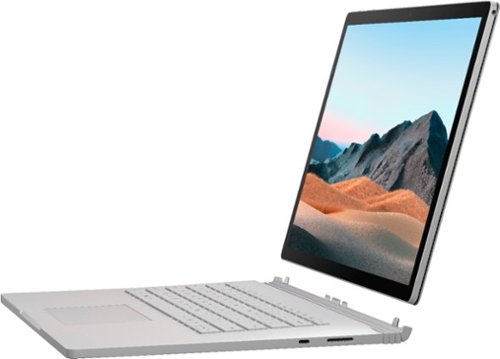
Performance meets versatility. From intensive video and graphics files to high-octane gaming, the most powerful Surface laptop yet combines speed, graphics, and long battery life with the versatility of a laptop, tablet, and portable studio. Tackle your biggest demands with quadcore powered 10th Gen Intel~ Core~ processors, blazing NVIDIA~ graphics, and high-resolution PixelSense~ Display designed for Surface Pen* and touch.
Is there an HDMI port?
Performance meets versatility. From intensive video and graphics files to high-octane gaming, the most powerful Surface laptop yet combines speed, graphics, and long battery life with the versatility of a laptop, tablet, and portable studio. Tackle your biggest demands with quadcore powered 10th Gen Intel~ Core~ processors, blazing NVIDIA~ graphics, and high-resolution PixelSense~ Display designed for Surface Pen* and touch.
Are there additional memory slots to increase RAM on the 15inch 16gb ram 256Gb storage, model?
No, there is no ability to upgrade the RAM or the hard drive on any of the Surface Books. What you buy is what you'll be stuck with.
5 years, 11 months ago
by
Jturn

Completely customize your Wi-Fi Smart Color Thermostat to match your lifestyle and decor. The ENERGY STAR~ certified smart thermostat lets you choose the temperature, schedule, display color and the devices you use to control it all.
Want to replace RTH230B with RTH9580WiFi. Wires connected:G, Y, W has(black wire), R(red wire), Rh(red wire). Also I see a white wire that is not connected to current rth230. How do I know which wire is used for the "c" terminal for the new rth9580WiFi?

Since they're not labeled at the thermostat terminal, you'll need to check at your furnace to see what's connected where. Having the extra wire is great, since you should be able to use that for your common.
8 years, 5 months ago
by
Jturn
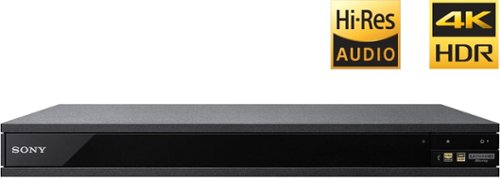
Experience immersive entertainment options with this Sony 4K Blu-ray player. Its Ultra HD resolution provides exceptionally detailed screen images with increased brightness and more realistic color, and its support of Dolby Atmos and DTS:X provides cinema-quality sound. This Sony 4K Blu-ray player supports high-resolution audio formats for more accurate music reproduction.
Does the on-screen display provide information on the video and audio bitrates? Does the display provide data on the audio output?
Yes. The Display button displays bit rate and format information for both audio and video.
9 years, 1 month ago
by
Jturn
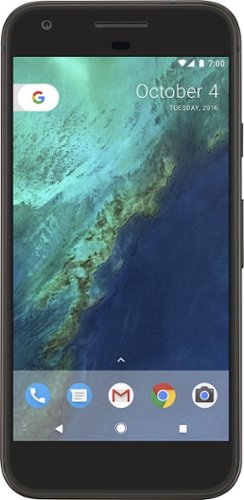
Bring the power of Google directly to your fingertips with the Google Pixel. A large 32GB of storage keep data secure, while unlimited cloud storage transfers data as needed, and it's completely automatic. The large 5-inch screen is protected by Corning Gorilla Glass 4 to ensure the Google Pixel remains scratch-free.
so i wanna get the pixel but with out getting a verizon contract how would i do so?
Your best option is probably to buy the phone directly from Google. The phone will come unlocked and will work as advertised with VZW and Project FI (meaning it should work well with Sprint and TMo).
9 years, 7 months ago
by
Jturn
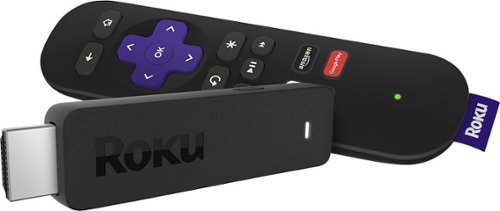
Enjoy HD programming with the Roku Streaming Stick. Plug it into any flat-screen television that has a built-in USB port to view streaming media. This device provides more than 4500 channels on demand and features more than 450,000 movies and TV episodes. Control the Roku Streaming Stick with the included remote or with your smartphone via the Roku Mobile App.
How can you connect the Roku to my theater Amplifier 5.1 sound system?
If your amplifier has an HDMI input, you'll need to plug the stick directly into the amplifier vs. plugging into your TV. The stick doesn't have any external audio outputs.
10 years ago
by
Jturn
Enjoy HD programming with the Roku Streaming Stick. Plug it into any flat-screen television that has a built-in USB port to view streaming media. This device provides more than 4500 channels on demand and features more than 450,000 movies and TV episodes. Control the Roku Streaming Stick with the included remote or with your smartphone via the Roku Mobile App.
The display shows it plugged into two places on the back of the tv. One is obviously the hdmi port, what is the other end plugged into?
Enjoy HD programming with the Roku Streaming Stick. Plug it into any flat-screen television that has a built-in USB port to view streaming media. This device provides more than 4500 channels on demand and features more than 450,000 movies and TV episodes. Control the Roku Streaming Stick with the included remote or with your smartphone via the Roku Mobile App.
Does the stick had profiles for different Netflix users?
Yes. It has the latest Netflix interface, meaning it has full support for profiles (unlike some of the older Roku devices).
10 years ago
by
Jturn
Enjoy HD programming with the Roku Streaming Stick. Plug it into any flat-screen television that has a built-in USB port to view streaming media. This device provides more than 4500 channels on demand and features more than 450,000 movies and TV episodes. Control the Roku Streaming Stick with the included remote or with your smartphone via the Roku Mobile App.
can I download google play store and down load free games like I have on my cell phone?
No. This device does not run Android. If you want the ability to side load apps, you'll need to look at either a Fire device or one of the hundreds of Android based streaming boxes available.
10 years ago
by
Jturn